
Touhou Hell Bingo Cards - Print Free or Customize
Print free Touhou Hell bingo cards or adjust them, unlimited cards! Pick from 42,200+ designs or use our bingo card generator. Add numbers, phrases, pictures, or any combination. Play using PDF printouts, digital bingo cards, and our digital bingo caller, or go hybrid.
About: This bingo card is perfect for fans of the Touhou Project series who want to put their skills to the test. Covering achievements from early to recent games and featuring a mix of challenges, shot types, and difficulties, it's great for game marathons, community events, or competitive streams among dedicated Touhou players looking for bragging rights.
How To: To get a printable PDF, click the Print button. You can alter the card quantity and other print options on the Print tab. Grid items and free space text can be edited on the Basic tab. Appearance can be highly personalized on the relevant tabs, or you can easily find any setting on the 🔍 tab.
How to play Touhou Hell Bingo Cards?
- Paper Caller: Print PDF calling list & calling slips and manually draw the slips.
- Digital Caller: Click on the Play button above.
- Paper Players: Print PDF bingo cards and manually mark the cards.
- Digital Players: Click on the Play button above, and then click on the 🎫 button.
- Hybrid Mode: Choose any combination above. For example, caller can be either Offline or Digital. And players can be Offline or Digital or a combo of both.
Step-By-Step:
- Start by saving the Touhou Hell PDF by clicking on the "Print" button above.
- Open the PDF and print a hard copy.
- For random drawing, you can print another copy of the call list, cut, fold and then draw them randomly at play time.
- Cut the bingo cards at the cut lines if there are more than 1 bingo cards per page.
- Distribute one card per player. For marking, you can use pencils. Crayons cost the least.
- Choose one person to be the caller. If you are playing in a small group, the caller may also play along with their own Bingo card.
- The caller starts the game by randomly drawing an item from the call list and announcing it to everyone.
- The players scan their cards to see if they have the called word. If they do, they dab that word.
- The first player to complete a horizontal, vertical, or a diagonal line of marked items yells "Bingo!" and wins the play.
- The caller verifies that the items crossed off form a correct line as per the Bingo card and call list.
- You can play for multiple patterns or a full card blackout for an extended play.
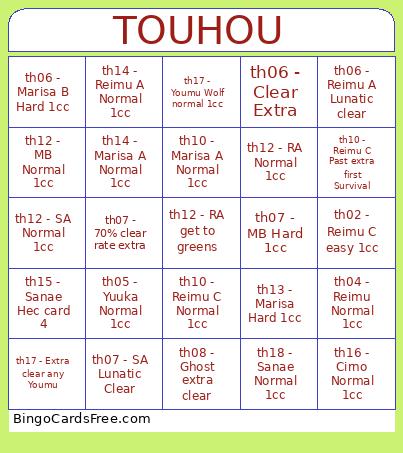 This Touhou Hell Bingo Cards Game contains following Words or Phrases: th02 - Reimu A easy 1cc, th02 - Reimu B easy 1cc, th02 - Reimu C easy 1cc, th03 - Any shot clear, th04 - Reimu Normal 1cc, th04 - Marisa Normal 1cc, th04- Any shot beat Mugetsu, th05 - Reimu Normal 1cc, th05 - Marisa Normal 1cc, th05 - Mima Normal 1cc, th05 - Yuuka Normal 1cc, th06 - Reimu B Lunatic clear, th06 - Reimu A Hard 1cc, th06 - Reimu A Lunatic clear, th06 - Marisa A Hard 1cc, th06 - Marisa B Lunatic Clear, th06 - Marisa B Hard 1cc, th06 - Clear Extra, th07 - RA Hard 1cc, th07 - RB Hard 1cc, th07 - MA Hard 1cc, th07 - MB Hard 1cc, th07 - SA Lunatic Clear, th07 - SB Hard 1cc, th07 - 70% clear rate extra, th07 - 70% clear rate phantasm, th08 - Border Lunatic Clear, th08 - Malice Hard 1cc, th08 - Scarlet Hard 1cc, th08 - Ghost Lunatic Clear, th08 - Any single shot Lunatic Clear, th08 - Border extra clear, th08 - Magic extra clear, th08 - Scarlet extra clear, th08 - Ghost extra clear, th08 - Any single shot extra clear, th09 - Any shot clear, th10 - Reimu A Hard 1cc, th10 - Reimu B Hard 1cc, th10 - Reimu C Normal 1cc, th10 - Marisa A Normal 1cc, th10 - Marisa B Hard 1cc, th10 - Marisa C Normal 1cc, th10 - Reimu A Extra Clear, th10 - Reimu B Past extra first survival, th10 - Reimu C Past extra first Survival, th10 - Marisa A Past extra first survival, th10 - Marisa B Extra Clear, th10 - Marisa C Past extra first survival, th11 - Any Reimu shot easy 1cc, th11 - Any Marisa shot easy 1cc, th11 - Any Reimu shot cap Polygraph, th11 - Any Marisa shot cap Polygraph, th12 - RA Normal 1cc, th12 - RB Normal 1cc, th12 - MA Normal 1cc, th12 - MB Normal 1cc, th12 - SA Normal 1cc, th12 - SB Hard 1cc, th12 - RA get to greens, th12 - RB get to rainbows, th12 - MA get to rainbows, th12 - MB get to Blues, th12 - SA get to greens, th12 - SB get to rainbows, th13 - Reimu Lunatic Clear, th13 - Marisa Hard 1cc, th13 - Sanae Normal 1cc, th13 - Youmu Normal 1cc, th13 - Get to Mamizou card 4 on any shot, th14 - Reimu A Normal 1cc, th14 - Reimu B Normal 1cc, th14 - Marisa A Normal 1cc, th14 - Marisa B Normal 1cc, th14 - Sakuya A Hard 1cc, th14 - Sakuya B Normal 1cc, th14 - Any shot Raiko card 4, th15 - Easy 1cc any shot, th15 - Normal pointdevice any shot, th15 - Reimu Hec card 6, th15 - Marisa Hec card 4, th15 - Sanae Hec card 4, th15 - Reisen Hec card 6, th16 - Reimu Normal 1cc, th16 - Marisa Normal 1cc, th16 - Aya Normal 1cc, th16 - Cirno Normal 1cc, th16 - Anyshot extra Okina card 5, th17 - Reimu Wolf hard 1cc, th17 - Reimu Eagle normal 1cc, th17 - Reimu Otter Hard 1cc, th17 - Marisa Wolf normal 1cc, th17 - Marisa Eagle normal 1cc, th17 - Marisa Otter Hard 1cc, th17 - Youmu Wolf normal 1cc, th17 - Youmu Eagle normal 1cc, th17 - Youmu Otter hard 1cc, th17 - Extra clear any Reimu, th17 - Extra clear any Marisa, th17 - Extra clear any Youmu, th18 - Reimu Normal 1cc, th18 - Marisa Normal 1cc, th18 - Sanae Normal 1cc, th18 - Sakuya Normal 1cc, th18 - Any shot Momoyo card 4, th19 - Any shot normal 1cc, th20 - Marisa Hard 1cc, th20 - Marisa Hard 1cc.