
TSU VB Bingo vs UNA Cards - Print Free or Customize
Print free TSU VB bingo vs UNA cards or personalize, unlimited cards! Select from 42,200+ designs or use our bingo card generator. Add numbers, phrases, pictures, or any combination. Play using PDF printouts, online bingo cards, and our online bingo caller, or mix physical and digital.
About: This bingo card captures all the exciting moments and standout plays that could happen during a Tennessee State University Tigers volleyball match. Perfect for fans, families, or students cheering in Kean Hall, it turns key player highlights, team achievements, and crowd energy into an interactive game everyone can enjoy as the Tigers battle their rivals on the court.
How To: To save a printable PDF, click the Print button. You can alter the number of cards and other printing settings on the Print tab. Grid items and free space content can be edited on the Basic tab. Appearance can be entirely customized on the corresponding tabs, or you can quickly search any option on the 🔍 tab.
How to play TSU VB Bingo vs UNA Cards?
- Paper Caller: Print PDF calling list & calling slips and manually select the slips.
- Virtual Players: Click on the Play button above, and then click on the 🎫 button.
- Virtual Caller: Click on the Play button above.
- Paper Players: Print PDF bingo cards and manually write on the cards.
- Hybrid Mode: Choose any combination above. For instance, caller can be either Offline or Virtual. And players can be Offline or Virtual or a combo of both.
Step-By-Step:
- Start by downloading the TSU VB Bingo vs UNA PDF by clicking on the "Print" button above.
- Open the PDF and print it.
- For random drawing, you can print another copy of the call list, cut, fold and then pull them randomly at play time.
- Cut the bingo cards at the cut marks if there are greater than 1 bingo cards per page.
- Distribute one card per player. For marking, you can use markers. Crayons are the cheapest.
- Choose one person to be the caller. If you are playing in a small group, the caller may also play along with their own Bingo card.
- The caller starts the play by randomly pulling an item from the call list and announcing it to everyone.
- The players check their cards to see if they have the called word. If they do, they dab that word.
- The first player to complete a horizontal, vertical, or a diagonal line of crossed items yells "Bingo!" and wins the play.
- The caller confirms that the items crossed off form a proper line as per the Bingo card and call list.
- You can play for varied patterns or a full card blackout for an extended play.
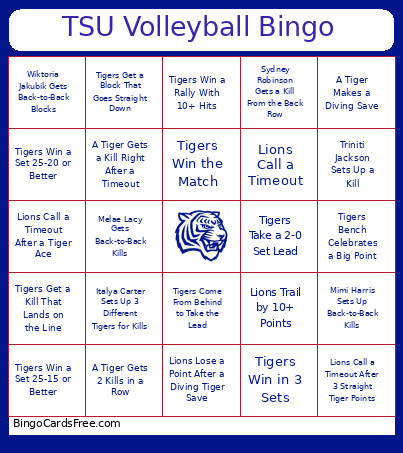 This TSU VB Bingo vs UNA Cards Game contains following Words or Phrases: Carsyn Stansberry Gets a Kill, Carsyn Stansberry Gets 2 Kills in One Set, Julia Culpepper Gets an Ace, Julia Culpepper Gets a Kill, Sydni Poston Makes a Diving Save, Sydni Poston Keeps a Long Rally Alive, Jordan Imperial Digs a Hard-Hit Ball, Jordan Imperial Makes a One-Handed Save, Savanna Moore Gets a Block, Savanna Moore Gets a Kill Right After a Block, Mimi Harris Gets an Ace, Mimi Harris Sets Up Back-to-Back Kills, Gabrielle Washington Gets a Solo Block, Gabrielle Washington Gets a Kill at the Net, Melae Lacy Gets Back-to-Back Kills, Melae Lacy Gets a Kill That Forces a Lions Timeout, Italya Carter Gets an Ace, Italya Carter Sets Up 3 Different Tigers for Kills, Wiktoria Jakubik Gets Back-to-Back Blocks, Wiktoria Jakubik Gets a Kill Off a Quick Hit, Brie Blevins Gets a Block, Brie Blevins Gets a Kill That Lands on the Line, Triniti Jackson Sets Up a Kill, Triniti Jackson Scores on a Surprise Tip, Sydney Robinson Gets a Kill From the Back Row, Sydney Robinson Gets 3 Kills in One Set, Tigers Score the First Point, Tigers Get the First Ace, Tigers Get the First Block, Tigers Get the First Kill, Tigers Score 3 Points in a Row, Tigers Score 5 Points in a Row, Tigers Get Back-to-Back Kills, Tigers Get Back-to-Back Aces, Tigers Get Back-to-Back Blocks, Tigers Take a 5-Point Lead, Tigers Come From Behind to Take the Lead, Tigers Reach 10 Points First, Tigers Reach 20 Points First, Tigers Win a Long Rally, Tigers Win a Rally After a Diving Save, Tigers Win a Rally With 10+ Hits, Tigers Get a Kill That Lands on the Line, Tigers Get a Block That Goes Straight Down, Tigers Get an Ace That Hits the Floor Untouched, Tigers Score on a Soft Tip Over the Net, Tigers Score After the Ball Hits the Net, Tigers Force a Lions Timeout, Tigers Score Right After a Lions Timeout, Tigers Score Right After Their Own Timeout, Tigers Win the First Set, Tigers Win Back-to-Back Sets, Tigers Win a Set by 5+ Points, Tigers Reach Set Point First, Tigers Score the Final Point of a Set, Tigers Win a Set 25-20 or Better, Tigers Win a Set 25-15 or Better, Tigers Hold the Lions Under 20 Points in a Set, Tigers Take a 2-0 Set Lead, Tigers Win in 3 Sets, Tigers Win the Match, Three Different Tigers Get a Kill, Three Different Tigers Get an Ace, Two Tigers Team Up for a Block, A Tiger Gets 2 Kills in a Row, A Tiger Gets 2 Aces in a Row, A Tiger Gets 3 Kills in One Set, A Tiger Gets 5 Kills in the Match, A Tiger Gets 3 Blocks in the Match, A Tiger Makes a Diving Save, A Tiger Makes a One-Handed Save, A Tiger Saves the Ball From Going Out, A Tiger Gets a Kill After a Long Rally, A Tiger Gets a Kill Right After a Timeout, A Tiger Gets a Kill on Set Point, A Tiger Gets an Ace on Set Point, A Tiger Gets a Block on Set Point, Lions Serve Into the Net, Lions Serve Out, Lions Hit the Ball Into the Net, Lions Hit the Ball Out, Lions Hit the Ball Out Twice in a Row, Lions Get Blocked, Lions Get Blocked Twice in One Set, Lions Call a Timeout, Lions Call Both Timeouts in One Set, Lions Call a Timeout After 3 Straight Tiger Points, Lions Call a Timeout After a Tiger Kill, Lions Call a Timeout After a Tiger Block, Lions Call a Timeout After a Tiger Ace, Lions Lose a Long Rally, Lions Lose a Point After a Diving Tiger Save, Lions Trail by 5+ Points, Lions Trail by 10+ Points, Lions Fail to Reach 20 Points in a Set, Lions Serve Out Late in a Set, Lions Hit Out Late in a Set, Lions Serve Into the Net on Set Point, Lions Hit Out on Set Point, Lions Get Blocked on Set Point, Lions Lose a Set by 5+ Points, Lions Lose Back-to-Back Sets, Kean Hall Gets Loud, Crowd Starts a "TSU" Chant, Tigers Bench Celebrates a Big Point, Tigers Celebrate a Big Block, Tigers Celebrate an Ace, Tigers Celebrate After Winning a Long Rally, Coach Sutton Calls a Timeout, Tigers Huddle After a Big Point, Tigers Take the Lead and Kean Hall Gets Loud.