Print free UCG bingo cards or alter them,
limitless cards! Select from 41,500+ templates or use the bingo card generator.
Add numbers, phrases, pictures, or any combination.
Play using PDF prints, digital bingo cards,
and the digital bingo caller, or mix physical and digital.
About: This bingo card is perfect for energizing a veterinary clinic team or celebrating a staff appreciation event. The activities highlight teamwork, creativity, and the daily quirks of veterinary life with a playful twist. Expect lots of laughs as colleagues tackle fun challenges together while also spotlighting some common milestones from busy shifts.
How To: To save a PDF to print, click the Print button.
You can modify the card quantity and other
print options on the Print tab.
Grid items and free space text can be changed on the Basic tab.
Appearance can be highly personalized on the
relevant tabs, or you can quickly search any preference
on the 🔍 tab.
How to play UCG Bingo Cards?
Digital Caller: Click on the Play button above.
Digital Players: Click on the Play button above, and then click on the 🎫 button.
Paper Players: Print PDF bingo cards and manually cross off the cards.
Paper Caller: Print PDF calling list & calling slips and manually draw the slips.
Mixed Play: Pick any combination above.
For example, caller can be either Offline or Digital.
And players can be Offline or Digital or a mix of both.
Step-By-Step:
Start by getting the UCG Bingo PDF by clicking on the "Print" button above.
Open the PDF and print it.
For random drawing, you can print another copy of the call list, cut, fold and then draw them randomly at play time.
Cut the bingo cards at the cut lines if there are greater than 1 bingo cards per page.
Distribute one card per player. For marking, you can use markers. Crayons are the cheapest.
Pick one person to be the caller. If you are playing in a small group, the caller may as well play along with their own Bingo card.
The caller begins the play by randomly pulling an item from the call list and calling out it to everyone.
The players look at their cards to see if they have the called word. If they do, they mark that word.
The first player to finish a horizontal, vertical, or a diagonal line of crossed items announces "Bingo!" and wins the game.
The caller checks that the items marked form a correct line as per the Bingo card and call list.
You can play for multiple patterns or a full card blackout for a longer game.
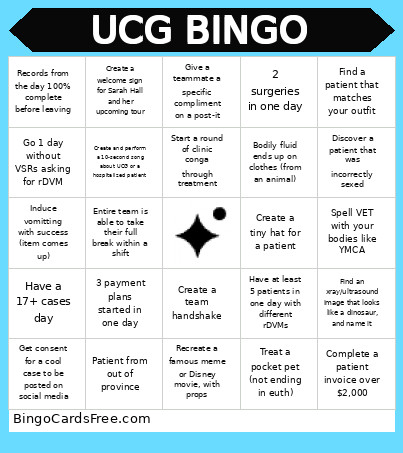
This UCG Bingo Cards Game contains following Words or Phrases: Find a patient that matches your outfit, Spell VET with your bodies like YMCA, Create a tiny hat for a patient, Recreate a famous meme or Disney movie, with props, Create and perform a 10-second song about UCG or a hospitalized patient, Start a round of clinic conga through treatment, Give a teammate a specific compliment on a post-it, Create a team handshake, Find an xray/ultrasound image that looks like a dinosaur, and name it, Have a 17+ cases day, Complete a patient invoice over $2,000, Get consent for a cool case to be posted on social media, Have at least 5 patients in one day with different rDVMs, Patient from out of province, Go 1 day without VSRs asking for rDVM, Records from the day 100% complete before leaving, Treat a pocket pet (not ending in euth), 2 surgeries in one day, Induce vomitting with success (item comes up), Bodily fluid ends up on clothes (from an animal), Discover a patient that was incorrectly sexed, Entire team is able to take their full break within a shift, 3 payment plans started in one day, Create a welcome sign for Sarah Hall and her upcoming tour.

 This UCG Bingo Cards Game contains following Words or Phrases: Find a patient that matches your outfit, Spell VET with your bodies like YMCA, Create a tiny hat for a patient, Recreate a famous meme or Disney movie, with props, Create and perform a 10-second song about UCG or a hospitalized patient, Start a round of clinic conga through treatment, Give a teammate a specific compliment on a post-it, Create a team handshake, Find an xray/ultrasound image that looks like a dinosaur, and name it, Have a 17+ cases day, Complete a patient invoice over $2,000, Get consent for a cool case to be posted on social media, Have at least 5 patients in one day with different rDVMs, Patient from out of province, Go 1 day without VSRs asking for rDVM, Records from the day 100% complete before leaving, Treat a pocket pet (not ending in euth), 2 surgeries in one day, Induce vomitting with success (item comes up), Bodily fluid ends up on clothes (from an animal), Discover a patient that was incorrectly sexed, Entire team is able to take their full break within a shift, 3 payment plans started in one day, Create a welcome sign for Sarah Hall and her upcoming tour.