Print free USC Esports bingo cards or adjust them,
limitless cards! Pick from 42,600+ templates or use our bingo card generator.
Add numbers, words, pictures, or mix them all.
Play using PDF printouts, online bingo cards,
and our online bingo caller, or mix physical and digital.
About: This bingo card is perfect for breaking the ice at a gaming club meetup or Esports event. Its focus on gaming interests, personal backgrounds, and club roles helps everyone find common ground and spark conversations. Whether you’re a seasoned gamer or new to the scene, this card keeps things fun and social for all kinds of players.
How To: To download a PDF to print, click the Print button.
You can change the card quantity and other
printing options on the Print tab.
Grid items and free space text can be added on the Basic tab.
Appearance can be completely customized on the
corresponding tabs, or you can easily find any preference
using the 🔍 tab.
How to play USC Esports Bingo Cards?
Digital Caller: Click on the Play button above.
Paper Caller: Print PDF calling list & calling slips and manually choose the slips.
Digital Players: Click on the Play button above, and then click on the 🎫 button.
Paper Players: Print PDF bingo cards and manually cross off the cards.
Hybrid Play: Pick any combination above.
For instance, caller can be either Printed or Digital.
And players can be Printed or Digital or a combo of both.
Step-By-Step:
Start by getting the USC Esports PDF by clicking on the "Print" button above.
Open the PDF and print it.
For random calling, you can print another copy of the call list, cut, fold and then pick them randomly at play time.
Cut the bingo cards at the cut lines if there are greater than 1 bingo cards per page.
Distribute one card per player. For marking, you can use pencils. Crayons cost the least.
Pick one person to be the caller. If you are playing in a small group, the caller may also play along with their own Bingo card.
The caller begins the game by randomly picking an item from the call list and saying it to all players.
The players look at their cards to see if they have the called word. If they do, they cross off that word.
The first player to finish a horizontal, vertical, or a diagonal line of marked items announces "Bingo!" and wins the play.
The caller validates that the items crossed off form a correct line as per the Bingo card and call list.
You can play for multiple patterns or a full card blackout for a longer play.
This USC Esports Bingo Cards Game contains following Words or Phrases: Someone who prefers console over PC, Someone who plays the same game as you, Someone who has played a game for 5+ years, Someone who has built their own PC, Someone who has attended a live Esports event, Someone who is interested in game dev, Someone who has a pet, Someone who speaks multiple languages, Someone who has cosplayed a game character before, Someone who is a content creator, Someone with a controversial game opinion, Someone who can name 3 different pro players, Someone with a major you have never heard of before, Someone who has/is wearing game merch, Someone new to the club, Someone who is a part of content team, Someone who has casted for a game before, Someone on E-board, Someone who is a team manager, Someone who has a sibling, Someone in a different year than you, Someone wearing the same color as you, Someone who likes the same genre of music, Someone who wants a career in the Esports industry.

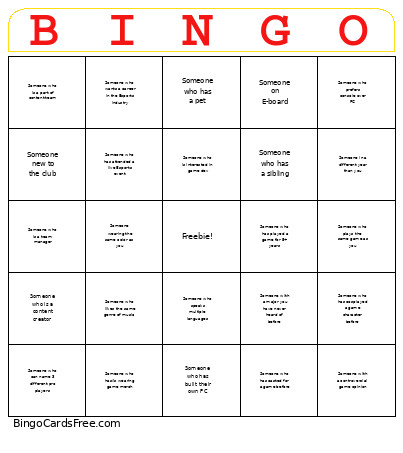 This USC Esports Bingo Cards Game contains following Words or Phrases: Someone who prefers console over PC, Someone who plays the same game as you, Someone who has played a game for 5+ years, Someone who has built their own PC, Someone who has attended a live Esports event, Someone who is interested in game dev, Someone who has a pet, Someone who speaks multiple languages, Someone who has cosplayed a game character before, Someone who is a content creator, Someone with a controversial game opinion, Someone who can name 3 different pro players, Someone with a major you have never heard of before, Someone who has/is wearing game merch, Someone new to the club, Someone who is a part of content team, Someone who has casted for a game before, Someone on E-board, Someone who is a team manager, Someone who has a sibling, Someone in a different year than you, Someone wearing the same color as you, Someone who likes the same genre of music, Someone who wants a career in the Esports industry.