
Valboosin til i Lummel Bingo Cards - Print Free or Customize
Print free Valboosin til i Lummel bingo cards or customize, limitless cards! Select from 42,200+ templates or use the bingo card generator. Add numbers, words, pictures, or any combination. Play using PDF printouts, online bingo cards, and the online bingo caller, or combine all formats.
About: This bingo card is made for a wild, inside-joke–filled party with a tight-knit group of friends who aren’t afraid to get chaotic. Packed with hilarious dares, classic mishaps, and legendary personalities, it's perfect for a house party or reunion where everyone’s out to make unforgettable memories (and probably some questionable decisions). Get ready to laugh, tease, and cheer each other on as the madness unfolds.
How To: To get a printable PDF, click the Print button. You can adjust the card quantity and other printing options on the Print tab. Grid items and free space text can be added on the Basic tab. Appearance can be exactly personalized on the relevant tabs, or you can quickly locate any setting on the 🔍 tab.
How to play Valboosin til i Lummel Bingo Cards?
- Printed Players: Print PDF bingo cards and manually cross off the cards.
- Printed Caller: Print PDF calling list & calling slips and manually pick the slips.
- Virtual Caller: Click on the Play button above.
- Virtual Players: Click on the Play button above, and then click on the 🎫 button.
- Combo Play: Choose any combination above. For example, caller can be either Printed or Virtual. And players can be Printed or Virtual or a mix of both.
Step-By-Step:
- Start by downloading the Valboosin til i Lummel PDF by clicking on the "Print" button above.
- Open the PDF and print it.
- For random drawing, you can print another copy of the call list, cut, fold and then pull them randomly at play time.
- Cut the bingo cards at the cut lines if there are greater than 1 bingo cards per page.
- Distribute one card per player. For marking, you can use pens. Crayons are the cheapest.
- Choose one person to be the caller. If you are playing in a small group, the caller can as well play along with their own Bingo card.
- The caller opens the play by randomly picking an item from the call list and saying it to everyone.
- The players look at their cards to see if they have the announced word. If they do, they mark that word.
- The first player to finish a horizontal, vertical, or a diagonal line of marked items yells "Bingo!" and wins the play.
- The caller confirms that the items marked form a proper line as per the Bingo card and call list.
- You can play for different patterns or a full card blackout for a longer play.
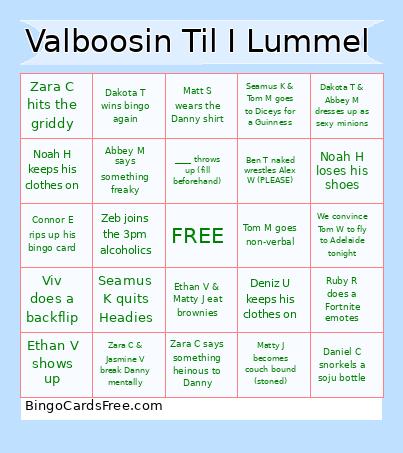 This Valboosin til i Lummel Bingo Cards Game contains following Words or Phrases: Figure out who are the 'Boner Boys', Take a photo with all three Dans, Adam F & Talall DON'T break the fence, Danny breaks his 3 beers max rule, Tom M goes non-verbal, Moose breaks a chair (again), Daniel C snorkels a soju bottle, Moose & Goose goes to Diceys for a guinness, Dan C & Damo V argue, Ethan V shows up, Ethan V doesn't show up, Adam F is late by more than 2 hours, Connor E rips up his bingo card, James S has a diva down moment, Moose says "I'm sick of it", Matty J becomes couch bound (stoned), Valbusa gets hammered, Valbusa gives Danny his sexy mum's number, Riley C survives the whole night, Damo V rants about something crazy, Deniz U keeps his clothes on, Ruby G puts on her fedora, Alex W has an anaphylactic reaction, Noah H loses his shoes, Danny, Alex W and Noah H start naked wrestling, Dakota T & Abbey M dresses up as sexy minions, Ben S sleeps under the stairs, Ruby G's digital camera has a picture of Danny's balls, Abbey M says something freaky, Dakota T wins bingo again, Noah H keeps his clothes on, Iluka J beats someone up, Ermaeh-leigh beats up Damo V, Ehmmuh-leih survives the whole night, Matt S wears the Danny shirt, Liam R wears the Valbusa shirt, Jack C wears his Batman costume, Jemma W is gaslit, Kyuss S quits Headies, Seamus K & Tom M goes to Diceys for a Guinness, Zeb joins the 3pm alcoholics, Ethan V & Matty J eat brownies, Kai P and Ryan E kiss, Jai T gets his sporty close covered, Elena G has a brain rot moment, Ruby R does a Fortnite emotes, Danny kisses Sexy Luke, Dan C or Jack L, Viv does a backflip, Seamus K quits Headies, Talall reads out a holy sermon, Jack L gets lime/lemon squeezed into his eye, We convince Tom W to fly to Adelaide tonight, Zara C hits the griddy, Talall brings a fence panel to break, Zara C says something heinous to Danny, Matthew Lumley shows up, ____ throws up (fill beforehand), Ben T naked wrestles Alex W (PLEASE), Zara C & Jasmine V break Danny mentally.