Print free Valentines bingoo cards or personalize,
limitless prints! Choose from 42,200+ designs or use our bingo card generator.
Add numbers, words, pictures, or all of them.
Play using printable PDF, virtual bingo cards,
and our virtual bingo caller, or combine all formats.
About: This bingo card is a playful, slightly spicy take on modern dating and romance, perfect for singles mixers, Galentine’s parties, or a fun night out with friends. With prompts that span flirty confessions, quirky talents, awkward encounters, and heartfelt moments, it sets the stage for laughter and connection in any group excited to celebrate love in all its messy glory.
How To: To save a printable PDF, click the Print button.
You can modify the number of cards and other
printing settings on the Print tab.
Grid items and free space text can be added on the Basic tab.
Appearance can be fully personalized on the
corresponding tabs, or you can quickly locate any option
using the 🔍 tab.
How to play Valentines Bingoo Cards?
Paper Players: Print PDF bingo cards and manually cross off the cards.
Online Caller: Click on the Play button above.
Paper Caller: Print PDF calling list & calling slips and manually select the slips.
Online Players: Click on the Play button above, and then click on the 🎫 button.
Mixed Mode: Choose any combination above.
For example, caller can be either Paper or Online.
And players can be Paper or Online or a combo of both.
Step-By-Step:
Start by downloading the Valentines Bingoo PDF by clicking on the "Print" button above.
Open the PDF and print a hard copy.
For random calling, you can print another copy of the call list, cut, fold and then pick them randomly at play time.
Cut the bingo cards at the cut marks if there are more than 1 bingo cards per page.
Distribute one card per player. For marking, you can use crayons. Crayons are the cheapest.
Choose one person to be the caller. If you are playing in a small group, the caller can also play along with their own Bingo card.
The caller opens the game by randomly pulling an item from the call list and announcing it to all players.
The players look at their cards to see if they have the called word. If they do, they dab that word.
The first player to finish a horizontal, vertical, or a diagonal line of marked items announces "Bingo!" and wins the game.
The caller confirms that the items marked form a proper line according to the Bingo card and call list.
You can play for different patterns or a full card blackout for a longer game.
This Valentines Bingoo Cards Game contains following Words or Phrases: 1+ dates in ONE day, Announce "true love exists!" like a town crier, Ask someone if they believe in fate, Ask someone their favorite beer style, Ask someone their go-to karaoke song, Attempt a secret handshake with someone, Been on a blind date, Been set up on a blind date, Believes in love at first sight, Binged Heated Rivalry in 1 day, Can touch their nose with their tongue, Can twerk & proves it, Cheers with someone wearing red, Chronic situationship, Convince someone to share a happy story, Currently reading something smutty <3, Cut bangs after breakup, Dislikes Valentines day, Drunk dialed an Ex, Embraced Celibacy, Exchange numbers with someone, F***k ice, Faked an emergency to get out of a bad date, Found a friends sibling attractive, Ghosted Someone, Give someone a hug *with consent*, Gone on a double date, Gone to the movies alone, Has a "worst date ever" story, Has been on a date at Remnant, In a long distance relationship, Is a certified flirt, Is attracted to someone in the room, Is in LOVE, Is single, It's your birthday TODAY, Knows their love language, Likes long walks on the beach, Name 3 rom-coms in 10 seconds, Regretted a hookup, Saw Ex on a dating app, Say you go-to pickup line, Set up friends on a blind date, Share an Amaro with a lover, Slid into someones DM's, Stalked an Ex online, Sunrise or Sunset & WHY, U-hauled, Use the new photobooth in the lobby, Written a love letter.

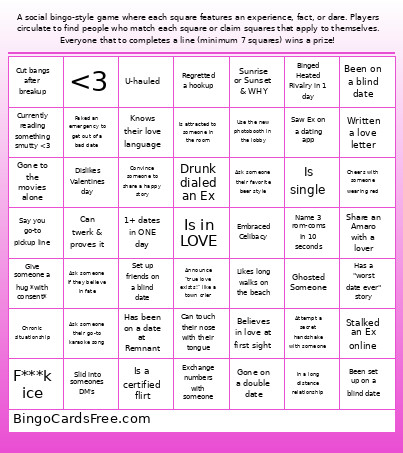 This Valentines Bingoo Cards Game contains following Words or Phrases: 1+ dates in ONE day, Announce "true love exists!" like a town crier, Ask someone if they believe in fate, Ask someone their favorite beer style, Ask someone their go-to karaoke song, Attempt a secret handshake with someone, Been on a blind date, Been set up on a blind date, Believes in love at first sight, Binged Heated Rivalry in 1 day, Can touch their nose with their tongue, Can twerk & proves it, Cheers with someone wearing red, Chronic situationship, Convince someone to share a happy story, Currently reading something smutty <3, Cut bangs after breakup, Dislikes Valentines day, Drunk dialed an Ex, Embraced Celibacy, Exchange numbers with someone, F***k ice, Faked an emergency to get out of a bad date, Found a friends sibling attractive, Ghosted Someone, Give someone a hug *with consent*, Gone on a double date, Gone to the movies alone, Has a "worst date ever" story, Has been on a date at Remnant, In a long distance relationship, Is a certified flirt, Is attracted to someone in the room, Is in LOVE, Is single, It's your birthday TODAY, Knows their love language, Likes long walks on the beach, Name 3 rom-coms in 10 seconds, Regretted a hookup, Saw Ex on a dating app, Say you go-to pickup line, Set up friends on a blind date, Share an Amaro with a lover, Slid into someones DM's, Stalked an Ex online, Sunrise or Sunset & WHY, U-hauled, Use the new photobooth in the lobby, Written a love letter.