VALO WATCH PARTY Bingo Cards - Print Free or Customize
Print free VALO WATCH PARTY bingo cards or personalize,
unlimited cards! Choose from 41,500+ templates or use the bingo card generator.
Add numbers, words, photos, or any combination.
Play using PDF printouts, online bingo cards,
and the online bingo caller, or go hybrid.
About: This bingo card is perfect for spicing up any Valorant esports watch party or live match stream with friends. It captures the excitement, drama, and fun quirks you’ll see during big tournaments—everything from epic clutches and wild agent picks to classic caster moments and unexpected technical issues. Ideal for dedicated fans and newcomers eager to add an extra layer of competition to their viewing experience!
How To: To download a printable PDF, click the Print button.
You can adjust the card count and other
printing preferences on the Print tab.
Grid items and free space content can be edited on the Basic tab.
Appearance can be completely personalized on the
corresponding tabs, or you can easily search any option
using the 🔍 tab.
How to play VALO WATCH PARTY Bingo Cards?
Paper Caller: Print PDF calling list & calling slips and physically pick the slips.
Online Caller: Click on the Play button above.
Online Players: Click on the Play button above, and then click on the 🎫 button.
Paper Players: Print PDF bingo cards and physically mark the cards.
Combo Play: Select any combination above.
For instance, caller can be either Offline or Online.
And players can be Offline or Online or a mix of both.
Step-By-Step:
Start by getting the VALO WATCH PARTY PDF by clicking on the "Print" button above.
Open the PDF and print a hard copy.
For random calling, you can print another copy of the call list, cut, fold and then draw them randomly at play time.
Cut the bingo cards at the cut lines if there are greater than 1 bingo cards per page.
Give one card to each player. For marking, you can use pencils. Crayons cost the least.
Select one person to be the caller. If you are playing in a small group, the caller can as well play along with their own Bingo card.
The caller begins the play by randomly pulling an item from the call list and calling out it to all players.
The players scan their cards to see if they have the announced word. If they do, they cross off that word.
The first player to complete a horizontal, vertical, or a diagonal line of marked items shouts "Bingo!" and wins the game.
The caller checks that the items marked form a correct line as per the Bingo card and call list.
You can play for different patterns or a full card blackout for a longer game.
This VALO WATCH PARTY Bingo Cards Game contains following Words or Phrases: 4K, 2K WITH OP, ACE, SHORTY KILL, 1V3 CLUTCH, COSPLAYER ON CAM, VYSE PICK, PHOENIX PICK, BREACH PICK, SOVA PICK, ISO PICK, KILL WITH UTILITY, THRIFTY, FLAWLESS, 10-2 HALF, 9-3 CURSE, ACE STOLEN BY TEAMMATE, HAVEN PICKED, HAVEN BANNED, ABYSS BANNED, CORRODE BANNED, SPLIT PICKED, SPLIT BANNED, SOMEONE END MATCH W/ LESS THEN 20 DEATHS, SOMEONE GETS 40+ DEATHS, SOMEONE ENDS MAP W/ 15+ ASSISTS, BOOMBOT KILL, RAZE NADE KILL, COACH SLAMS DESK, COACH FACE PALMS, OVERTIME, JENNLEE PREDICTS RIGHT, WYATT PREDICTS RIGHT, SIDESHOW PREDICTS RIGHT, MIMI PREDICTS RIGHT, ACHILOS PREDICTS RIGHT, 3K, JETT PICKED, ANY TEAM BUNDLE CAMEO, SOMEONE SWEARS, GHOST 3K, ONE TEAM BUYS DOUBLE OP, SHERIFF 2K, ALL 4 TIMEOUTS IN A MAP USED, YORU PICKED, SOMEONE ENDS THE MAP W/ 26+ KILLS, SOMEONE ENDS THE MAP W/ 30+ KILLS, SOMEONE ROZAS, SHOCK DART KILL, KILL THROUGH SMOKE, ECO ROUND WIN, LINEUP POST-PLANT WIN, WALL BANG KILL, STICK DEFUSE IN SMOKE, HERO RIFLE GETS 2+ KILLS, SAVE CALL W/ 3+ PLAYERS, CASTER SAYS "THE TIMING!", CASTER SAYS "THIS COULD BE HUGE!", SLOW MOTION REPLAY, STAT GRAPHIC APPEARS, IGL CLUTCH, PLAYER GETS 3K THEN DIES, PLAYER SURVIVES W/ 1HP, PLAYER STANDS UP, ENTRY DASHES IN AND DIES IMMEDIATELY, TEAM THROWS 5v3, TEAM FLASH /STUN, OP SAVE, AGGRESSIVE DEFENDER PUSH, SOMEONE SAYS "CHECK HIS PC" IN CHAT, TECH PAUSE, PLAYER CAM SHOWS SOMEONE LAUGHING, CROWD CHANT, CROWD GOES CRAZY.

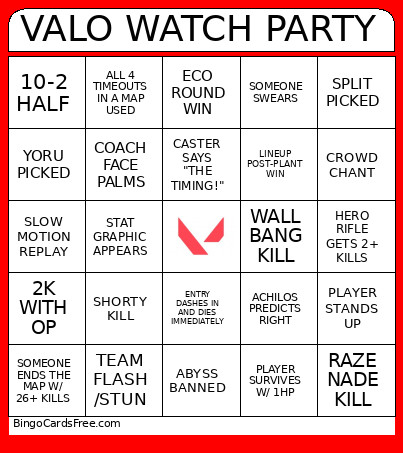 This VALO WATCH PARTY Bingo Cards Game contains following Words or Phrases: 4K, 2K WITH OP, ACE, SHORTY KILL, 1V3 CLUTCH, COSPLAYER ON CAM, VYSE PICK, PHOENIX PICK, BREACH PICK, SOVA PICK, ISO PICK, KILL WITH UTILITY, THRIFTY, FLAWLESS, 10-2 HALF, 9-3 CURSE, ACE STOLEN BY TEAMMATE, HAVEN PICKED, HAVEN BANNED, ABYSS BANNED, CORRODE BANNED, SPLIT PICKED, SPLIT BANNED, SOMEONE END MATCH W/ LESS THEN 20 DEATHS, SOMEONE GETS 40+ DEATHS, SOMEONE ENDS MAP W/ 15+ ASSISTS, BOOMBOT KILL, RAZE NADE KILL, COACH SLAMS DESK, COACH FACE PALMS, OVERTIME, JENNLEE PREDICTS RIGHT, WYATT PREDICTS RIGHT, SIDESHOW PREDICTS RIGHT, MIMI PREDICTS RIGHT, ACHILOS PREDICTS RIGHT, 3K, JETT PICKED, ANY TEAM BUNDLE CAMEO, SOMEONE SWEARS, GHOST 3K, ONE TEAM BUYS DOUBLE OP, SHERIFF 2K, ALL 4 TIMEOUTS IN A MAP USED, YORU PICKED, SOMEONE ENDS THE MAP W/ 26+ KILLS, SOMEONE ENDS THE MAP W/ 30+ KILLS, SOMEONE ROZAS, SHOCK DART KILL, KILL THROUGH SMOKE, ECO ROUND WIN, LINEUP POST-PLANT WIN, WALL BANG KILL, STICK DEFUSE IN SMOKE, HERO RIFLE GETS 2+ KILLS, SAVE CALL W/ 3+ PLAYERS, CASTER SAYS "THE TIMING!", CASTER SAYS "THIS COULD BE HUGE!", SLOW MOTION REPLAY, STAT GRAPHIC APPEARS, IGL CLUTCH, PLAYER GETS 3K THEN DIES, PLAYER SURVIVES W/ 1HP, PLAYER STANDS UP, ENTRY DASHES IN AND DIES IMMEDIATELY, TEAM THROWS 5v3, TEAM FLASH /STUN, OP SAVE, AGGRESSIVE DEFENDER PUSH, SOMEONE SAYS "CHECK HIS PC" IN CHAT, TECH PAUSE, PLAYER CAM SHOWS SOMEONE LAUGHING, CROWD CHANT, CROWD GOES CRAZY.