
Valorant BINGO NIGHT Cards - Print Free or Customize
Print free Valorant BINGO NIGHT cards or alter them, unlimited cards! Pick from 41,500+ templates or use our bingo card generator. Add numbers, phrases, photos, or any combination. Play using PDF prints, online bingo cards, and our online bingo caller, or mix physical and digital.
About: This bingo card is packed with Valorant-inspired challenges and inside jokes, making it perfect for a lively night with friends or your regular gaming crew. The mix of weapon feats, hilarious fails, and specific player antics sets a light-hearted, competitive vibe that’ll spark laughs and bragging rights during any squad hangout or Twitch stream session.
How To: To save a printable PDF, click the Print button. You can change the card quantity and other printing preferences on the Print tab. Grid items and free space content can be changed on the Basic tab. Appearance can be completely personalized on the corresponding tabs, or you can quickly search any option using the 🔍 tab.
How to play Valorant BINGO NIGHT Cards?
- Online Caller: Click on the Play button above.
- Printed Players: Print PDF bingo cards and manually write on the cards.
- Online Players: Click on the Play button above, and then click on the 🎫 button.
- Printed Caller: Print PDF calling list & calling slips and manually draw the slips.
- Combo Mode: Pick any combination above. For example, caller can be either Paper or Online. And players can be Paper or Online or a combination of both.
Step-By-Step:
- Start by saving the Valorant BINGO NIGHT PDF by clicking on the "Print" button above.
- Open the PDF and print a hard copy.
- For random calling, you can print another copy of the call list, cut, fold and then pick them randomly at play time.
- Cut the bingo cards at the cut lines if there are more than 1 bingo cards per page.
- Give one card to each player. For marking, you can use pencils. Crayons are the cheapest.
- Pick one person to be the caller. If you are playing in a small group, the caller may also play along with their own Bingo card.
- The caller opens the game by randomly pulling an item from the call list and saying it to everyone.
- The players look at their cards to see if they have the called word. If they do, they cross off that word.
- The first player to finish a horizontal, vertical, or a diagonal line of crossed items announces "Bingo!" and wins the game.
- The caller verifies that the items crossed off form a correct line as per the Bingo card and call list.
- You can play for varied patterns or a full card blackout for a longer game.
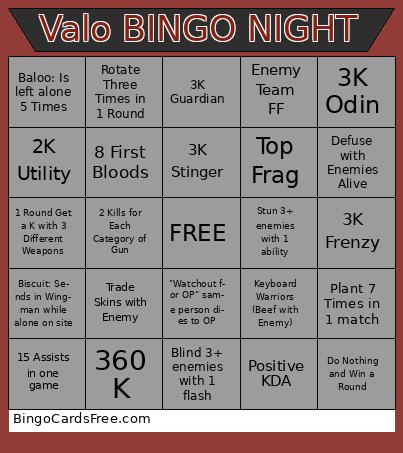 This Valorant BINGO NIGHT Cards Game contains following Words or Phrases: 3K Classic, 3K Shorty, 3K Frenzy, 3K Ghost, 3K Sheriff, 3K Stinger, 3K Specter, 3K Bucky, 3K Judge, 3K Bulldog, 3K Guardian, 4K Phantom/Vandal, 3K Marshal, 3K Outlaw, 3K OP, 3K Ares, 3K Odin, 2K Utility, 7 OP Kills, 2 Kills for Each Category of Gun, Get a K with Every Gun, 360 K, Pistol K on Full Buy, 1 Round Get a K with 3 Different Weapons, Get a Knife K, Full buy 2 teammates in the same round, Hit 150+ Without a Kill, Get a Kill by Run 'n Gun, Get Killed by Run 'n Gun, Get Knifed, Get Spammed Through Smoke, Get Wallbanged, Get Kill While Blinded, Hack-usation, Win a round by Enemy suicide, Pros Don't Fake 1v1+, Get Hit by 3+ Util at the same time, Negative KDA, Positive KDA, Top Frag, MVP Stolen, Under 10K, Agent Diff, Plant 7 Times in 1 match, 4 First Bloods as a non Dualist, 8 First Bloods, Match KDA with someone after 3 rounds in a half, Ace, 20 bomb, Defuse with Enemies Alive, Get 3 Wallbang Kills, 15 Assists in one game, 1v4+ Clutch, Get a collat, Break 7 pieces of enemy Util in 1 game, Blind 3+ enemies with 1 flash, Stun 3+ enemies with 1 ability, Spray Transfer Complete, 3 Team Knifes, 5 Team Clutches, Lose 4 Rounds in a row, Win 4 Rounds in a row, Teammate Network Problems, Majority Elim Ws (1 Half), Buy an OP for a Teammate, Keyboard Warriors (Beef with Enemy), Team flashed twice in 1 round, Die to Flanker 3 Times, Lose a 3+ advantage, Enemy Team FF, Thrifty, Flawless, Win by Time then Kill the Survivor, "Watchout for OP" same person dies to OP, Have a teammate plant "weird" (not default or open), Ulting Player Dies Before End of Voiceline, Match KDA with someone after 3 rounds in a half, Fake Plant 1 site then plant another within 10 seconds, Win a round in Spawn, Spray in Enemy Spawn, Trade Skins with Enemy, Say Hello to 2 enemy cypher cameras, Find the Funny Numbers in Score/KDA, Get a Kill with Invert Mouse, Crouch For 2 Rounds, Do Nothing and Win a Round, Rotate Three Times in 1 Round, Spray then get a K within 5 seconds, Friendly Fire K, Teammate Misses Util Stopping a Full Push, Agent Roulette, Steal Someone's Agent, Teammate Dies Alone on Site Due to Stall Util, Bryce: Waits till "Select Your Agent" to lock in agent, Bryce: Forgets to Buy, Bryce: Clutch, Bryce: Body Blocks, Baloo: Spike Planted while Baloo is the other site, Baloo: Is left alone 5 Times, Baloo: Baloo Clutch, Dusk: Dies in Mid 5 times, Dusk: Tilt Buys an OP, Dusk: "They Have to Be Cheating, Dusk: Clutch, Biscuit: Forgets to Buy Shields, Biscuit: Sends in Wingman while alone on site, Biscuit: Clutch.