
VIFI Summer Party 2026 Bingo Cards - Print Free or Customize
Print free VIFI Summer Party 2026 bingo cards or modify, unlimited cards! Choose from 42,600+ designs or use our bingo card generator. Add numbers, words, photos, or mix them all. Play using printable PDF, digital bingo cards, and our digital bingo caller, or combine all formats.
How To: To download a printable PDF, click the Print button. You can adjust the card count and other print settings on the Print tab. Grid items and free space content can be added on the Basic tab. Appearance can be completely customized on the corresponding tabs, or you can easily find any option using the 🔍 tab.
How to play VIFI Summer Party 2026 Bingo Cards?
- Online Players: Click on the Play button above, and then click on the 🎫 button.
- Paper Players: Print PDF bingo cards and manually scratch the cards.
- Paper Caller: Print PDF calling list & calling slips and manually choose the slips.
- Online Caller: Click on the Play button above.
- Mixed Play: Pick any combination above. For instance, caller can be either Printed or Online. And players can be Printed or Online or a combo of both.
Step-By-Step:
- Start by downloading the VIFI Summer Party 2026 PDF by clicking on the "Print" button above.
- Open the PDF and print it.
- For random drawing, you can print another copy of the call list, cut, fold and then draw them randomly at play time.
- Cut the bingo cards at the cut marks if there are more than 1 bingo cards per page.
- Give one card to each player. For marking, you can use markers. Crayons cost the least.
- Pick one person to be the caller. If you are playing in a small group, the caller may also play along with their own Bingo card.
- The caller starts the game by randomly picking an item from the call list and announcing it to all players.
- The players check their cards to see if they have the called word. If they do, they mark that word.
- The first player to complete a horizontal, vertical, or a diagonal line of crossed items shouts "Bingo!" and wins the play.
- The caller validates that the items marked form a proper line according to the Bingo card and call list.
- You can play for varied patterns or a full card blackout for an extended play.
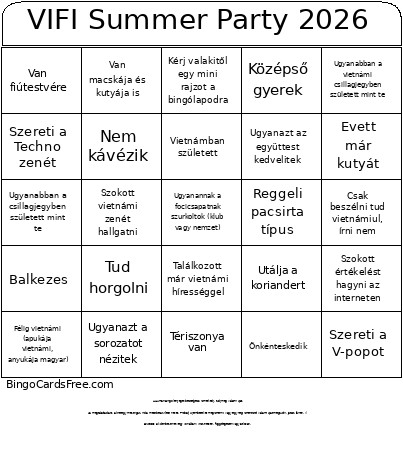 This VIFI Summer Party 2026 Bingo Cards Game contains following Words or Phrases: 5-nél több országban járt már, A kedvenc ünnepe a Halloween, Aki nincs még a VIFI Facebook csoportban és hívd meg, Akivel egy kerületben laktok., Akivel még nem vagytok ismerősök Facebookon., Akivel ugyanabba az iskolába/egyetemre jártok/jártatok és eddig nem ismerted., Akivel ugyanabban a hónapban születtetek., Akivel ugyanaz a kedvenc előadótok, Aludt már szabad ég alatt, Az apukája Vietnamnak ugyanabból a megyéjéből valósi mint a tiéd., Balkezes, Büntették már meg túlsúly miatt a repülőtéren, Büntették már meg valamilyen forgalmi vétség miatt, Csak beszélni tud vietnámiul, írni nem, Családjának vegyeskereskedése van., Csináljatok egy közös képet majd tageljétek be a vifi.hu-t instagramon, Egyik szülője észak vietnámi a másik pedig dél vietnámi., Egyke, Éjszakai bagoly típus, Ejtőernyőzött vagy bungee jumpingolt, El tud énekelni egy vietnámi gyerekdalt, Elmeséli egy meghatározó gyerekkori élményét, Élt már külföldön, Eltörte már valamelyik csontját, Emlékszik mit álmodott tegnap és el is meséli, Énekelt már közönség előtt, Értették már félre azt, amit vietnámiul mondott, Evett már békát, Evett már kígyót, Evett már kutyát, Félig vietnámi (anyukája vietnámi, apukája magyar), Félig vietnámi (apukája vietnámi, anyukája magyar), Futott már maratont, félmaratont, Ha Vietnámban van, akkor robogózik, Használ naponta AI-t (ChatGPT, Claude stb.), Házas már, Hord szemüveget, de nem mindig, Idén már volt a Balatonon, Idén már volt külföldön, Írt már dühös értékelést az interneten, Írt verset vagy történetet, Járt már Afrikában, Járt már Amerikában, Jógázik vagy meditál, Jól tud alkudni a piacon, Kávéfüggő, leglalább 3 kávét iszik egy nap, Képregényeket olvas szabadidejében, Keress valakit, aki le tud győzni kő-papír-ollóban, Kérj valakitől egy mini rajzot a bingólapodra, Kontaktlencsét hord, Koránkelő típus, Középső gyerek, Külföldön dolgozott / dolgozik, Külföldön tanult / tanul, Különleges hobbija van, Már vállalkozott legalább egyszer, Mászott már hegyet, Megtud nevezni 5 vietnami előadót., Mond neked egy viccet, Most nyáron volt Vietnámban., Most van először VIFI eseményen, Mostanában volt moziban és elmeséli milyen volt, Mutat egy bűvésztrükköt neked, Naponta legalább 2 órát eltölt Instagramon és/vagy Tiktokon., Nem használ TikTokot, Nem kávézik, Nem tud pálcikával enni., Nem tud úszni, Nyert már meg / dobogós volt valamilyen matekversenyen, Nyert már szerencsejátékkal nagyobb összeget, Önkénteskedik, Próbált már valamilyen extrém sportot, Reggeli pacsirta típus, Stopolt már, Szerepelt már a TV-ben, Szeret táncolni, Szereti a Bánh chưng-ot, Szereti a csípős ételeket, Szereti a duriánt, Szereti a fotózást, Szereti a horrorfilmeket, Szereti a K-popot, Szereti a koriandert, Szereti a májat, Szereti a mam tom -ot., Szereti a Techno zenét, Szereti a V-popot, Szerinte a hawaii pizza bűntény, Szokott értékelést hagyni az interneten, Szokott jótékonykodni, Szokott önkénteskedni, Szokott padelezni, Szokott sakkozni, Szokott teniszezni, Szokott vietnámi zenét hallgatni, Találkozott már vietnámi hírességgel, Tanul vagy dolgozik egészségügyben, Tanul vagy dolgozik IT-ban, Tanul vagy dolgozik vendéglátásban, Tanult már vietnámiul a Duolingón, Tériszonya van, Tetoválása van., Több mint 10× járt Vietnámban, Több mint 6 unokatestvére van, Többször költözött az elmúlt 5 évben, Töltött már Vietnámban több mint fél évet, Tud fütyülni a ujjaival, Tud horgolni, Tud rubikkockát kirakni, Tud valamilyen hangszeren játszani, Ugyanabban a csillagjegyben született mint te, Ugyanabban a vietnámi csillagjegyben született mint te, Ugyanannak a focicsapatnak szurkoltok (klub vagy nemzet), Ugyanaz a kedvenc színetek, Ugyanazt a sorozatot nézitek, Ugyanazt az együttest kedvelitek, Utálja a koriandert, Van fiútestvére, Van háziállata ami nem kutya vagy macska, Van kutyája, Van macskája, Van macskája és kutyája is, Van már gyereke, Vegetáriánus vagy vegán, Veszett már el a csomagja utazás közben, Vietnámban született, Volt már vietnámi tanárnál magánórán.