Print free Vikilinki bingo cards or modify,
limitless cards! Pick from 41,500+ templates or use the bingo card generator.
Add numbers, words, images, or all of them.
Play using printable PDF, online bingo cards,
and the online bingo caller, or mix physical and digital.
How To: To save a printable PDF, click the Print button.
You can alter the card count and other
printing settings on the Print tab.
Grid items and free space text can be added on the Basic tab.
Appearance can be entirely customized on the
relevant tabs, or you can easily locate any preference
on the 🔍 tab.
How to play Vikilinki Bingo Cards?
Digital Caller: Click on the Play button above.
Printed Players: Print PDF bingo cards and physically write on the cards.
Printed Caller: Print PDF calling list & calling slips and physically draw the slips.
Digital Players: Click on the Play button above, and then click on the 🎫 button.
Hybrid Play: Pick any combination above.
For example, caller can be either Offline or Digital.
And players can be Offline or Digital or a combo of both.
Step-By-Step:
Start by downloading the Vikilinki PDF by clicking on the "Print" button above.
Open the PDF and print it.
For random drawing, you can print another copy of the call list, cut, fold and then pick them randomly at play time.
Cut the bingo cards at the cut lines if there are more than 1 bingo cards per page.
Give one card to each player. For marking, you can use crayons. Crayons are the cheapest.
Pick one person to be the caller. If you are playing in a small group, the caller may as well play along with their own Bingo card.
The caller starts the play by randomly drawing an item from the call list and saying it to all players.
The players scan their cards to see if they have the announced word. If they do, they dab that word.
The first player to complete a horizontal, vertical, or a diagonal line of crossed items yells "Bingo!" and wins the play.
The caller confirms that the items crossed off form a correct line as per the Bingo card and call list.
You can play for varied patterns or a full card blackout for a longer play.
This Vikilinki Bingo Cards Game contains following Words or Phrases: 1. Sabi, MIA BOYKA — «Базовый минимум», 2. Ваня Дмитриенко — «Шёлк», 3. Джиган, Artik & Asti, Niletto — «Худи», 4. Иванушки International — «Тополиный пух», "5. Солодуха ""Виноград"", 6. Анна Немченко - Танцпол везде (снять тренд), 7. Люся Чеботина - за бывшего, 8. Жена Трофимов - Самолеты, 9. Слава Скрипка - Бобр, 10. Моя Мишель - Зима в сердце, 11. Люся Чеботина - Солнце Монако, 12. Jakone / kiliana Асфальт, 13. Агутин, Пресняков - Аэропорты, 14. Юлиана Караулова - А ты не такой, 15. Татьяна Куртукова — «Матушка», 16. Ирина Аллегрова «Угонщица», 17. Король и Шут «Кукла колдуна», 18. Юрий Шатунов — «Седая ночь», 19. Galibri & Mavik — «Федерико Феллини», 20. Руки Вверх! — «Крошка моя», 21. Артик и Асти - Грустный дэнс, 22. Женя Отрадная - Уходи дверь закрой, 23. Фактор 2 - скажи красавица, 24. Нилетто - Любимка, 25. Холидэйбой - Пожары, 26. Анна Асти - По Барам, 27. ДЕМО - солнышко в руках, 28. Дима Билан - невозможное возможно, 29. Киркоров - я эту жизнь тебе отдам, 30. Жуки — «Батарейка», 31. Reflex — «Танцы», 32. Андрей Губин — «Девушки как звёзды», 33. Тату — «Не догонят», 34. Виа Гра — «Попытка №5», 35. Катя Лель — «Мой мармеладный», 36. Егор Крид — «Самбо белого мотылька», 37. Бандэрос - Каламбия пикчерс, 38. Тимати - У нас в клубе, 39. Фабрика - Золотая рыбка, 40. Боестящие - за 4 моря, 41. Чичерина - Тулула, 42. Анна Асти - Царица, 43. Hi fi - 7 лепесток, 44. Ярослав Евдокимов - Фантазер, 45. Винтаж — «ЕВА», 46.максим круженков - Салют, Вера, 47. Максим - знаешь ли ты, 48. Кадышева - широка река, 49. Серебро - мало тебя, 50. Макарена ВСЕ ТАНЦУЮТ!!!, 51. Виагра - у меня появился другой, 52. Инста Самка - за деньги да, 53. Ваня Дмитриенко - Силуэт, 54. Руки вверх! — «Ай–яй-яй, девчонка», 55. Моя Мишель - ветер меняет направление, 56. градусы - голая, 57.бис - катя возьми телефон, 58. Люся Чеботина - за бывшего, 59. Непара - другая причина, 60. А студио -улетаю.

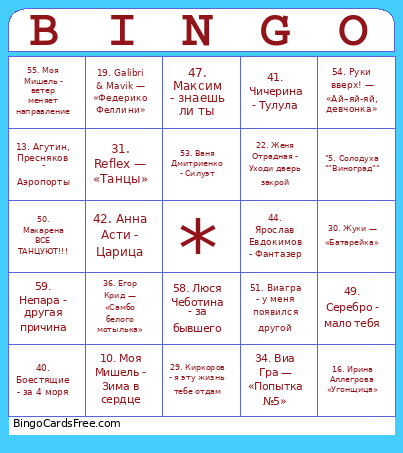 This Vikilinki Bingo Cards Game contains following Words or Phrases: 1. Sabi, MIA BOYKA — «Базовый минимум», 2. Ваня Дмитриенко — «Шёлк», 3. Джиган, Artik & Asti, Niletto — «Худи», 4. Иванушки International — «Тополиный пух», "5. Солодуха ""Виноград"", 6. Анна Немченко - Танцпол везде (снять тренд), 7. Люся Чеботина - за бывшего, 8. Жена Трофимов - Самолеты, 9. Слава Скрипка - Бобр, 10. Моя Мишель - Зима в сердце, 11. Люся Чеботина - Солнце Монако, 12. Jakone / kiliana Асфальт, 13. Агутин, Пресняков - Аэропорты, 14. Юлиана Караулова - А ты не такой, 15. Татьяна Куртукова — «Матушка», 16. Ирина Аллегрова «Угонщица», 17. Король и Шут «Кукла колдуна», 18. Юрий Шатунов — «Седая ночь», 19. Galibri & Mavik — «Федерико Феллини», 20. Руки Вверх! — «Крошка моя», 21. Артик и Асти - Грустный дэнс, 22. Женя Отрадная - Уходи дверь закрой, 23. Фактор 2 - скажи красавица, 24. Нилетто - Любимка, 25. Холидэйбой - Пожары, 26. Анна Асти - По Барам, 27. ДЕМО - солнышко в руках, 28. Дима Билан - невозможное возможно, 29. Киркоров - я эту жизнь тебе отдам, 30. Жуки — «Батарейка», 31. Reflex — «Танцы», 32. Андрей Губин — «Девушки как звёзды», 33. Тату — «Не догонят», 34. Виа Гра — «Попытка №5», 35. Катя Лель — «Мой мармеладный», 36. Егор Крид — «Самбо белого мотылька», 37. Бандэрос - Каламбия пикчерс, 38. Тимати - У нас в клубе, 39. Фабрика - Золотая рыбка, 40. Боестящие - за 4 моря, 41. Чичерина - Тулула, 42. Анна Асти - Царица, 43. Hi fi - 7 лепесток, 44. Ярослав Евдокимов - Фантазер, 45. Винтаж — «ЕВА», 46.максим круженков - Салют, Вера, 47. Максим - знаешь ли ты, 48. Кадышева - широка река, 49. Серебро - мало тебя, 50. Макарена ВСЕ ТАНЦУЮТ!!!, 51. Виагра - у меня появился другой, 52. Инста Самка - за деньги да, 53. Ваня Дмитриенко - Силуэт, 54. Руки вверх! — «Ай–яй-яй, девчонка», 55. Моя Мишель - ветер меняет направление, 56. градусы - голая, 57.бис - катя возьми телефон, 58. Люся Чеботина - за бывшего, 59. Непара - другая причина, 60. А студио -улетаю.