
Loise Bingo Cards - Print Free or Customize
Print free Loise bingo cards or customize, limitless prints! Pick from 42,200+ designs or use our bingo card generator. Add numbers, words, photos, or all of them. Play using PDF printouts, digital bingo cards, and our digital bingo caller, or combine all formats.
How To: To get a printable PDF, click the Print button. You can change the card count and other print settings on the Print tab. Grid items and free space text can be changed on the Basic tab. Appearance can be exactly customized on the corresponding tabs, or you can quickly search any setting using the 🔍 tab.
How to play Loise Bingo Cards?
- Digital Players: Click on the Play button above, and then click on the 🎫 button.
- Printed Players: Print PDF bingo cards and physically scratch the cards.
- Printed Caller: Print PDF calling list & calling slips and physically pick the slips.
- Digital Caller: Click on the Play button above.
- Combo Play: Choose any combination above. For example, caller can be either Paper or Digital. And players can be Paper or Digital or a combination of both.
Step-By-Step:
- Start by downloading the Loise PDF by clicking on the "Print" button above.
- Open the PDF and print a hard copy.
- For random drawing, you can print another copy of the call list, cut, fold and then pick them randomly at play time.
- Cut the bingo cards at the cut lines if there are greater than 1 bingo cards per page.
- Distribute one card per player. For marking, you can use crayons. Crayons are the cheapest.
- Choose one person to be the caller. If you are playing in a small group, the caller can also play along with their own Bingo card.
- The caller opens the play by randomly drawing an item from the call list and saying it to all players.
- The players scan their cards to see if they have the called word. If they do, they mark that word.
- The first player to finish a horizontal, vertical, or a diagonal line of crossed items shouts "Bingo!" and wins the play.
- The caller confirms that the items crossed off form a proper line as per the Bingo card and call list.
- You can play for multiple patterns or a full card blackout for a longer play.
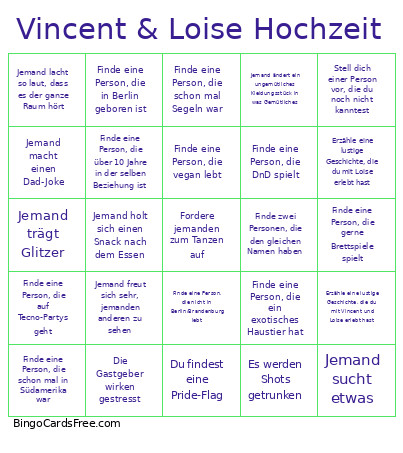 This Loise Bingo Cards Game contains following Words or Phrases: Finde eine Person, die eine andere Fremdsprache als Englisch/Französisch spricht, Finde eine Person, die DnD spielt, Finde eine Person, die Loises zweiten Namen kennt, Finde eine Person, die Vincent weitere Vornamen kennt, Finde eine Person, die über 10 Jahre in der selben Beziehung ist, Finde eine Person, die nichts mit Psychologie am Hut hat, Finde zwei Personen, die den gleichen Namen haben, Finde eine Person, die bouldern geht, Finde eine Person, die ein Instrument beherrscht, Finde eine Person mit einem ähnlichen Musikgeschmack, Finde eine Person, die nicht in Berlin/Brandenburg lebt, Finde eine Person, die in Berlin geboren ist, Finde eine Person, die ein Tattoo hat, Finde eine Person, die mit Vincent und Loise im Urlaub war, Finde eine Person, die in einer Mannschaft spielt, Finde eine Person, die gerne Metal hört, Finde eine Person, die gerne Science-Fiction ließt/schaut, Finde eine Person, die vegan lebt, Finde eine Person, die viele Pflanzen hat, Finde eine Person, die gerne Brettspiele spielt, Finde eine Person, die ein exotisches Haustier hat, Finde eine Person, die bereits ein Paper veröffentlicht hat, Finde eine Person, die schon mal in Südamerika war, Finde eine Person, die einen Angelschein besitzt, Finde eine Person, die schon mal Segeln war, Finde eine Person, die auflegen kann (DJ ist), Finde eine Person, die auf Tecno-Partys geht, Finde eine Person, die kürzer als 1 Jahr in einer Beziehung ist, Finde eine Person, die dieses Jahr auf mindestens einem ersten Date war, Finde eine Person, die in einem Chor singt, Lass dir von einer Person ein Foto ihres Haustiers zeigen, Mache ein Selfie mit einer Person, die dir ähnlich sieht, Frage eine Person die beim Kochen geholfen hat, nach dem Rezept, Mache jemanden ein ehrliches Kompliment, Gebe 5 Leute ein High-Five, Stell dich einer Person vor, die du noch nicht kanntest, Fordere jemanden zum Tanzen auf, Erzähle eine lustige Geschichte, die du mit Loise erlebt hast, Erzähle eine lustige Geschichte, die du mit Vincent erlebt hast, Erzähle eine lustige Geschichte, die du mit Vincent und Loise erlebt hast, Lasse dir von einer Person von ihrem letzten Urlaub erzählen, Lasse dir von einer Person von ihrer Lieblingsserie/-film erzählen, Mache einen Witz vor 2 Leuten, Lasse dir von einer Person ein Foto von dir machen, Lasse dir ein Tattoo von einer Person erklären, Lasse dir eine lustige Dating-Story erzählen, Jemand weint, Jemand macht einen Dad-Joke, Jemand verschüttet ein Getränk, Jemand lobt das Essen, Jemand lacht so laut, dass es der ganze Raum hört, Jemand ändert ein ungemütliches Kleidungsstück in was Gemütliches, Die Gastgeber wirken gestresst, Jemand sagt „hat jemand Loise o. Vincent gesehen?", Es spielt ABBA, Alle singen laut mit, Ein Lied zieht mindestens 2 Leute auf die Tanzfläche, Technik funktioniert nicht, Jemand erwähnt Alfredo oder Fritzy, Jemand küsst sich, Jemand holt sich einen Snack nach dem Essen, Es werden Shots getrunken, Jemand sucht etwas, Jemand twerkt, Jemand verliert in einem Spiel, Jemand freut sich sehr, jemanden anderen zu sehen, Du findest eine Pride-Flag, Jemand trägt Glitzer, Jemand macht ein Nickerchen (auf dem Zimmer ausgenommen).