W Residences Holiday Bingo Cards - Print Free or Customize
Print free W Residences Holiday bingo cards or personalize,
unlimited cards! Pick from 42,200+ templates or use our bingo card generator.
Add numbers, words, pictures, or mix them all.
Play using printable PDF, virtual bingo cards,
and our virtual bingo caller, or mix physical and digital.
About: This bingo card is perfect for a lively community gathering at a residential building such as the W Residences. It’s designed to spark conversations and help neighbors get to know each other, staff, and local favorites. The questions cover everything from building trivia to holiday fun, making it ideal for social mixers or holiday parties.
How To: To get a printable PDF, click the Print button.
You can modify the card quantity and other
printing preferences on the Print tab.
Grid items and free space text can be added on the Basic tab.
Appearance can be completely personalized on the
corresponding tabs, or you can easily locate any setting
on the 🔍 tab.
How to play W Residences Holiday Bingo Cards?
Paper Players: Print PDF bingo cards and manually mark the cards.
Paper Caller: Print PDF calling list & calling slips and manually select the slips.
Virtual Players: Click on the Play button above, and then click on the 🎫 button.
Virtual Caller: Click on the Play button above.
Combo Mode: Select any combination above.
For instance, caller can be either Printed or Virtual.
And players can be Printed or Virtual or a combination of both.
Step-By-Step:
Start by getting the W Residences Holiday Bingo PDF by clicking on the "Print" button above.
Open the PDF and print a hard copy.
For random drawing, you can print another copy of the call list, cut, fold and then draw them randomly at play time.
Cut the bingo cards at the cut marks if there are more than 1 bingo cards per page.
Distribute one card per player. For marking, you can use pencils. Crayons are the cheapest.
Select one person to be the caller. If you are playing in a small group, the caller may as well play along with their own Bingo card.
The caller starts the game by randomly picking an item from the call list and saying it to everyone.
The players scan their cards to see if they have the announced word. If they do, they mark that word.
The first player to finish a horizontal, vertical, or a diagonal line of crossed items yells "Bingo!" and wins the game.
The caller verifies that the items marked form a correct line according to the Bingo card and call list.
You can play for varied patterns or a full card blackout for a longer game.
This W Residences Holiday Bingo Cards Game contains following Words or Phrases: Name someone who lives on your floor _________, Name a member of the social committee _________, How deep is the water in our pool? _________, Name a male concierge _________, Name a concierge who works the midnight shift _________, Who made all the pastries for dessert tonight? _________, What is the name of the manager of the W Hotel? _________, Name a female concierge ________, Name a restaurant on our block _________, What is the cocktail we are serving tonight? _________, What is the name of the food company providing dinner tonight? _________, A neighbor who has lived at the W residences at least 12 years _________, Something on the new menu at the W hotel restaurant _________, A neighbor with a dog and the name of the dog! _________, Someone on our board of directors _________, How many nights is Hanukkah celebrated? _________, When is the last night of Hanukkah? _________, What is a beverage served around Christmas? _________, What is the toy associated with Hanukkah? _________, Name one color that will be in our new lobby _________, How many fireplaces are there on our rooftop? _________, Name the theatre across the street _________, Someone who has lived here less than a year _________, Name a Wheels (valet) attendant _________.

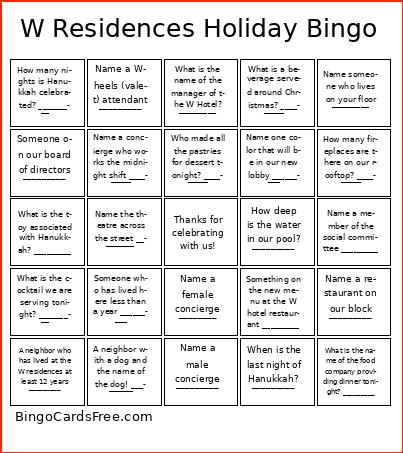 This W Residences Holiday Bingo Cards Game contains following Words or Phrases: Name someone who lives on your floor _________, Name a member of the social committee _________, How deep is the water in our pool? _________, Name a male concierge _________, Name a concierge who works the midnight shift _________, Who made all the pastries for dessert tonight? _________, What is the name of the manager of the W Hotel? _________, Name a female concierge ________, Name a restaurant on our block _________, What is the cocktail we are serving tonight? _________, What is the name of the food company providing dinner tonight? _________, A neighbor who has lived at the W residences at least 12 years _________, Something on the new menu at the W hotel restaurant _________, A neighbor with a dog and the name of the dog! _________, Someone on our board of directors _________, How many nights is Hanukkah celebrated? _________, When is the last night of Hanukkah? _________, What is a beverage served around Christmas? _________, What is the toy associated with Hanukkah? _________, Name one color that will be in our new lobby _________, How many fireplaces are there on our rooftop? _________, Name the theatre across the street _________, Someone who has lived here less than a year _________, Name a Wheels (valet) attendant _________.