
Waipuna BUZZZZZ Bingo Cards - Print Free or Customize
Print free Waipuna BUZZZZZ bingo cards or modify, limitless cards! Choose from 41,500+ templates or use our bingo card generator. Add numbers, words, images, or all of them. Play using PDF prints, online bingo cards, and our online bingo caller, or mix physical and digital.
About: This bingo card is perfect for team-building events or workplace icebreakers. It’s designed to help colleagues connect, share stories, and have fun together with creative prompts and lighthearted challenges. The tone is playful and inclusive, making it ideal for fostering new friendships, building trust, and sparking lively conversations across the office.
How To: To get a PDF to print, click the Print button. You can adjust the number of cards and other printing preferences on the Print tab. Grid items and free space text can be changed on the Basic tab. Appearance can be totally customized on the corresponding tabs, or you can quickly find any setting using the 🔍 tab.
How to play Waipuna BUZZZZZ Bingo Cards?
- Paper Caller: Print PDF calling list & calling slips and physically select the slips.
- Paper Players: Print PDF bingo cards and physically scratch the cards.
- Digital Caller: Click on the Play button above.
- Digital Players: Click on the Play button above, and then click on the 🎫 button.
- Combo Mode: Select any combination above. For example, caller can be either Offline or Digital. And players can be Offline or Digital or a combination of both.
Step-By-Step:
- Start by downloading the Waipuna BUZZZZZ PDF by clicking on the "Print" button above.
- Open the PDF and print a hard copy.
- For random calling, you can print another copy of the call list, cut, fold and then draw them randomly at play time.
- Cut the bingo cards at the cut marks if there are more than 1 bingo cards per page.
- Distribute one card per player. For marking, you can use pens. Crayons are the cheapest.
- Select one person to be the caller. If you are playing in a small group, the caller can as well play along with their own Bingo card.
- The caller starts the play by randomly picking an item from the call list and calling out it to all players.
- The players look at their cards to see if they have the called word. If they do, they mark that word.
- The first player to complete a horizontal, vertical, or a diagonal line of marked items shouts "Bingo!" and wins the game.
- The caller checks that the items marked form a proper line according to the Bingo card and call list.
- You can play for multiple patterns or a full card blackout for an extended game.
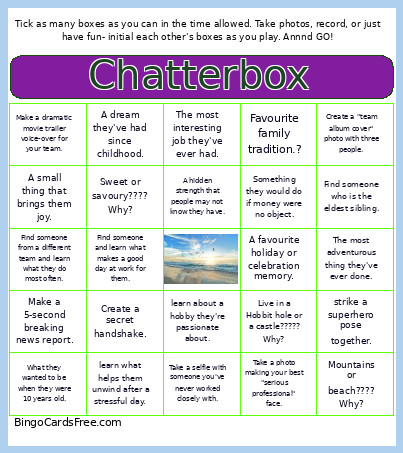 This Waipuna BUZZZZZ Bingo Cards Game contains following Words or Phrases: Learn something they're quietly proud of., Make a 5-second breaking news report., Find out what they wanted to be at age 10., Create a secret handshake., Learn the best advice they've ever received., Take a dramatic corporate headshot together., Record a fake advertisement for your workplace., Find a hidden talent., Learn something they wish more people knew about them., Strike a superhero pose together., Walk across the room like runway models., Have a staring contest- first one to laugh wins!, Find someone and do your best robot impression together., Record a 5-second weather forecast about today's office mood., Make a dramatic movie trailer voice-over for your team., Record a two-person slow-motion high-five., Create a 5-second "breaking news" bulletin., Create a one-sentence motivational speech., Do a "red carpet interview" with a colleague., Take a selfie with someone you've never worked closely with., Practice the most dramatic "corporate headshot" possible., Create a "team album cover" photo with three people., Take a selfie making the same facial expression., Take a photo where everyone is pointing dramatically at something., Create a scene that looks like you're solving a world crisis., Take a photo of your best "we've just won an award" celebration., Coffee forever or tea forever???? Why?, Mountains or beach???? Why?, Early bird or night owl???? Why?, Sweet or savoury???? Why?, Book or movie???? Why?, Dogs or cats????? Why?, Summer or winter????? Why?, fly or be invisible????? Why?, Time travel to the past or future????? Why?, Live in a Hobbit hole or a castle????? Why?, A skill they wish they had. Why???, Something they're looking forward to this year., A book that influenced them., Favourite family tradition.?, Something that always makes them laugh., The best advice they've ever received., A place that feels like home to them., A dream they've had since childhood., A small thing that brings them joy., What they wanted to be when they were 10 years old., A favourite memory from the past year., Something they're grateful for right now., A personal achievement they're quietly proud of., A lesson they've learned the hard way., The most interesting job they've ever had., Something they would do if money were no object., A favourite holiday or celebration memory., Something that always helps them through a difficult week., The most adventurous thing they've ever done., A piece of advice they'd give their younger self., A hidden strength that people may not know they have., Share one thing they appreciate about this organisation., Find someone from a different team and learn what they do most often., Find someone and learn what makes a good day at work for them., Share one thing that helps them feel supported at work., Find someone and learn a piece of advice they'd give a new staff member., Take a photo making your best "serious professional" face., strike a superhero pose together., learn about a hobby they're passionate about., learn something they're proud of accomplishing recently., learn what helps them unwind after a stressful day., learn about a favourite childhood memory., learn what motivates them in their work., learn about a goal they have for the next year., learn about a person who has influenced them., learn one thing they'd like colleagues to know about them., Find someone who is the eldest sibling., Find someone who has the same birth month as you..