
bingo Cards - Print Free or Customize
Print free bingo cards or modify, limitless cards! Pick from 39,000+ templates or use the bingo card generator. Add numbers, phrases, images, or all of them. Play using printed PDF, digital bingo cards, and the digital bingo caller, or combine all formats.
About: This bingo card is perfect for breaking the ice at a college or fraternity social event, encouraging everyone to mingle and discover fun facts about each other. The prompts cover everything from travel adventures to quirky personal preferences, making it a lively way for new members or classmates to connect and spark conversations beyond the usual small talk.
How To: To get a printable PDF, click the Print button. You can adjust the number of cards and other print options on the Print tab. Grid items and free space content can be edited on the Basic tab. Appearance can be totally personalized on the corresponding tabs, or you can quickly locate any preference using the 🔍 tab.
How to play bingo Cards?
- Online Caller: Click on the Play button above.
- Paper Players: Print PDF bingo cards and manually scratch the cards.
- Paper Caller: Print PDF calling list & calling slips and manually select the slips.
- Online Players: Click on the Play button above, and then click on the 🎫 button.
- Combo Mode: Pick any combination above. For instance, caller can be either Printed or Online. And players can be Printed or Online or a combo of both.
Step-By-Step:
- Start by getting the bingo PDF by clicking on the "Print" button above.
- Open the PDF and print it.
- For random drawing, you can print another copy of the call list, cut, fold and then draw them randomly at play time.
- Cut the bingo cards at the cut lines if there are more than 1 bingo cards per page.
- Distribute one card per player. For marking, you can use crayons. Crayons are the cheapest.
- Pick one person to be the caller. If you are playing in a small group, the caller can also play along with their own Bingo card.
- The caller initiates the game by randomly drawing an item from the call list and announcing it to everyone.
- The players look at their cards to see if they have the announced word. If they do, they dab that word.
- The first player to finish a horizontal, vertical, or a diagonal line of crossed items shouts "Bingo!" and wins the play.
- The caller confirms that the items marked form a correct line according to the Bingo card and call list.
- You can play for varied patterns or a full card blackout for an extended play.
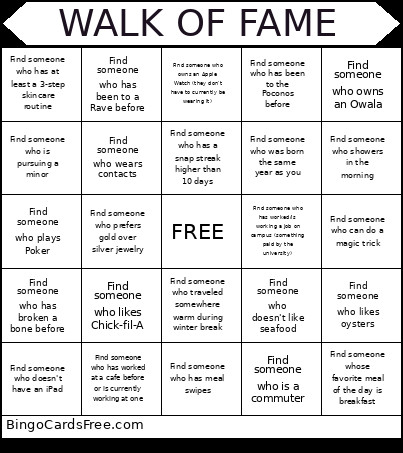 This bingo Cards Game contains following Words or Phrases: Find someone who is a commuter, Find someone who holds an e-board position in an organization outside of the fraternity, Find someone who has been to Mexico before, Find someone who doesn't like seafood, Find someone whose favorite color is the same as yours, Find someone who has gone skiing before, Find someone who is pursuing a minor, Find someone who has been to a concert, Find someone who has been to a national park before, Find someone who owns an Owala, Find someone who has watched Interstellar, Find someone who has meal swipes, Find someone who doesn't have an iPad, Find someone who has been on a veo scooter, Find someone who likes Chick-fil-A, Find someone who wears contacts, Find someone who has at least a 3-step skincare routine, Find someone who has broken a bone before, Find someone who traveled somewhere warm during winter break, Find someone who is wearing the same shoe brand as you, Find someone who has been to HeyTea, Find someone who still plays Wordle, Find someone who has a snap streak higher than 10 days, Find someone who doesn't like coffee, Find someone who is wearing mismatched socks, Find someone who has been to Universal Studios before, Find someone who likes reading dystopian fiction, Find someone who can do a magic trick, Find someone whose favorite thing to hit at the gym is back/biceps, Find someone who still owns and plays the same instrument, Find someone who prefers cats over dogs, Find someone who has been cliff jumping before, Find someone who showers in the morning, Find someone whose favorite meal of the day is breakfast, Find someone who likes oysters, Find someone who has worn braces before, Find someone who was born the same year as you, Find someone who has a Busch parking pass, Find someone who doesn't have a TikTok account, Find someone who owns an Apple Watch (they don't have to currently be wearing it), Find someone who prefers gold over silver jewelry, Find someone who has worked at a cafe before or is currently working at one, Find someone who owns a North Face Puffer, Find someone who lived in Barr Hall, Find someone who plays/used to play Minecraft, Find someone who has a Disney+ subscription, Find someone who has been to the Poconos before, Find someone who has been to a Rave before, Find someone who plays Poker, Find someone who has worked/is working a job on campus (something paid by the university).