Print free War Games bingo cards or modify,
limitless cards! Select from 41,500+ designs or use the bingo card generator.
Add numbers, words, images, or any combination.
Play using printed PDF, virtual bingo cards,
and the virtual bingo caller, or go hybrid.
About: This bingo card is perfect for any group watching a big wrestling pay-per-view or premium live event. It captures everything from signature moves and wild stunts to surprise returns and hilarious commentary moments. Fans will love keeping an eye out for these classic and quirky happenings as the action unfolds, making the show even more interactive and fun.
How To: To save a PDF to print, click the Print button.
You can change the number of cards and other
printing settings on the Print tab.
Grid items and free space text can be edited on the Basic tab.
Appearance can be entirely customized on the
relevant tabs, or you can easily search any preference
using the 🔍 tab.
How to play War Games Bingo Cards?
Printed Caller: Print PDF calling list & calling slips and physically pick the slips.
Printed Players: Print PDF bingo cards and physically cross off the cards.
Online Caller: Click on the Play button above.
Online Players: Click on the Play button above, and then click on the 🎫 button.
Combo Mode: Select any combination above.
For instance, caller can be either Paper or Online.
And players can be Paper or Online or a mix of both.
Step-By-Step:
Start by downloading the War Games PDF by clicking on the "Print" button above.
Open the PDF and print it.
For random drawing, you can print another copy of the call list, cut, fold and then pick them randomly at play time.
Cut the bingo cards at the cut marks if there are more than 1 bingo cards per page.
Give one card to each player. For marking, you can use markers. Crayons are the cheapest.
Select one person to be the caller. If you are playing in a small group, the caller may also play along with their own Bingo card.
The caller initiates the game by randomly picking an item from the call list and saying it to all players.
The players scan their cards to see if they have the called word. If they do, they mark that word.
The first player to complete a horizontal, vertical, or a diagonal line of marked items yells "Bingo!" and wins the play.
The caller verifies that the items marked form a correct line according to the Bingo card and call list.
You can play for multiple patterns or a full card blackout for a longer play.
This War Games Bingo Cards Game contains following Words or Phrases: Spear, Cross-Rhodes, More Than 1 Tsunami (Consecutive), Rhea Mouths her Music, Iyo Does the Thing, Drew Flexes his Pecs, Heel Team Wargames Victory, Face Team Wargames Victory, Local Sports Team Mention, Tables, Superkick, Blood, Kip-Up, Someone Goes Over or Through The Barricade (By Force), Superplex, Botch, Knock Over / Attack with Prime Bottle, Suicide Dive, Wardrobe Malfunction, Trash Can, 5 Moves of Doom Attempt (Up to AA Attempt), Chair Hit, AND THE NEW, AND STILL, Moonsault, German Suplex?, Charles Robinson Appearance, Jessica Carr Appearance, Kendo Stick, Stolen Move (includes John Cena referencing someone), Sexy Pin Attempt, Top of the Cage, Dom Attempts to Cheat, Cody Powers Up, Code Red/Sunset Flip Powerbomb, Got the Knees Up, Hurricanrana, It's Not Just Me Saying It, Shitty Windmill Punches, Nia Sits Down, Entrance Merchant Yeets With Crowd, Uso in the Wind, Using Ropes to Break a Hold, Absent/Injured Wrestler Returns, Celebrity Appearance (Not a Sportsball Person), Lingering Camera Shot on Sponsor, Yeetpunch or Bionic Elbow, KAIRI!!!, Terrible Charlotte Flair Chop, Jey Uso Could Never.

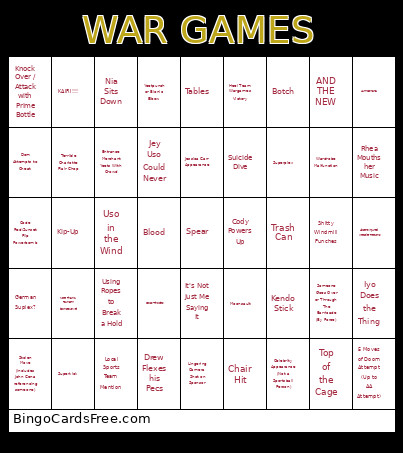 This War Games Bingo Cards Game contains following Words or Phrases: Spear, Cross-Rhodes, More Than 1 Tsunami (Consecutive), Rhea Mouths her Music, Iyo Does the Thing, Drew Flexes his Pecs, Heel Team Wargames Victory, Face Team Wargames Victory, Local Sports Team Mention, Tables, Superkick, Blood, Kip-Up, Someone Goes Over or Through The Barricade (By Force), Superplex, Botch, Knock Over / Attack with Prime Bottle, Suicide Dive, Wardrobe Malfunction, Trash Can, 5 Moves of Doom Attempt (Up to AA Attempt), Chair Hit, AND THE NEW, AND STILL, Moonsault, German Suplex?, Charles Robinson Appearance, Jessica Carr Appearance, Kendo Stick, Stolen Move (includes John Cena referencing someone), Sexy Pin Attempt, Top of the Cage, Dom Attempts to Cheat, Cody Powers Up, Code Red/Sunset Flip Powerbomb, Got the Knees Up, Hurricanrana, It's Not Just Me Saying It, Shitty Windmill Punches, Nia Sits Down, Entrance Merchant Yeets With Crowd, Uso in the Wind, Using Ropes to Break a Hold, Absent/Injured Wrestler Returns, Celebrity Appearance (Not a Sportsball Person), Lingering Camera Shot on Sponsor, Yeetpunch or Bionic Elbow, KAIRI!!!, Terrible Charlotte Flair Chop, Jey Uso Could Never.