Weekly Buzz Anniversary Bingo Cards - Print Free or Customize
Print free Weekly Buzz Anniversary bingo cards or modify,
unlimited prints! Select from 41,900+ templates or use our bingo card generator.
Add numbers, phrases, pictures, or any combination.
Play using PDF prints, digital bingo cards,
and our digital bingo caller, or mix physical and digital.
About: This bingo card captures all the classic moments from virtual meetings on Teams, making it perfect for remote team gatherings or large online company events. With lighthearted squares about technical mishaps, office chatter, and fun GIFs in the chat, it brings a playful spirit to virtual calls and helps colleagues bond over shared experiences.
How To: To download a printable PDF, click the Print button.
You can adjust the card count and other
printing options on the Print tab.
Grid items and free space text can be edited on the Basic tab.
Appearance can be fully personalized on the
relevant tabs, or you can quickly find any option
using the 🔍 tab.
How to play Weekly Buzz Anniversary Bingo Cards?
Paper Caller: Print PDF calling list & calling slips and physically draw the slips.
Virtual Caller: Click on the Play button above.
Virtual Players: Click on the Play button above, and then click on the 🎫 button.
Paper Players: Print PDF bingo cards and physically write on the cards.
Combo Mode: Pick any combination above.
For instance, caller can be either Printed or Virtual.
And players can be Printed or Virtual or a mix of both.
Step-By-Step:
Start by downloading the Weekly Buzz Anniversary PDF by clicking on the "Print" button above.
Open the PDF and print a hard copy.
For random calling, you can print another copy of the call list, cut, fold and then pick them randomly at play time.
Cut the bingo cards at the cut marks if there are greater than 1 bingo cards per page.
Give one card to each player. For marking, you can use crayons. Crayons are the cheapest.
Pick one person to be the caller. If you are playing in a small group, the caller may as well play along with their own Bingo card.
The caller starts the game by randomly picking an item from the call list and saying it to all players.
The players scan their cards to see if they have the announced word. If they do, they cross off that word.
The first player to complete a horizontal, vertical, or a diagonal line of crossed items yells "Bingo!" and wins the game.
The caller confirms that the items crossed off form a correct line as per the Bingo card and call list.
You can play for varied patterns or a full card blackout for an extended game.
This Weekly Buzz Anniversary Bingo Cards Game contains following Words or Phrases: Someone forgets to unmute, Technical Difficulties, Someone is asked to turn on camera, Someone sends a dancing GIF, Coffee is mentioned, Weather is mentioned, More than one person seen on one camera, Someone has a purple Teams background, Someone accidentally unmutes, Shari has glasses on, Awkward silence, More than 1 virtual hand is raised, "Buzz" is mentioned more than 7x, Andres appears on screen, You share a GIF in the chat, More than 100 attendees in the call, An echo is heard over the mic, You share your office/unit in chat, You share one small win from the week in chat, Someone mentions Easter, Weekend is mentioned, You hear an Ed Sheeran song, Someone shares their weekend plans, You share a pet photo in chat.

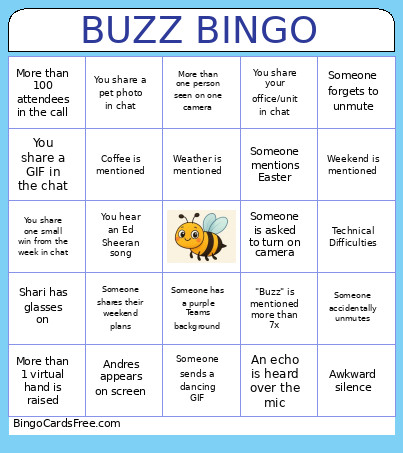 This Weekly Buzz Anniversary Bingo Cards Game contains following Words or Phrases: Someone forgets to unmute, Technical Difficulties, Someone is asked to turn on camera, Someone sends a dancing GIF, Coffee is mentioned, Weather is mentioned, More than one person seen on one camera, Someone has a purple Teams background, Someone accidentally unmutes, Shari has glasses on, Awkward silence, More than 1 virtual hand is raised, "Buzz" is mentioned more than 7x, Andres appears on screen, You share a GIF in the chat, More than 100 attendees in the call, An echo is heard over the mic, You share your office/unit in chat, You share one small win from the week in chat, Someone mentions Easter, Weekend is mentioned, You hear an Ed Sheeran song, Someone shares their weekend plans, You share a pet photo in chat.