Thanksgiving Bingo Cards - Print Free or Customize
Print free Thanksgiving bingo cards or customize,
unlimited prints! Choose from 41,500+ designs or use our bingo card generator.
Add numbers, words, photos, or all of them.
Play using printed PDF, online bingo cards,
and our online bingo caller, or go hybrid.
About: This bingo card is perfect for a lively family gathering or holiday get-together with relatives who love to share stories and poke fun at each other. It captures all the quirky, unforgettable moments typical of extended family reunions—awkward conversations, hilarious mishaps, and playful teasing—making it ideal for anyone looking to add more laughter to a festive event.
How To: To get a printable PDF, click the Print button.
You can adjust the number of cards and other
printing options on the Print tab.
Grid items and free space content can be added on the Basic tab.
Appearance can be totally customized on the
relevant tabs, or you can easily search any preference
using the 🔍 tab.
How to play Thanksgiving Bingo Cards?
Paper Caller: Print PDF calling list & calling slips and physically select the slips.
Paper Players: Print PDF bingo cards and physically write on the cards.
Digital Caller: Click on the Play button above.
Digital Players: Click on the Play button above, and then click on the 🎫 button.
Mixed Play: Choose any combination above.
For instance, caller can be either Paper or Digital.
And players can be Paper or Digital or a mix of both.
Step-By-Step:
Start by getting the Thanksgiving PDF by clicking on the "Print" button above.
Open the PDF and print a hard copy.
For random calling, you can print another copy of the call list, cut, fold and then pick them randomly at play time.
Cut the bingo cards at the cut lines if there are greater than 1 bingo cards per page.
Give one card to each player. For marking, you can use markers. Crayons cost the least.
Choose one person to be the caller. If you are playing in a small group, the caller can also play along with their own Bingo card.
The caller starts the play by randomly pulling an item from the call list and saying it to all players.
The players check their cards to see if they have the called word. If they do, they dab that word.
The first player to complete a horizontal, vertical, or a diagonal line of crossed items yells "Bingo!" and wins the game.
The caller verifies that the items marked form a correct line as per the Bingo card and call list.
You can play for varied patterns or a full card blackout for an extended game.
This Thanksgiving Bingo Cards Game contains following Words or Phrases: extended family arrives drunk, cracks drink at before 2:15, "We have a crazy family", Someone complains about the temperature, Explains why we are not having trad meal, "I think everyone turned out okay", Bev mentions someone no one knows, Bev asks where her purse is, Bev's response is incorrect, Jared wrestles child, Jared sidebars with Drew, Rhonda tells you about her new favorite drink, Janna talks about exercising, Jared questions your beverage, Drew gets wasted/hungover, Mark asks if his outfit looks okay, Jared has his next "bright idea", Avis snap her tongue, Mark is unsure how to host, "Age before beauty", "Bless the cook", Michelle talks about people being late, Avis mentions how busy she is, Rhonda will explain why Kyle left early, Who is Michael? (Is not present in celebration), Megan shows up/Rhonda's excuse for Megan, "Let's go to the bar", Jared lays out on couch, Michelle psych herself out, Rhonda talks about weight loss, Crime in MSP, Tale of the two Gail's, Drew flexes Lulu, 4 opened wine bottles, Rhonda and Janna leave Michelle out, Not adding Kyle on FB, Michelle will mention toilet paper, Michelle ask why Bailey won't eat meat, Michelle does not believe in Lactose intolerance, Michelle comments on outfits (ours), Gets caught with bingo card.

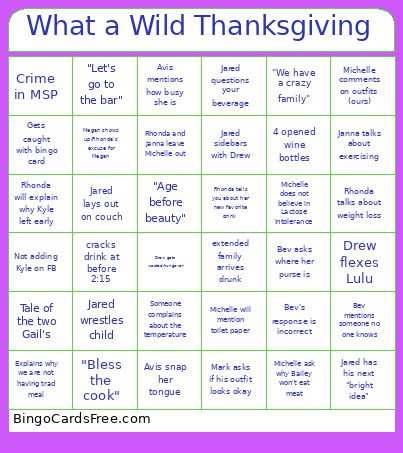 This Thanksgiving Bingo Cards Game contains following Words or Phrases: extended family arrives drunk, cracks drink at before 2:15, "We have a crazy family", Someone complains about the temperature, Explains why we are not having trad meal, "I think everyone turned out okay", Bev mentions someone no one knows, Bev asks where her purse is, Bev's response is incorrect, Jared wrestles child, Jared sidebars with Drew, Rhonda tells you about her new favorite drink, Janna talks about exercising, Jared questions your beverage, Drew gets wasted/hungover, Mark asks if his outfit looks okay, Jared has his next "bright idea", Avis snap her tongue, Mark is unsure how to host, "Age before beauty", "Bless the cook", Michelle talks about people being late, Avis mentions how busy she is, Rhonda will explain why Kyle left early, Who is Michael? (Is not present in celebration), Megan shows up/Rhonda's excuse for Megan, "Let's go to the bar", Jared lays out on couch, Michelle psych herself out, Rhonda talks about weight loss, Crime in MSP, Tale of the two Gail's, Drew flexes Lulu, 4 opened wine bottles, Rhonda and Janna leave Michelle out, Not adding Kyle on FB, Michelle will mention toilet paper, Michelle ask why Bailey won't eat meat, Michelle does not believe in Lactose intolerance, Michelle comments on outfits (ours), Gets caught with bingo card.