
WHS 2016 Reunion Bingo Cards - Print Free or Customize
Print free WHS 2016 Reunion bingo cards or modify, unlimited cards! Select from 42,600+ designs or use the bingo card generator. Add numbers, words, images, or any combination. Play using PDF prints, online bingo cards, and the online bingo caller, or mix physical and digital.
About: This bingo card is perfect for a high school reunion, specifically for Wando High alumni looking to reconnect and spark fun conversations. The prompts mix quirky talents, career paths, travel stories, and unique memories tied to Wando. Expect lots of laughter and nostalgia as classmates discover how much—or how little—everyone has changed since graduation.
How To: To save a PDF to print, click the Print button. You can adjust the card count and other printing options on the Print tab. Grid items and free space text can be edited on the Basic tab. Appearance can be highly customized on the relevant tabs, or you can quickly locate any setting on the 🔍 tab.
How to play WHS 2016 Reunion Bingo Cards?
- Paper Players: Print PDF bingo cards and manually mark the cards.
- Paper Caller: Print PDF calling list & calling slips and manually draw the slips.
- Digital Players: Click on the Play button above, and then click on the 🎫 button.
- Digital Caller: Click on the Play button above.
- Mixed Play: Select any combination above. For example, caller can be either Printed or Digital. And players can be Printed or Digital or a mix of both.
Step-By-Step:
- Start by getting the WHS 2016 Reunion Bingo PDF by clicking on the "Print" button above.
- Open the PDF and print it.
- For random drawing, you can print another copy of the call list, cut, fold and then pull them randomly at play time.
- Cut the bingo cards at the cut lines if there are greater than 1 bingo cards per page.
- Give one card to each player. For marking, you can use pencils. Crayons cost the least.
- Select one person to be the caller. If you are playing in a small group, the caller can as well play along with their own Bingo card.
- The caller initiates the game by randomly picking an item from the call list and saying it to everyone.
- The players check their cards to see if they have the called word. If they do, they dab that word.
- The first player to finish a horizontal, vertical, or a diagonal line of crossed items yells "Bingo!" and wins the play.
- The caller checks that the items marked form a correct line as per the Bingo card and call list.
- You can play for multiple patterns or a full card blackout for an extended play.
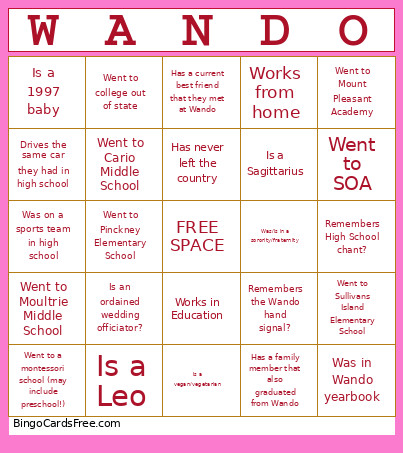 This WHS 2016 Reunion Bingo Cards Game contains following Words or Phrases: Can do a handstand, Can do a split, Can still sing the school song, Drives the same car they had in high school, Has a child/children, Has a current best friend that they met at Wando, Has a doctorate degree, Has a family member that also graduated from Wando, Has a masters degree, Has a strange obsession, quirk, or skill, Has an exotic pet (not cat or dog)?, Has an interesting hobby, Has an interesting job, Has been back to Wando after graduating, Has cash in their wallet, Has changed their name, Has more than 1 tattoo, Has more than 2 pets, Has never left the country, Has never lived outside of SC, Has run a marathon, Has skydived, Has visited more than 10 countries, Is a 1997 baby, Is a 1998 baby, Is a 1999 baby, Is a Aquarius, Is a Aries, Is a Cancer, Is a Capricorn, Is a Gemini, Is a Leo, Is a Libra, Is a Pisces, Is a Sagittarius, Is a Scorpio, Is a Taurus, Is a vegan/vegetarian, Is a Virgo, Is an only child, Is an ordained wedding officiator?, Is bilingual, Is currently wearing school colors, Is facebook friends with a teacher they had at Wando, Is in the medical field, Is left handed, Is still with their high school sweetheart, Lives/lived in a different country, Moved away from Charleston and then moved back, Owns their own business, Performed on stage after high school, Remembers High School chant?, Remembers the Wando hand signal?, Served detention/Saturday school, Serves/served in the military, Shares a name with an ancestor, Still lives in Charleston, Transferred to Wando during high school, Traveled over 200 miles to be here, Was in Wando band, Was in Wando chorus, Was in Wando newspaper, Was in Wando yearbook, Was on a sports team in high school, Was/is in a sorority/fraternity, Went into law, Went to a montessori school (may include preschool!), Went to Belle Hall Elementary School, Went to Cario Middle School, Went to college out of state, Went to James B Edwards Elementary School, Went to Jennie Moore Elementary School, Went to Laing Middle School, Went to Moultrie Middle School, Went to Mount Pleasant Academy, Went to Pinckney Elementary School, Went to SOA, Went to Sullivans Island Elementary School, Went to Whitesides Elementary School, Works from home, Works in Education, Works in medicine, Works in tech, Works/worked at Wando.