Workloads are not working Bingo Cards - Print Free or Customize
Print free Workloads are not working bingo cards or customize,
limitless cards! Pick from 42,200+ designs or use the bingo card generator.
Add numbers, words, images, or mix them all.
Play using printable PDF, digital bingo cards,
and the digital bingo caller, or combine all formats.
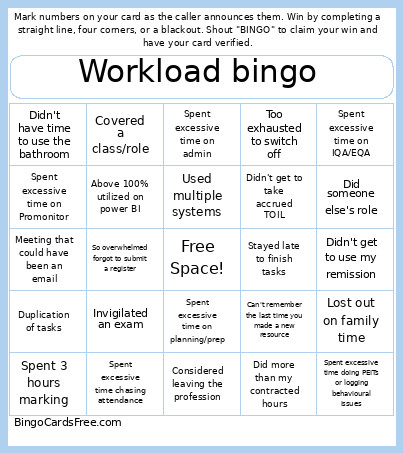
About: This bingo card sums up the daily grind and frustrations faced by educators, especially in further or higher education. With a tongue-in-cheek look at common struggles like endless admin, lost family time, and task overload, it’s perfect for a staff meeting icebreaker or teacher appreciation event. This card captures the relatable chaos of academic life with a bit of humor.
How To: To save a PDF to print, click the Print button.
You can modify the card quantity and other
printing preferences on the Print tab.
Grid items and free space text can be edited on the Basic tab.
Appearance can be exactly customized on the
corresponding tabs, or you can quickly search any setting
on the 🔍 tab.
How to play Workloads are not working Bingo Cards?
Printed Players: Print PDF bingo cards and manually write on the cards.
Online Caller: Click on the Play button above.
Printed Caller: Print PDF calling list & calling slips and manually select the slips.
Online Players: Click on the Play button above, and then click on the 🎫 button.
Combo Mode: Select any combination above.
For instance, caller can be either Paper or Online.
And players can be Paper or Online or a mix of both.
Step-By-Step:
Start by getting the Workloads are not working PDF by clicking on the "Print" button above.
Open the PDF and print it.
For random calling, you can print another copy of the call list, cut, fold and then pull them randomly at play time.
Cut the bingo cards at the cut lines if there are more than 1 bingo cards per page.
Distribute one card per player. For marking, you can use pens. Crayons cost the least.
Select one person to be the caller. If you are playing in a small group, the caller can as well play along with their own Bingo card.
The caller starts the game by randomly pulling an item from the call list and calling out it to everyone.
The players check their cards to see if they have the announced word. If they do, they mark that word.
The first player to complete a horizontal, vertical, or a diagonal line of crossed items yells "Bingo!" and wins the game.
The caller verifies that the items crossed off form a correct line according to the Bingo card and call list.
You can play for multiple patterns or a full card blackout for a longer game.
This Workloads are not working Bingo Cards Game contains following Words or Phrases: Meeting that could have been an email, Invigilated an exam, Spent 3 hours marking, Lost out on family time, Got 20+ emails in a day, Duplication of tasks, Did someone else's role, Covered a class/role, Too exhausted to switch off, Stayed late to finish tasks, Did more than my contracted hours, Used annual leave to catch up on tasks, Used multiple systems, Lost data due to system crashes, Worked through lunch break, Spent excessive time on Promonitor, Spent excessive time doing PEITs or logging behavioural issues, Got waylaid addressing student behaviour in social spaces, So overwhelmed forgot to submit a register, Above 100% utilized on power BI, More than 24hrs contact a week, Didn't get to use my remission, Didn't get to take accrued TOIL, Spent excessive time on IQA/EQA, Considered leaving the profession, Didn't have time to use the bathroom, Spent excessive time on admin, Can't remember the last time you made a new resource, Spent excessive time on planning/prep, Spent excessive time chasing attendance.

 This Workloads are not working Bingo Cards Game contains following Words or Phrases: Meeting that could have been an email, Invigilated an exam, Spent 3 hours marking, Lost out on family time, Got 20+ emails in a day, Duplication of tasks, Did someone else's role, Covered a class/role, Too exhausted to switch off, Stayed late to finish tasks, Did more than my contracted hours, Used annual leave to catch up on tasks, Used multiple systems, Lost data due to system crashes, Worked through lunch break, Spent excessive time on Promonitor, Spent excessive time doing PEITs or logging behavioural issues, Got waylaid addressing student behaviour in social spaces, So overwhelmed forgot to submit a register, Above 100% utilized on power BI, More than 24hrs contact a week, Didn't get to use my remission, Didn't get to take accrued TOIL, Spent excessive time on IQA/EQA, Considered leaving the profession, Didn't have time to use the bathroom, Spent excessive time on admin, Can't remember the last time you made a new resource, Spent excessive time on planning/prep, Spent excessive time chasing attendance.