
Young Adults Bingo Cards - Print Free or Customize
Print free Young Adults bingo cards or modify, limitless prints! Choose from 42,200+ templates or use our bingo card generator. Add numbers, words, pictures, or any combination. Play using printed PDF, online bingo cards, and our online bingo caller, or combine all formats.
About: This bingo card is the perfect icebreaker for a Young Adults group or church community event. Its friendly, get-to-know-you prompts spark conversations and help everyone find common ground, share interests, and make new connections. The tone is upbeat and welcoming, making it ideal for newcomers and regulars alike to mingle in a fun, relaxed setting.
How To: To save a printable PDF, click the Print button. You can alter the number of cards and other printing settings on the Print tab. Grid items and free space content can be added on the Basic tab. Appearance can be highly customized on the relevant tabs, or you can easily locate any option using the 🔍 tab.
How to play Young Adults Bingo Cards?
- Online Caller: Click on the Play button above.
- Online Players: Click on the Play button above, and then click on the 🎫 button.
- Printed Caller: Print PDF calling list & calling slips and physically select the slips.
- Printed Players: Print PDF bingo cards and physically cross off the cards.
- Combo Play: Pick any combination above. For instance, caller can be either Offline or Online. And players can be Offline or Online or a combination of both.
Step-By-Step:
- Start by saving the Young Adults PDF by clicking on the "Print" button above.
- Open the PDF and print it.
- For random drawing, you can print another copy of the call list, cut, fold and then draw them randomly at play time.
- Cut the bingo cards at the cut marks if there are more than 1 bingo cards per page.
- Distribute one card per player. For marking, you can use pens. Crayons cost the least.
- Pick one person to be the caller. If you are playing in a small group, the caller may as well play along with their own Bingo card.
- The caller opens the game by randomly pulling an item from the call list and calling out it to everyone.
- The players look at their cards to see if they have the called word. If they do, they cross off that word.
- The first player to complete a horizontal, vertical, or a diagonal line of marked items shouts "Bingo!" and wins the play.
- The caller verifies that the items crossed off form a proper line as per the Bingo card and call list.
- You can play for varied patterns or a full card blackout for a longer play.
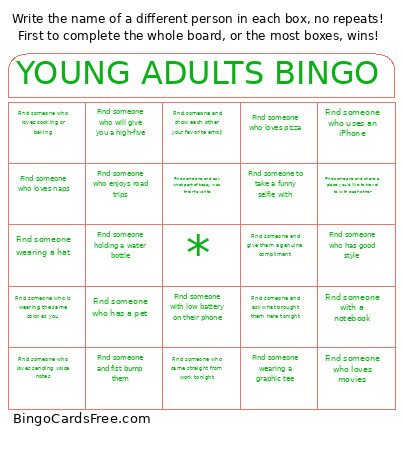 This Young Adults Bingo Cards Game contains following Words or Phrases: Find someone who lives in the same city as you, Find someone who is wearing the same color as you, Find someone who is an only child, Find someone who has a pet, Find someone who works full-time, Find someone who is a student, Find someone who drove more than 20 min to get here, Find someone who has been coming to Young Adults for over a year, Find someone who is new to Young Adults, Find someone who loves coffee, Find someone who loves the gym, Find someone who loves reading, Find someone who shares a hobby with you, Find someone who plays an instrument, Find someone who loves cooking or baking, Find someone who plays a sport, Find someone who enjoys hiking, Take a selfie with someone and post it on your story (tag @transformchurchnj), Take a group selfie and post it on your story (tag @transformchurchnj), Find someone who came straight from work tonight, Find someone wearing sneakers, Find someone who uses an iPhone, Find someone who set goals for this year, Find someone who loves worship music, Find someone who has a favorite Bible verse, Find someone who listens to podcasts, Find someone who is always running late, Find someone who loves movies, Find someone who loves TV Shows, Find someone who enjoys road trips, Find someone who loves trying new food, Find someone who loves photography, Find someone who enjoys writing, Find someone who enjoys DIY projects, Find someone who is excited about this season of YA, Find someone and ask what brought them here tonight, Find someone and ask what they're most excited for this seasom, Find someone and ask their favorite type of food, Find someone who has a fun phone wallpaper, Find someone who loves pizza, Find someone who could eat the same meal every single day, Find someone who always has a playlist ready, Find someone who is competitive, Find someone who will give you a high-five, Find someone who loves naps, Find someone who loves sending voice notes, Find someone you haven't met before, Find someone who prefers texting over calling, Find someone who enjoys traveling, Find someone who collects things, Find someone and show each other your favorite emoji, Find someone to take a funny selfie with, Find someone and give them a genuine compliment, Find someone who loves brunch, Find someone who has good style, Find someone who loves going to bed early, Find someone and ask what part of today was their favorite, Find someone wearing glasses, Find someone wearing a hat, Find someone holding a water bottle, Find someone who has more than 2 siblings, Find someone who uses an Android, Find someone wearing a graphic tee, Find someone with a notebook, Find someone with low battery on their phone, Find someone and create a handshake with each other, Find someone and fist bump them, Find someone who loves to eat out, Find someone who has a nickname, Find someone and share the last song you've both listened to, Find someone with the same favorite color as you, Find someone and share one thing you're grateful for today with each other, Find someone and share a place you'd like to travel to with each other, Find someone who ate breakfast today.