
Your mission, should you choose to accept it Bingo Cards - Print Free or Customize
Print free Your mission, should you choose to accept it bingo cards or customize, unlimited prints! Pick from 42,200+ designs or use our bingo card generator. Add numbers, words, photos, or mix them all. Play using PDF printouts, digital bingo cards, and our digital bingo caller, or combine all formats.
About: This bingo card is perfect for anyone throwing a lively Halloween party and looking to spark laughter, conversation, and playful chaos. With themed challenges, social dares, and quirky interactions, it encourages guests to let loose, get creative, and connect in silly ways. It’s great for adults or older teens ready to make some unforgettable spooky season memories.
How To: To get a PDF to print, click the Print button. You can adjust the card count and other printing preferences on the Print tab. Grid items and free space text can be edited on the Basic tab. Appearance can be exactly customized on the corresponding tabs, or you can easily locate any preference on the 🔍 tab.
How to play Your mission, should you choose to accept it Bingo Cards?
- Online Players: Click on the Play button above, and then click on the 🎫 button.
- Paper Caller: Print PDF calling list & calling slips and manually pick the slips.
- Paper Players: Print PDF bingo cards and manually scratch the cards.
- Online Caller: Click on the Play button above.
- Hybrid Play: Select any combination above. For example, caller can be either Offline or Online. And players can be Offline or Online or a combo of both.
Step-By-Step:
- Start by downloading the Your mission, should you choose to accept it PDF by clicking on the "Print" button above.
- Open the PDF and print it.
- For random drawing, you can print another copy of the call list, cut, fold and then pull them randomly at play time.
- Cut the bingo cards at the cut marks if there are greater than 1 bingo cards per page.
- Give one card to each player. For marking, you can use markers. Crayons are the cheapest.
- Select one person to be the caller. If you are playing in a small group, the caller can as well play along with their own Bingo card.
- The caller begins the play by randomly picking an item from the call list and calling out it to everyone.
- The players check their cards to see if they have the announced word. If they do, they cross off that word.
- The first player to finish a horizontal, vertical, or a diagonal line of crossed items yells "Bingo!" and wins the play.
- The caller checks that the items crossed off form a correct line as per the Bingo card and call list.
- You can play for multiple patterns or a full card blackout for an extended play.
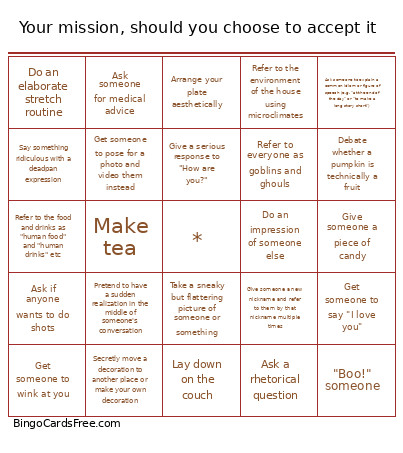 This Your mission, should you choose to accept it Bingo Cards Game contains following Words or Phrases: Give someone a high five, Give someone a fist bump, Say something that you costumed character says or would say, Try on someone else's costume accessory (hat/glove/robe/jacket/horns etc), "Boo!" someone, Share a favorite Halloween memory, Create a secret handshake with someone, Ask if anyone wants to do shots, Mansplain Halloween to someone, Refer to everyone as goblins and ghouls, Ask everyone about their favorite Halloween candy, Ask everyone about their favorite Halloween movie or TV show, Refer to the house as "The Haunted Mansion", Ask the host for a broom and carry it around like a witch would, Secretly move a decoration to another place or make your own decoration, Tell a ghost story, Share a piece of Halloween trivia, Get someone to say they hate or love a song, Win a game of rock-paper-scissors, Have someone bring you a piece of candy without directly asking for one, Ask someone to identify a random spooky sound you "heard" (but didn't actually happen), Get someone to say "trick or treat", Have someone check for something scary behind them, Confidently mistake someone's Halloween costume for something/ someone else, Completely swap a costume with someone, Read someone's fortune, Debate whether a argument about the true color of an item of party decor, Debate whether a pumpkin is technically a fruit, Come up with a new way to eat something and go around sharing it, Give someone a new nickname and refer to them by that nickname multiple times, Repeatedly compliment someone's time of clothing or accessory multiple times, Start a slow clap, Photo bomb a picture, Invent and use a fake slang word, Ask someone to explain a common idiom or figure of speech (e.g. "at the end of the day" or "to make a long story short"), Introduce yourself to the same person multiple times, Pretend to have a sudden realization in the middle of someone's conversation, Find a shared childhood connection with someone new, Talk about a hobby or a passion, Speak in a British accent for several minutes, Make tea, Say "you look different today" to someone, Sneak a random object into someone's pocket, Give someone a piece of candy, Ask someone about the backstory of their Halloween costume, Share a recent personal victory, Offer to take a picture, Take a sneaky but flattering picture of someone or something, Make a toast, Refer to the environment of the house using microclimates, Make someone a drink, Refer to the food and drinks as "human food" and "human drinks" etc, Ask someone a creative question about their costumed character's perspective, Do a 3 second round of applause, Offer someone a napkin when they need it, Use a coaster, Fluff the couch pillows, Arrange your plate aesthetically, Make someone laugh out loud, Say something ridiculous with a deadpan expression, Finish someone's sentence, Ask a rhetorical question, Recommend a piece of media, Blame a minor inconvenience on "Mercury in retrograde", Share a recent dream or nightmare, Tell a completely pointless story, Juggle, Teach someone how to do something, Explain some action or trait or yours with your star sign, Do an elaborate stretch routine, Basket toss a piece of trash, Ask someone the same question three times, Make someone else yawn, Ask someone for medical advice, Wink at someone, Get someone to wink at you, Get someone to do "finger guns" at you, Have someone show/ explain a scar on their body, Get someone to say "I love you", Get someone to pose for a photo and video them instead, Learn/ do a magic trick, Do some origami, Sing a Christmas song, Do an impression of someone else, Sigh loudly and get someone to ask you about it, Ask someone "Are you okay?", Give a serious response to "How are you?", Lay down on the couch, Stand on a chair, Use "That's Rough Buddy" in conversation, Scream, Locate and use a pair of scissors, Sweep/ vacuum the ground, Take a picture using someone else's phone, Lay on the ground.