Agatha All Along Bingo Cards - Print Free or Customize
Print free Agatha All Along bingo cards or customize,
limitless cards! Pick from 42,200+ templates or use our bingo card generator.
Add numbers, phrases, pictures, or any combination.
Play using PDF prints, virtual bingo cards,
and our virtual bingo caller, or mix physical and digital.
About: This bingo card is perfect for fans of Agatha and Rio-centric fanfiction, especially those who love modern AUs and character-driven stories. With references to familiar settings, witty banter, and lots of snarky inner thoughts, it’s ideal for a fan event, fic-writing challenge, or online watch party among friends who enjoy clever nods to canon and creative twists on beloved characters.
How To: To get a PDF to print, click the Print button.
You can alter the card quantity and other
printing preferences on the Print tab.
Grid items and free space text can be changed on the Basic tab.
Appearance can be exactly customized on the
corresponding tabs, or you can quickly locate any option
on the 🔍 tab.
How to play Agatha All Along Bingo Cards?
Online Players: Click on the Play button above, and then click on the 🎫 button.
Online Caller: Click on the Play button above.
Printed Caller: Print PDF calling list & calling slips and physically pick the slips.
Printed Players: Print PDF bingo cards and physically cross off the cards.
Combo Mode: Select any combination above.
For instance, caller can be either Printed or Online.
And players can be Printed or Online or a mix of both.
Step-By-Step:
Start by downloading the Agatha All Along PDF by clicking on the "Print" button above.
Open the PDF and print it.
For random drawing, you can print another copy of the call list, cut, fold and then pick them randomly at play time.
Cut the bingo cards at the cut marks if there are more than 1 bingo cards per page.
Distribute one card per player. For marking, you can use markers. Crayons cost the least.
Select one person to be the caller. If you are playing in a small group, the caller can as well play along with their own Bingo card.
The caller initiates the play by randomly picking an item from the call list and announcing it to all players.
The players check their cards to see if they have the announced word. If they do, they cross off that word.
The first player to finish a horizontal, vertical, or a diagonal line of crossed items shouts "Bingo!" and wins the play.
The caller verifies that the items marked form a proper line as per the Bingo card and call list.
You can play for varied patterns or a full card blackout for an extended play.
This Agatha All Along Bingo Cards Game contains following Words or Phrases: Wandanat, Rio's tooth gap mentioned in an inner monologue, Congratulations my love, Modern/ No magic, Real life reference, Puerto Rico mentioned, Salem mentioned, Witches mentioned, Agatha & Rio are/ get married, Takes place in Westview, Takes place in New York, Nicky is alive, Nicky is dead/doesn't exist, College / roommates AU, AgathaRio meet at a bar or social event unexpectedly, Evanora is homophobic/ awful mother, Jen and Alice are together/ hooking up, Agatha is a buzzkill, Rio has/likes plants/Flowers, Rio is an annoying little shit, Wanda & Agatha bffs, The entire Coven know each other is some combination, Agatha is a CEO/Lawyer, Rio is a Mortician/ doctor, Cops/FBI AU, Professor / teacher, Rio and Agatha are Divorced, Age Gap (Agatha), Age Gap (Rio), Rio and Agatha raise Nicky together, Rio's parents are dead, Bill is here somewhere, Rio is friends with/knows/ adopted by Lilia, Agatha wears glasses, Senior scratchy mentioned, Top Agatha/ Bottom Rio, Agatha is a good mom, "Te Veo", Free, Rio speaks MORE Spanish, Someone is/ was in a band, F.R.E.K, "Good Girl", Switches, "Please my love", Lilia is the same age as everyone else, Agatha is emotionally constipated and is called out on it, Rio/Agatha "is going to be the death of her", "Oh no she's HOT".

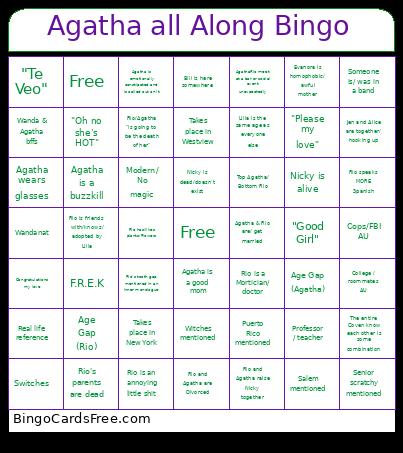 This Agatha All Along Bingo Cards Game contains following Words or Phrases: Wandanat, Rio's tooth gap mentioned in an inner monologue, Congratulations my love, Modern/ No magic, Real life reference, Puerto Rico mentioned, Salem mentioned, Witches mentioned, Agatha & Rio are/ get married, Takes place in Westview, Takes place in New York, Nicky is alive, Nicky is dead/doesn't exist, College / roommates AU, AgathaRio meet at a bar or social event unexpectedly, Evanora is homophobic/ awful mother, Jen and Alice are together/ hooking up, Agatha is a buzzkill, Rio has/likes plants/Flowers, Rio is an annoying little shit, Wanda & Agatha bffs, The entire Coven know each other is some combination, Agatha is a CEO/Lawyer, Rio is a Mortician/ doctor, Cops/FBI AU, Professor / teacher, Rio and Agatha are Divorced, Age Gap (Agatha), Age Gap (Rio), Rio and Agatha raise Nicky together, Rio's parents are dead, Bill is here somewhere, Rio is friends with/knows/ adopted by Lilia, Agatha wears glasses, Senior scratchy mentioned, Top Agatha/ Bottom Rio, Agatha is a good mom, "Te Veo", Free, Rio speaks MORE Spanish, Someone is/ was in a band, F.R.E.K, "Good Girl", Switches, "Please my love", Lilia is the same age as everyone else, Agatha is emotionally constipated and is called out on it, Rio/Agatha "is going to be the death of her", "Oh no she's HOT".