Print free artist bingo cards or adjust them,
limitless cards! Select from 42,200+ templates or use our bingo card generator.
Add numbers, phrases, pictures, or mix them all.
Play using printable PDF, online bingo cards,
and our online bingo caller, or go hybrid.
About: This bingo card captures the quirks, triumphs, and relatable struggles of being an artist. With a playful and understanding tone, it’s perfect for art meetups, creative retreats, or art class icebreakers. Those who live and breathe creativity will laugh and nod along as they spot their own artistic habits and confessions in each square.
How To: To get a PDF to print, click the Print button.
You can modify the card count and other
printing settings on the Print tab.
Grid items and free space content can be changed on the Basic tab.
Appearance can be entirely personalized on the
corresponding tabs, or you can quickly search any option
on the 🔍 tab.
How to play artist bingo Cards?
Online Players: Click on the Play button above, and then click on the 🎫 button.
Online Caller: Click on the Play button above.
Printed Players: Print PDF bingo cards and physically write on the cards.
Printed Caller: Print PDF calling list & calling slips and physically pick the slips.
Mixed Mode: Select any combination above.
For example, caller can be either Offline or Online.
And players can be Offline or Online or a mix of both.
Step-By-Step:
Start by getting the artist bingo PDF by clicking on the "Print" button above.
Open the PDF and print it.
For random drawing, you can print another copy of the call list, cut, fold and then pull them randomly at play time.
Cut the bingo cards at the cut lines if there are more than 1 bingo cards per page.
Distribute one card per player. For marking, you can use pencils. Crayons cost the least.
Select one person to be the caller. If you are playing in a small group, the caller may also play along with their own Bingo card.
The caller starts the play by randomly picking an item from the call list and saying it to everyone.
The players scan their cards to see if they have the called word. If they do, they dab that word.
The first player to finish a horizontal, vertical, or a diagonal line of crossed items shouts "Bingo!" and wins the game.
The caller checks that the items crossed off form a correct line as per the Bingo card and call list.
You can play for varied patterns or a full card blackout for a longer game.
This artist bingo Cards Game contains following Words or Phrases: Has sold art at a market, Has successfully completed an inktober, Has done plein air painting, Art supply hoarder, Curated your handwriting to a font, Has read the Artists Way, Has art in a gallery, Designed a tattoo for someone, Cried over a painting, Has an emotional support art supply, Owns way too many sketchbooks, Got in trouble for doodling on notes in school, Has a dream project they haven't told anyone about, Has experienced artistic burn out, Has questioned if they're a "real artist", Has used a random object as a paint tool, Has said "I'll just sketch for 10 minutes" and looked up 3 hours later, Wears paint covered clothes on the regular, Has a Pinterest board called "art studio dreams", Has a Pinterest board for everything, Has a "junk drawer" of random art supplies, Was gifted those crappy marker and colored pencil sets as a kid, Has felt scared to call themselves an artist out loud, Has wanted to change art styles but was worried people wouldn't like it, Has drank paint water instead of their coffee IYKYK, Forgot to save their work, Accidentally made all their digital artwork on the same layer, Has made art as a way to cope with something hard, Has bought a new art supply thinking it would fix everything, Has started a whole new medium instead of finishing a project, Has saved paint peel scraps "just in case", Had an etsy sticker shop, Has a separate art insta.

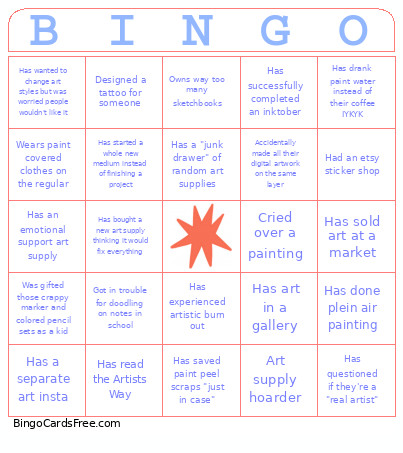 This artist bingo Cards Game contains following Words or Phrases: Has sold art at a market, Has successfully completed an inktober, Has done plein air painting, Art supply hoarder, Curated your handwriting to a font, Has read the Artists Way, Has art in a gallery, Designed a tattoo for someone, Cried over a painting, Has an emotional support art supply, Owns way too many sketchbooks, Got in trouble for doodling on notes in school, Has a dream project they haven't told anyone about, Has experienced artistic burn out, Has questioned if they're a "real artist", Has used a random object as a paint tool, Has said "I'll just sketch for 10 minutes" and looked up 3 hours later, Wears paint covered clothes on the regular, Has a Pinterest board called "art studio dreams", Has a Pinterest board for everything, Has a "junk drawer" of random art supplies, Was gifted those crappy marker and colored pencil sets as a kid, Has felt scared to call themselves an artist out loud, Has wanted to change art styles but was worried people wouldn't like it, Has drank paint water instead of their coffee IYKYK, Forgot to save their work, Accidentally made all their digital artwork on the same layer, Has made art as a way to cope with something hard, Has bought a new art supply thinking it would fix everything, Has started a whole new medium instead of finishing a project, Has saved paint peel scraps "just in case", Had an etsy sticker shop, Has a separate art insta.