
Amber's Baby Shower Bingo Cards - Print Free or Customize
Print free Amber's Baby Shower bingo cards or modify, limitless prints! Pick from 42,200+ designs or use the bingo card generator. Add numbers, words, images, or any combination. Play using PDF prints, online bingo cards, and the online bingo caller, or go hybrid.
About: This bingo card is made for a warm, family-focused baby shower with strong ties to faith and friendship. It blends sweet parenting milestones, personal connections with Amber, and church community experiences. Guests will love sharing stories, celebrating memories, and bonding over their unique journeys as parents, friends, and supporters of Amber and her growing family.
How To: To get a PDF to print, click the Print button. You can change the card quantity and other printing options on the Print tab. Grid items and free space text can be edited on the Basic tab. Appearance can be exactly personalized on the corresponding tabs, or you can easily locate any preference on the 🔍 tab.
How to play Amber's Baby Shower Bingo Cards?
- Digital Caller: Click on the Play button above.
- Paper Players: Print PDF bingo cards and manually mark the cards.
- Paper Caller: Print PDF calling list & calling slips and manually select the slips.
- Digital Players: Click on the Play button above, and then click on the 🎫 button.
- Combo Play: Pick any combination above. For example, caller can be either Printed or Digital. And players can be Printed or Digital or a combination of both.
Step-By-Step:
- Start by downloading the Amber's Baby Shower PDF by clicking on the "Print" button above.
- Open the PDF and print a hard copy.
- For random drawing, you can print another copy of the call list, cut, fold and then pull them randomly at play time.
- Cut the bingo cards at the cut lines if there are greater than 1 bingo cards per page.
- Distribute one card per player. For marking, you can use pens. Crayons cost the least.
- Pick one person to be the caller. If you are playing in a small group, the caller can as well play along with their own Bingo card.
- The caller starts the play by randomly picking an item from the call list and saying it to all players.
- The players look at their cards to see if they have the called word. If they do, they cross off that word.
- The first player to finish a horizontal, vertical, or a diagonal line of marked items announces "Bingo!" and wins the game.
- The caller checks that the items marked form a correct line as per the Bingo card and call list.
- You can play for varied patterns or a full card blackout for a longer game.
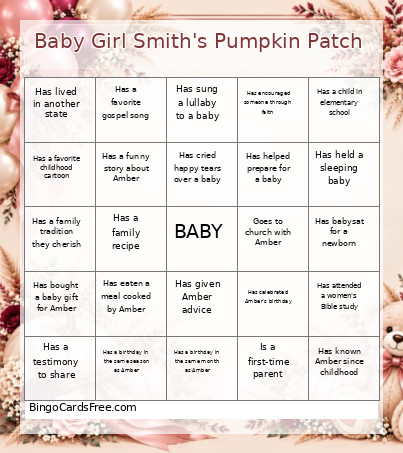 This Amber's Baby Shower Bingo Cards Game contains following Words or Phrases: Has changed a baby's diaper, Has held a newborn in the last year, Has a child under 5 years old, Has more than one child, Is a first-time parent, Has a grandchild, Has babysat for a newborn, Has bought a baby gift for Amber, Has a favorite children's book, Has sung a lullaby to a baby, Has attended a baby's birth, Has helped prepare for a baby, Has a baby photo on their phone, Has rocked a baby to sleep, Has a child in elementary school, Has made a baby bottle, Has attended a baby dedication, Has a favorite baby name, Has twins in the family, Has a funny parenting story, Has prayed for Amber, Has prayed for Baby, Has a favorite Bible verse, Has a prayer journal, Goes to church with Amber, Serves in a church ministry, Has a favorite gospel song, Has a favorite worship song, Has prayed with Amber, Has a testimony to share, Has sent someone Scripture for encouragement, Can name a biblical mother, Has experienced an answered prayer, Has encouraged someone through faith, Has attended a women's Bible study, Has prayed for a new mother, Has a favorite Bible story, Has known Amber for 10+ years, Has known Amber for less than a year, Has known Amber since childhood, Has worked with Amber, Has traveled with Amber, Has celebrated Amber's birthday, Has a childhood memory with Amber, Has a funny story about Amber, Has gone shopping with Amber, Has eaten a meal cooked by Amber, Has received advice from Amber, Has given Amber advice, Has attended a wedding with Amber, Has a photo with Amber from 5+ years ago, Has laughed with Amber until they cried, Has met Amber through family, Has had a late-night phone call with Amber, Has celebrated a milestone with Amber, Has a nickname for Amber, Was born outside the United States, Has traveled outside the country, Has lived in another state, Has visited 5 or more states, Has a birthday in the same month as Amber, Has a birthday in October, Is the oldest sibling, Is the youngest sibling, Is an only child, Has 3 or more siblings, Has a pet, Has a hidden talent, Has a family recipe, Has hosted a family gathering, Has a fall birthday, Has attended a fall festival, Has a favorite fall tradition, Is meeting someone at the shower for the first time, Has held a sleeping baby, Has changed a diaper in the middle of the night, Has packed a diaper bag, Has cried happy tears over a baby, Has a favorite motherhood quote, Has helped plan a baby shower, Has attended 5 or more baby showers, Has a favorite childhood memory, Has a family tradition they cherish, Has taken a spontaneous road trip, Has a favorite holiday, Has won a baby shower game before, Has a favorite comfort food, Has been on a cruise, Has a birthday in the same season as Amber, Has made a handmade gift, Has a favorite childhood cartoon, Has learned a new skill this year, Has been a godmother, Has a story that makes their family laugh.