
Body Cam Bingo Cards - Print Free or Customize
Print free Body Cam bingo cards or alter them, limitless cards! Select from 42,200+ templates or use the bingo card generator. Add numbers, words, pictures, or mix them all. Play using PDF prints, online bingo cards, and the online bingo caller, or combine all formats.
About: This bingo card is packed with the classic lines and excuses people tend to use when dealing with law enforcement or authority figures. It captures the tense, sometimes humorous back-and-forth that can happen during police stops or similar encounters. Perfect for legal workshops, criminal justice classes, or even as an icebreaker at a cop show watch party, this card is a light-hearted take on a high-stress situation many people recognize.
How To: To download a PDF to print, click the Print button. You can modify the number of cards and other print options on the Print tab. Grid items and free space content can be added on the Basic tab. Appearance can be fully customized on the relevant tabs, or you can easily find any preference on the 🔍 tab.
How to play Body Cam Bingo Cards?
- Digital Players: Click on the Play button above, and then click on the 🎫 button.
- Printed Players: Print PDF bingo cards and manually cross off the cards.
- Printed Caller: Print PDF calling list & calling slips and manually draw the slips.
- Digital Caller: Click on the Play button above.
- Hybrid Mode: Select any combination above. For instance, caller can be either Offline or Digital. And players can be Offline or Digital or a mix of both.
Step-By-Step:
- Start by saving the Body Cam PDF by clicking on the "Print" button above.
- Open the PDF and print it.
- For random calling, you can print another copy of the call list, cut, fold and then pull them randomly at play time.
- Cut the bingo cards at the cut lines if there are greater than 1 bingo cards per page.
- Distribute one card per player. For marking, you can use markers. Crayons are the cheapest.
- Select one person to be the caller. If you are playing in a small group, the caller can as well play along with their own Bingo card.
- The caller starts the play by randomly picking an item from the call list and saying it to all players.
- The players look at their cards to see if they have the announced word. If they do, they dab that word.
- The first player to finish a horizontal, vertical, or a diagonal line of crossed items yells "Bingo!" and wins the play.
- The caller checks that the items crossed off form a proper line as per the Bingo card and call list.
- You can play for multiple patterns or a full card blackout for a longer play.
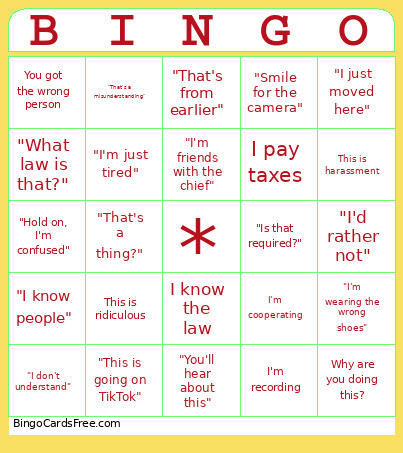 This Body Cam Bingo Cards Game contains following Words or Phrases: I didn't do anything, That's not mine, Am I being detained?, You got the wrong person, I know my rights, Call my lawyer, This is harassment, I barely drank, I'm cooperating, What did I do?, You can't search that, I pay your salary, I'm recording, Talk to my lawyer, I wasn't speeding, That's not my car, You're violating my rights, Let me explain, Can't you give a warning?, I didn't know, This is illegal, Why are you doing this?, I want a supervisor, What's your badge number?, I'm innocent, Let me go, This is ridiculous, You can't do that, I know the law, I pay taxes, This isn't fair, "I literally just got here", "I wasn't even driving", "That's my friend's", "I just borrowed it", "I didn't realize that", "Nobody told me", "I just moved here", "I thought it was allowed", "I didn't see the sign", "I was just about to leave", "I only had one beer", "It was hours ago", "I'm totally fine to drive", "I've done this test before", "I have a medical condition", "I'm just tired", "That's from earlier", "I ate something weird", "My balance is bad", "I'm wearing the wrong shoes", "You're doing too much", "This is crazy bro", "For real right now?", "You're tripping", "This is unnecessary", "You're wasting your time", "Go catch real criminals", "This is why nobody likes cops", "You're on a power trip", "You're embarrassing yourself", "Wait, what's going on?", "Hold on, I'm confused", "What's the problem?", "I don't understand", "Can you explain that again?", "What law is that?", "Since when?", "That's a thing?", "I've never heard that before", "Are you serious?", "This is going on TikTok", "You're gonna be famous", "Say hi to YouTube", "I've got thousands of followers", "Everyone's watching this", "You're live right now", "Don't touch me, it's on camera", "This is evidence", "I got you on video", "Smile for the camera", "That's not what it looks like", "I can explain everything", "You're misunderstanding", "That's out of context", "It's not illegal where I'm from", "That's a misunderstanding", "You don't have the full story", "There's more to this", "Ask them, they saw it", "Check the cameras", "Do I have to?", "I'd rather not", "I don't feel comfortable with that", "Is that required?", "Can I refuse that?", "I'm good, thanks", "I'll pass on that", "I don't consent to that", "I'd like to leave now", "Am I free to go?", "My dad's a lawyer", "I work for the government", "Do you know who I am?", "I'm friends with the chief", "I'm in the military", "I have connections", "You're making a big mistake", "This will cost you your job", "I'm reporting you", "You'll hear about this", "Google it", "That's not how that works", "You're wrong", "I saw it on the internet", "I know people", "This is discrimination", "You're profiling me", "This always happens to me", "Unbelievable", "Wow… just wow".