
Smetch CCC Bingo Cards - Print Free or Customize
Print free Smetch CCC bingo cards or alter them, unlimited cards! Choose from 41,500+ designs or use our bingo card generator. Add numbers, words, images, or any combination. Play using PDF printouts, online bingo cards, and our online bingo caller, or mix physical and digital.
About: Get ready for a lively and interactive Commander night with this bingo card made for Magic: The Gathering fans. The challenges capture classic multiplayer antics, combat shenanigans, clever politics, and wild stack interactions. Perfect for your next EDH pod, these squares will keep everyone alert and laughing as you aim to check off each unique play.
How To: To save a printable PDF, click the Print button. You can change the card count and other printing options on the Print tab. Grid items and free space text can be edited on the Basic tab. Appearance can be entirely customized on the corresponding tabs, or you can easily locate any setting on the 🔍 tab.
How to play Smetch CCC Bingo Cards?
- Printed Caller: Print PDF calling list & calling slips and physically choose the slips.
- Printed Players: Print PDF bingo cards and physically scratch the cards.
- Virtual Caller: Click on the Play button above.
- Virtual Players: Click on the Play button above, and then click on the 🎫 button.
- Combo Mode: Choose any combination above. For instance, caller can be either Printed or Virtual. And players can be Printed or Virtual or a combination of both.
Step-By-Step:
- Start by getting the Smetch CCC Bingo PDF by clicking on the "Print" button above.
- Open the PDF and print a hard copy.
- For random drawing, you can print another copy of the call list, cut, fold and then pick them randomly at play time.
- Cut the bingo cards at the cut lines if there are greater than 1 bingo cards per page.
- Distribute one card per player. For marking, you can use pens. Crayons cost the least.
- Choose one person to be the caller. If you are playing in a small group, the caller may as well play along with their own Bingo card.
- The caller opens the play by randomly pulling an item from the call list and announcing it to all players.
- The players scan their cards to see if they have the called word. If they do, they dab that word.
- The first player to complete a horizontal, vertical, or a diagonal line of crossed items shouts "Bingo!" and wins the play.
- The caller verifies that the items crossed off form a correct line as per the Bingo card and call list.
- You can play for different patterns or a full card blackout for a longer play.
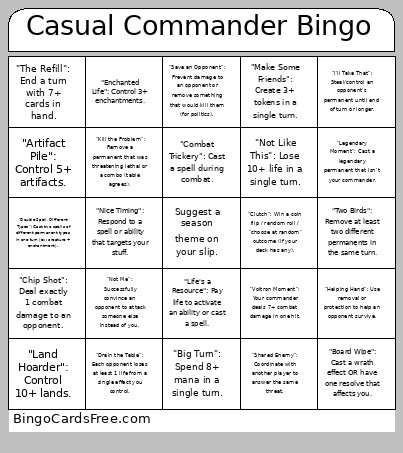 This Smetch CCC Bingo Cards Game contains following Words or Phrases: "Spread the Love": Attack each opponent in the same combat (at least 1 damage each)., "Chip Shot": Deal exactly 1 combat damage to an opponent., "Revenge Swing": Attack the player who most recently dealt damage to you., "Not Me": Successfully convince an opponent to attack someone else instead of you., "Defensive Driver": Make a deal that prevents you from being attacked for a turn cycle., "Crackback": After being attacked, attack back on your next turn., "No Blocks, No Problem": Take combat damage without blocking when you had at least one legal blocker., "Alpha-ish": Attack with 3+ creatures in one combat step., "Flying Lesson": Hit someone with a flyer (just connect with flying)., "Sneak Past": Deal combat damage with an unblocked creature., "I'm Just Checking": Attack with exactly one creature., "All Gas": Attack with every creature you control., "Hold the Line": Block with 3+ creatures in one combat., "Draw Two": Draw 2+ cards in a single turn (beyond your normal draw step)., "The Refill": End a turn with 7+ cards in hand., "Ramp It Up": Put a land onto the battlefield from your library., "Mana Rock Enjoyer": Cast a mana rock (Sol Ring counts, but doesn't have to)., "Two Spells Turn": Cast 2+ spells in one turn., "Topdeck Mode": Start your turn with 0 or 1 card in hand., "Big Turn": Spend 8+ mana in a single turn., "Card Advantage Flex": Resolve a spell that draws 3+ cards., "I'll Take That": Steal/control an opponent's permanent until end of turn or longer., "Nice Try": Counter a spell OR have your spell countered., "Spot Removal": Destroy/exile an opponent's creature., "Artifact/Enchantment Cleanup": Destroy/exile an artifact or enchantment., "Graveyard Boop": Exile at least 1 card from an opponent's graveyard., "Save the Baby": Protect a permanent with an instant-speed trick, "Board Wipe": Cast a wrath effect OR have one resolve that affects you., "Stack Moment": Put 3+ spells/abilities on the stack at once (table-wide or your own turn)., "Kill the Problem": Remove a permanent that was threatening lethal or a combo (table agrees)., "Foggy Feelings": Prevent combat damage this turn (Fog effect or equivalent)., "Redirected": Change the target of a spell/ability., "In Response…": Respond to an opponent's spell with an instant or activated ability., "Commander Taxed": Cast your commander for the second time (paid commander tax)., "Command Zone Detour": Your commander goes to the command zone from anywhere., "Voltron Moment": Your commander deals 7+ combat damage in one hit., "Commander's First Blood": First combat damage dealt in the game is by your commander., "Protection Racket": Equip or aura-up your commander (attach at least 1 equipment or aura to it)., "Commander Saves the Day": Your commander blocks and survives (or trades up) in combat., "Make Some Friends": Create 3+ tokens in a single turn., "Go Wide": Control 8+ creatures at once (tokens count)., "Counters Please": Put a +1/+1 counter on a creature., "The Big Idiot": Control a creature with power 8+., "Enchanted Life": Control 3+ enchantments., "Artifact Pile": Control 5+ artifacts., "Land Hoarder": Control 10+ lands., "Spend It All": End your turn with 0 untapped lands., "Group Hug Adjacent": An opponent draws a card due to a spell/ability you controlled., "Table Math": Someone asks "wait how big is that?" and you resolve the confusion., "That's Lethal?": You present lethal damage to a player (combat or noncombat), even if it gets stopped., "Save an Opponent": Prevent damage to an opponent or remove something that would kill them (for politics)., "Not Like This": Lose 10+ life in a single turn., "Clutch": Win a coin flip / random roll / "choose at random" outcome (if your deck has any)., "Call an Ambulance, but not for me": Kill a player who is about to kill you., "Two Birds": Remove at least two different permanents in the same turn., "Instant Speed": Cast an instant on an opponent's turn., "Combat Trickery": Cast a spell during combat., "ETB Party": Have 2+ creatures enter the battlefield under your control in one turn., "Double Spell, Different Types": Cast two spells of different permanent types in one turn (ex: creature + enchantment)., "Nice Timing": Respond to a spell or ability that targets your stuff., "Protection Detail": Save a creature from dying, "Bounce House": Return a permanent to its owner's hand., "Shared Enemy": Coordinate with another player to answer the same threat., "Helping Hand": Use removal or protection to help an opponent survive., "Life's a Resource": Pay life to activate an ability or cast a spell., "Big Gain": Gain 5+ life in one turn., "Drain the Table": Each opponent loses at least 1 life from a single effect you control., "Grave Value": Return any card from your graveyard to your hand or battlefield., "Sac for Value": Sacrifice a permanent to draw cards, make mana, or get another clear benefit., "Death Trigger": Get value from a creature dying (yours or anyone's)., "Shuffle Up": Shuffle your library., "Keyword Soup": Control a creature with 3+ keywords (flying/trample/etc.)., "Legendary Moment": Cast a legendary permanent that isn't your commander., "Survive a Cycle": Start a full turn cycle as the lowest life total and survive to your next turn..