Print free Fall Fest bingo cards or alter them,
limitless cards! Select from 42,200+ templates or use the bingo card generator.
Add numbers, phrases, images, or any combination.
Play using PDF printouts, virtual bingo cards,
and the virtual bingo caller, or combine all formats.
About: This bingo card is perfect for an icebreaker at gatherings where people want to share quirky stories and uncommon life experiences. The prompts invite players to celebrate unique adventures, hidden talents, and fascinating personal facts in a fun, relaxed way. It’s ideal for team-building events, reunions, or any group looking to connect through memorable and surprising stories.
How To: To get a printable PDF, click the Print button.
You can adjust the card quantity and other
printing options on the Print tab.
Grid items and free space text can be edited on the Basic tab.
Appearance can be completely personalized on the
corresponding tabs, or you can quickly locate any option
on the 🔍 tab.
How to play Fall Fest Bingo Cards?
Paper Caller: Print PDF calling list & calling slips and physically choose the slips.
Virtual Caller: Click on the Play button above.
Paper Players: Print PDF bingo cards and physically cross off the cards.
Virtual Players: Click on the Play button above, and then click on the 🎫 button.
Combo Mode: Pick any combination above.
For example, caller can be either Offline or Virtual.
And players can be Offline or Virtual or a combination of both.
Step-By-Step:
Start by saving the Fall Fest Bingo PDF by clicking on the "Print" button above.
Open the PDF and print a hard copy.
For random calling, you can print another copy of the call list, cut, fold and then draw them randomly at play time.
Cut the bingo cards at the cut lines if there are more than 1 bingo cards per page.
Give one card to each player. For marking, you can use pens. Crayons cost the least.
Pick one person to be the caller. If you are playing in a small group, the caller may also play along with their own Bingo card.
The caller starts the play by randomly picking an item from the call list and saying it to everyone.
The players scan their cards to see if they have the called word. If they do, they mark that word.
The first player to complete a horizontal, vertical, or a diagonal line of marked items announces "Bingo!" and wins the game.
The caller verifies that the items crossed off form a correct line as per the Bingo card and call list.
You can play for multiple patterns or a full card blackout for a longer game.
This Fall Fest Bingo Cards Game contains following Words or Phrases: I've lived in Jordan, Belgium, and Japan, I saw Taylor Swift's Eras Tour show in Tokyo last year., Only been to 29 states, The day after 911 occurred, we drove across the United States (Seattle, Washington to Barre, Vermont) and it took 47 1/2 hours!, I used to work as an Account Representative for a lapel pin company with clients such as: Nickelodeon, Cartoon Network, NBC, and Marvel Studios., My pups are named after nut spreads, I met Taylor Swift in an elevator and had no idea who she was, I have the same first and last name as the author of a pension textbook, but I am unrelated to them., I have run the bases at the Metrodome, the Minnesota Twin's stadium before their move to Target Field., I was featured in a TV commercial in India for a textile factory., I've got a metal plate in my arm, I have hiked the Machu Pichu in Peru, I can throw a frisbee with my foot, I have an identical twin, My dog Ziggy was rescued from the illegal dog-meat trade in Asia and was brought to the United States., My husband and I fly kites professionally, My family invented the M1 Garand - most famously used in WW2!, I collect coins and my oldest one is from 1858, Participated in Junior pre-world Championships for two-man whitewater canoe slalom in the Czech Republic at 15 years old., I am an AirBNB Superhost!, My birthday is on Christmas., I have a Bernese Mountain Dog and two bunnies, I bungee jumped once. Never again., I can speak Catalan.

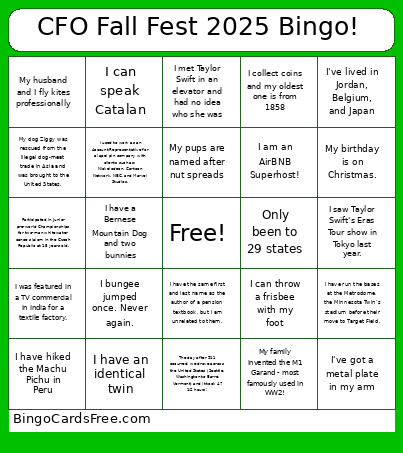 This Fall Fest Bingo Cards Game contains following Words or Phrases: I've lived in Jordan, Belgium, and Japan, I saw Taylor Swift's Eras Tour show in Tokyo last year., Only been to 29 states, The day after 911 occurred, we drove across the United States (Seattle, Washington to Barre, Vermont) and it took 47 1/2 hours!, I used to work as an Account Representative for a lapel pin company with clients such as: Nickelodeon, Cartoon Network, NBC, and Marvel Studios., My pups are named after nut spreads, I met Taylor Swift in an elevator and had no idea who she was, I have the same first and last name as the author of a pension textbook, but I am unrelated to them., I have run the bases at the Metrodome, the Minnesota Twin's stadium before their move to Target Field., I was featured in a TV commercial in India for a textile factory., I've got a metal plate in my arm, I have hiked the Machu Pichu in Peru, I can throw a frisbee with my foot, I have an identical twin, My dog Ziggy was rescued from the illegal dog-meat trade in Asia and was brought to the United States., My husband and I fly kites professionally, My family invented the M1 Garand - most famously used in WW2!, I collect coins and my oldest one is from 1858, Participated in Junior pre-world Championships for two-man whitewater canoe slalom in the Czech Republic at 15 years old., I am an AirBNB Superhost!, My birthday is on Christmas., I have a Bernese Mountain Dog and two bunnies, I bungee jumped once. Never again., I can speak Catalan.