
CPDME Wellness at Work Bingo Cards - Print Free or Customize
Print free CPDME Wellness at Work bingo cards or customize, limitless cards! Choose from 42,200+ templates or use our bingo card generator. Add numbers, words, pictures, or any combination. Play using printable PDF, virtual bingo cards, and our virtual bingo caller, or go hybrid.
About: This bingo card is designed to inspire workplace wellness and encourage healthy habits in a fun, approachable way. Perfect for office teams or health-oriented group challenges, it prompts you to move more, eat better, nurture your mind, and build connections with others. The vibe is upbeat and supportive, making self-care feel both achievable and enjoyable.
How To: To save a PDF to print, click the Print button. You can modify the card quantity and other print settings on the Print tab. Grid items and free space content can be added on the Basic tab. Appearance can be highly personalized on the relevant tabs, or you can quickly locate any option on the 🔍 tab.
How to play CPDME Wellness at Work Bingo Cards?
- Paper Players: Print PDF bingo cards and physically mark the cards.
- Online Players: Click on the Play button above, and then click on the 🎫 button.
- Paper Caller: Print PDF calling list & calling slips and physically select the slips.
- Online Caller: Click on the Play button above.
- Combo Play: Select any combination above. For instance, caller can be either Offline or Online. And players can be Offline or Online or a combination of both.
Step-By-Step:
- Start by getting the CPDME Wellness at Work PDF by clicking on the "Print" button above.
- Open the PDF and print it.
- For random calling, you can print another copy of the call list, cut, fold and then pick them randomly at play time.
- Cut the bingo cards at the cut lines if there are more than 1 bingo cards per page.
- Give one card to each player. For marking, you can use pens. Crayons are the cheapest.
- Select one person to be the caller. If you are playing in a small group, the caller can also play along with their own Bingo card.
- The caller starts the play by randomly drawing an item from the call list and announcing it to everyone.
- The players look at their cards to see if they have the called word. If they do, they mark that word.
- The first player to complete a horizontal, vertical, or a diagonal line of crossed items shouts "Bingo!" and wins the play.
- The caller confirms that the items crossed off form a proper line as per the Bingo card and call list.
- You can play for varied patterns or a full card blackout for an extended play.
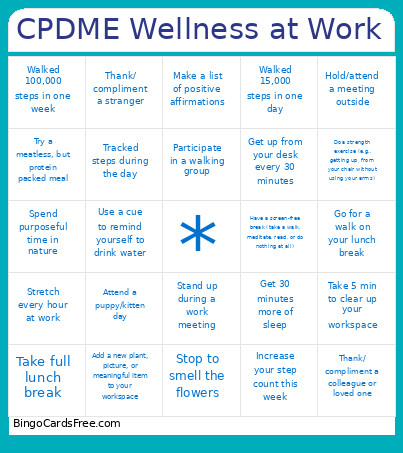 This CPDME Wellness at Work Bingo Cards Game contains following Words or Phrases: Add a new plant, picture, or meaningful item to your workspace, Add more protein or fiber in your diet, Attend a group fitness class (e.g., puppy yoga), Attend a puppy/kitten day, Complete a task you have been putting off, Contribute to a potluck/soup or salad swap, Do a balance exercise (e.g., putting on socks without holding yourself up), Do a guided meditation or breathwork, Do a strength exercise (e.g., getting up from your chair without using your arms), Do yoga/tai chi/pilates/other similar activity, Drink 2-3L water 1 or more days in a week, Get 30 minutes more of sleep, Get up and dance (at a time you normally wouldn't), Get up from your desk every 30 minutes, Go for a walk on your lunch break, Have a screen-free break (take a walk, meditate, read, or do nothing at all), Hold/attend a meeting outside, Increase your step count this week, Make a list of positive affirmations, Make flower arrangements with a colleague, Participate in a recipe exchange, Participate in a walking group, Participate in health screening, Play a song during a work meeting, Read a book you love, Reinstitute Tupper Trek/take the stairs, Share a photo of your pet with the group, Sleep under the stars, Spend purposeful time in nature, Spend time on a hobby or leisurely activity: making art, music, coloring, Stand up during a work meeting, Stop to smell the flowers, Stretch every hour at work, Stroll through the public gardens, Take 5 min to clear up your workspace, Take full lunch break, Thank/ compliment a colleague or loved one, Thank/ compliment a stranger, Tracked steps during the day, Try a meatless, but protein packed meal, Try a new recipe or new vegetable, Try a recipe from a different culture, Try something (anything!) new, Use a cue to remind yourself to drink water, Visit a farmer's market, Walked 100,000 steps in one week, Walked 15,000 steps in one day, Write down 5 things you are grateful for.