Print free CSP bingo cards or adjust them,
unlimited cards! Pick from 42,600+ designs or use the bingo card generator.
Add numbers, words, pictures, or all of them.
Play using printed PDF, virtual bingo cards,
and the virtual bingo caller, or mix physical and digital.
About: This bingo card is tailor-made for sales and technical teams working in the Microsoft ecosystem, especially those focused on cloud solutions and managed services. It captures the fast-paced, goal-driven vibe of tech sales, mixing deal-closing milestones with learning opportunities. Perfect for a team competition or sales kickoff, it encourages collaboration, customer engagement, and skill-building with a dash of friendly rivalry.
How To: To get a printable PDF, click the Print button.
You can alter the card count and other
printing options on the Print tab.
Grid items and free space content can be edited on the Basic tab.
Appearance can be fully customized on the
relevant tabs, or you can quickly find any option
on the 🔍 tab.
How to play CSP Bingo Cards?
Virtual Players: Click on the Play button above, and then click on the 🎫 button.
Paper Caller: Print PDF calling list & calling slips and physically select the slips.
Paper Players: Print PDF bingo cards and physically write on the cards.
Virtual Caller: Click on the Play button above.
Combo Play: Pick any combination above.
For instance, caller can be either Paper or Virtual.
And players can be Paper or Virtual or a combination of both.
Step-By-Step:
Start by getting the CSP Bingo PDF by clicking on the "Print" button above.
Open the PDF and print it.
For random drawing, you can print another copy of the call list, cut, fold and then pull them randomly at play time.
Cut the bingo cards at the cut lines if there are more than 1 bingo cards per page.
Give one card to each player. For marking, you can use pencils. Crayons cost the least.
Pick one person to be the caller. If you are playing in a small group, the caller may also play along with their own Bingo card.
The caller begins the game by randomly picking an item from the call list and announcing it to everyone.
The players scan their cards to see if they have the announced word. If they do, they mark that word.
The first player to finish a horizontal, vertical, or a diagonal line of crossed items shouts "Bingo!" and wins the play.
The caller verifies that the items crossed off form a correct line according to the Bingo card and call list.
You can play for different patterns or a full card blackout for an extended play.
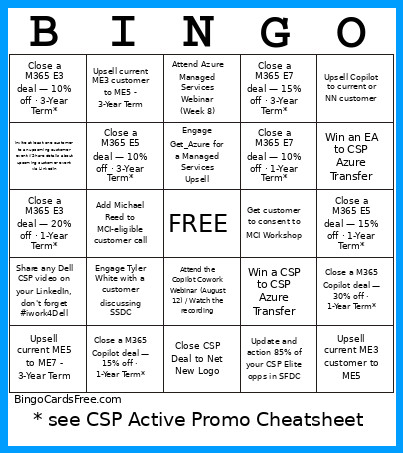
This CSP Bingo Cards Game contains following Words or Phrases: Add Michael Reed to MCI-eligible customer call, Attend Azure Managed Services Webinar (Week 8), Attend the Copilot Cowork Webinar (August 12) / Watch the recording, Close a M365 Copilot deal — 15% off · 1-Year Term*, Close a M365 Copilot deal — 15% off · 3-Year Term*, Close a M365 Copilot deal — 30% off · 1-Year Term*, Close a M365 E3 deal — 10% off · 3-Year Term*, Close a M365 E3 deal — 20% off · 1-Year Term*, Close a M365 E5 deal — 10% off · 3-Year Term*, Close a M365 E5 deal — 15% off · 1-Year Term*, Close a M365 E7 deal — 10% off · 1-Year Term*, Close a M365 E7 deal — 15% off · 1-Year Term*, Close a M365 E7 deal — 15% off · 3-Year Term*, Close CSP Deal to Net New Logo, Complete CSS Skilling Module, Convert free Copilot to paid, Engage Get_Azure for a Managed Services Upsell, Engage Tyler White with a customer discussing MXDR, Engage Tyler White with a customer discussing SSDC, Get customer to consent to MCI Workshop, Invite at least one customer to an upcoming customer event // Share details about upcoming customer event via LinkedIn, Onboard a new Surveil customer, Share any Dell CSP video on your LinkedIn, don't forget #iwork4Dell, Update and action 85% of your CSP Elite opps in SFDC, Upsell Copilot to current or NN customer, Upsell current ME3 customer to ME5, Upsell current ME3 customer to ME5 - 3-Year Term, Upsell current ME5 to ME7, Upsell current ME5 to ME7 - 3-Year Term, Win a CSP to CSP Azure Transfer, Win an EA to CSP Azure Transfer.

 This CSP Bingo Cards Game contains following Words or Phrases: Add Michael Reed to MCI-eligible customer call, Attend Azure Managed Services Webinar (Week 8), Attend the Copilot Cowork Webinar (August 12) / Watch the recording, Close a M365 Copilot deal — 15% off · 1-Year Term*, Close a M365 Copilot deal — 15% off · 3-Year Term*, Close a M365 Copilot deal — 30% off · 1-Year Term*, Close a M365 E3 deal — 10% off · 3-Year Term*, Close a M365 E3 deal — 20% off · 1-Year Term*, Close a M365 E5 deal — 10% off · 3-Year Term*, Close a M365 E5 deal — 15% off · 1-Year Term*, Close a M365 E7 deal — 10% off · 1-Year Term*, Close a M365 E7 deal — 15% off · 1-Year Term*, Close a M365 E7 deal — 15% off · 3-Year Term*, Close CSP Deal to Net New Logo, Complete CSS Skilling Module, Convert free Copilot to paid, Engage Get_Azure for a Managed Services Upsell, Engage Tyler White with a customer discussing MXDR, Engage Tyler White with a customer discussing SSDC, Get customer to consent to MCI Workshop, Invite at least one customer to an upcoming customer event // Share details about upcoming customer event via LinkedIn, Onboard a new Surveil customer, Share any Dell CSP video on your LinkedIn, don't forget #iwork4Dell, Update and action 85% of your CSP Elite opps in SFDC, Upsell Copilot to current or NN customer, Upsell current ME3 customer to ME5, Upsell current ME3 customer to ME5 - 3-Year Term, Upsell current ME5 to ME7, Upsell current ME5 to ME7 - 3-Year Term, Win a CSP to CSP Azure Transfer, Win an EA to CSP Azure Transfer.