
Cube Bingo Cards - Print Free or Customize
Print free Cube bingo cards or modify, unlimited cards! Choose from 41,500+ templates or use the bingo card generator. Add numbers, phrases, pictures, or all of them. Play using printed PDF, virtual bingo cards, and the virtual bingo caller, or combine all formats.
About: This bingo card is packed with challenges perfect for a lively game of Magic: The Gathering, especially among Commander or Cube enthusiasts. Expect witty references and difficult feats that highlight both skillful play and wild, memorable moments. It’s a great pick for game nights with friends who love bold strategies, splashy plays, and a good laugh at the table.
How To: To get a printable PDF, click the Print button. You can change the card quantity and other printing settings on the Print tab. Grid items and free space text can be changed on the Basic tab. Appearance can be exactly customized on the relevant tabs, or you can easily locate any option using the 🔍 tab.
How to play Cube Bingo Cards?
- Paper Players: Print PDF bingo cards and physically mark the cards.
- Paper Caller: Print PDF calling list & calling slips and physically draw the slips.
- Online Players: Click on the Play button above, and then click on the 🎫 button.
- Online Caller: Click on the Play button above.
- Hybrid Play: Choose any combination above. For example, caller can be either Printed or Online. And players can be Printed or Online or a combo of both.
Step-By-Step:
- Start by saving the Cube Bingo PDF by clicking on the "Print" button above.
- Open the PDF and print it.
- For random drawing, you can print another copy of the call list, cut, fold and then pull them randomly at play time.
- Cut the bingo cards at the cut lines if there are greater than 1 bingo cards per page.
- Give one card to each player. For marking, you can use markers. Crayons cost the least.
- Choose one person to be the caller. If you are playing in a small group, the caller can also play along with their own Bingo card.
- The caller initiates the play by randomly drawing an item from the call list and announcing it to all players.
- The players look at their cards to see if they have the called word. If they do, they mark that word.
- The first player to complete a horizontal, vertical, or a diagonal line of crossed items announces "Bingo!" and wins the play.
- The caller checks that the items marked form a correct line according to the Bingo card and call list.
- You can play for different patterns or a full card blackout for an extended play.
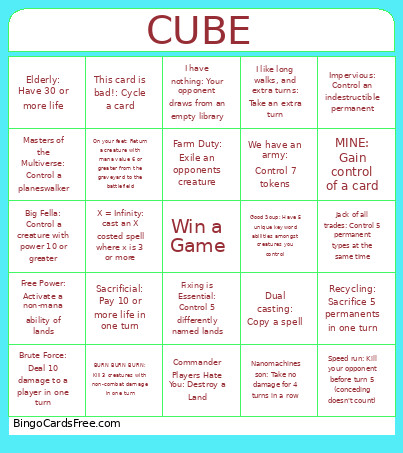 This Cube Bingo Cards Game contains following Words or Phrases: Fixing is Essential: Control 5 differently named lands, Free Power: Activate a non-mana ability of lands, Commander Players Hate You: Destroy a Land, Design Mistakes: Play a card banned in any format, Urza Himself: Control 4 artifacts, Spinning: Draw 7 or more cards in one turn, Speed run: Kill your opponent before turn 5 (conceding doesn't count), BURN BURN BURN: Kill 3 creatures with non-combat damage in one turn, I like long walks, and extra turns: Take an extra turn, I have nothing: Your opponent draws from an empty library, Sacrificial: Pay 10 or more life in one turn, Farm Duty: Exile an opponents creature, Jack of all trades: Control 5 permanent types at the same time, Usurped: Force an opponent to discard 2 cards in one turn, Roller coaster ride: Have a card enter the battlefield 3 times in one turn, On your feet: Return a creature with mana value 6 or greater from the graveyard to the battlefield, Its called RAMP: Have 5 lands on the battlefield before turn 5, Nanomachines son: Take no damage for 4 turns in a row, Ragebait: Counter 3 spells in one game, We have an army: Control 7 tokens, Big Fella: Control a creature with power 10 or greater, Average Cube Deck: Have 5 mythics cards on the battlefield or graveyard at once, This card is bad!: Cycle a card, Masters of the Multiverse: Control a planeswalker, Dual casting: Copy a spell, Its almost like drawing a card: Search your library for a card, Brute Force: Deal 10 damage to a player in one turn, MINE: Gain control of a card, Recycling: Sacrifice 5 permanents in one turn, Impervious: Control an indestructible permanent, Typal isnt even supported!: Control 3 non-token creatures of the same creature type, Elderly: Have 30 or more life, Easy Peasy, lemon squeezy: Cast a foil card, Good Soup: Have 5 unique keyword abilities amongst creatures you control, X = Infinity: cast an X costed spell where x is 3 or more, STORM!: Cast 5 spells in one turn.