Print free DALLAS IT BINGO cards or modify,
limitless prints! Select from 43,000+ templates or use the bingo card generator.
Add numbers, phrases, photos, or all of them.
Play using PDF prints, online bingo cards,
and the online bingo caller, or mix physical and digital.
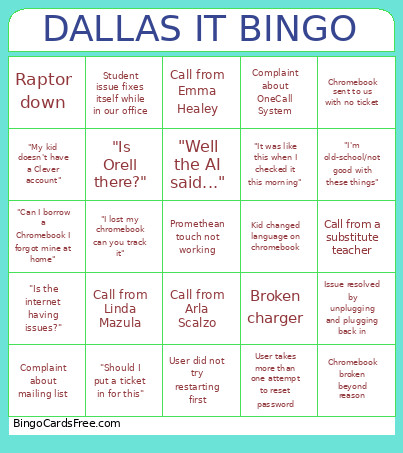
About: This bingo card captures the daily ups and downs of a school tech support team, highlighting those all-too-familiar calls, quirky user errors, and classic troubleshooting moments. Ideal for IT staff meetings or just a bit of comic relief in the department, it turns everyday tech frustrations into a fun, light-hearted game everyone in K-12 tech support can relate to.
How To: To download a PDF to print, click the Print button.
You can adjust the card quantity and other
printing settings on the Print tab.
Grid items and free space content can be edited on the Basic tab.
Appearance can be exactly customized on the
corresponding tabs, or you can quickly locate any preference
on the 🔍 tab.
How to play DALLAS IT BINGO Cards?
Virtual Caller: Click on the Play button above.
Virtual Players: Click on the Play button above, and then click on the 🎫 button.
Printed Players: Print PDF bingo cards and physically mark the cards.
Printed Caller: Print PDF calling list & calling slips and physically choose the slips.
Hybrid Mode: Pick any combination above.
For example, caller can be either Offline or Virtual.
And players can be Offline or Virtual or a mix of both.
Step-By-Step:
Start by saving the DALLAS IT BINGO PDF by clicking on the "Print" button above.
Open the PDF and print a hard copy.
For random calling, you can print another copy of the call list, cut, fold and then pick them randomly at play time.
Cut the bingo cards at the cut lines if there are more than 1 bingo cards per page.
Give one card to each player. For marking, you can use pencils. Crayons are the cheapest.
Pick one person to be the caller. If you are playing in a small group, the caller may also play along with their own Bingo card.
The caller initiates the game by randomly drawing an item from the call list and saying it to everyone.
The players look at their cards to see if they have the announced word. If they do, they mark that word.
The first player to complete a horizontal, vertical, or a diagonal line of crossed items yells "Bingo!" and wins the game.
The caller validates that the items marked form a correct line as per the Bingo card and call list.
You can play for varied patterns or a full card blackout for an extended game.
This DALLAS IT BINGO Cards Game contains following Words or Phrases: Call from Arla Scalzo, "Is the internet having issues?", User did not try restarting first, Promethean Board HDMI not working, Promethean touch not working, Phone not working, Chromebook broken beyond reason, Student issue fixes itself while in our office, "Should I put a ticket in for this", Chromebook sent to us with no ticket, Call from Emma Healey, Call from Linda Mazula, "It was like this when I checked it this morning", Chromebook won't charge, "My computer is running slow", "Can I borrow a Chromebook I forgot mine at home", Complaint about mailing list, Student sharing game websites, User takes more than one attempt to reset password, "Can you stay on while I try this", "Well the AI said...", Dr. Duffy lost his badge, Complaint about OneCall System, "My kid doesn't have a Clever account", Broken charger, Called about something that is Maintenance's job, "Is Orell there?", "I'm old-school/not good with these things", Issue resolved by unplugging and plugging back in, Call from a substitute teacher, "I lost my chromebook can you track it", User tries to get us to fix personal tech, Raptor down, New student needs chromebook, Kid turned on ALL the accessibility features, Kid changed language on chromebook, Sticker on webcam.

 This DALLAS IT BINGO Cards Game contains following Words or Phrases: Call from Arla Scalzo, "Is the internet having issues?", User did not try restarting first, Promethean Board HDMI not working, Promethean touch not working, Phone not working, Chromebook broken beyond reason, Student issue fixes itself while in our office, "Should I put a ticket in for this", Chromebook sent to us with no ticket, Call from Emma Healey, Call from Linda Mazula, "It was like this when I checked it this morning", Chromebook won't charge, "My computer is running slow", "Can I borrow a Chromebook I forgot mine at home", Complaint about mailing list, Student sharing game websites, User takes more than one attempt to reset password, "Can you stay on while I try this", "Well the AI said...", Dr. Duffy lost his badge, Complaint about OneCall System, "My kid doesn't have a Clever account", Broken charger, Called about something that is Maintenance's job, "Is Orell there?", "I'm old-school/not good with these things", Issue resolved by unplugging and plugging back in, Call from a substitute teacher, "I lost my chromebook can you track it", User tries to get us to fix personal tech, Raptor down, New student needs chromebook, Kid turned on ALL the accessibility features, Kid changed language on chromebook, Sticker on webcam.