
FWC2026 Bingo Cards - Print Free or Customize
Print free FWC2026 bingo cards or alter them, unlimited prints! Choose from 42,200+ templates or use our bingo card generator. Add numbers, words, images, or all of them. Play using printable PDF, digital bingo cards, and our digital bingo caller, or combine all formats.
About: This bingo card is perfect for fans watching a high-stakes Argentina vs. England football showdown, perhaps during the World Cup or another prestigious tournament. With a mix of on-pitch drama, passionate fan moments, and classic commentary nods, it adds an extra layer of excitement for lively watch parties or group viewing events centered on international football clashes.
How To: To save a printable PDF, click the Print button. You can alter the card quantity and other print settings on the Print tab. Grid items and free space text can be added on the Basic tab. Appearance can be totally customized on the relevant tabs, or you can easily locate any preference using the 🔍 tab.
How to play FWC2026 Bingo Cards?
- Virtual Caller: Click on the Play button above.
- Virtual Players: Click on the Play button above, and then click on the 🎫 button.
- Paper Caller: Print PDF calling list & calling slips and manually choose the slips.
- Paper Players: Print PDF bingo cards and manually scratch the cards.
- Mixed Play: Select any combination above. For instance, caller can be either Paper or Virtual. And players can be Paper or Virtual or a combo of both.
Step-By-Step:
- Start by downloading the FWC2026 PDF by clicking on the "Print" button above.
- Open the PDF and print it.
- For random calling, you can print another copy of the call list, cut, fold and then draw them randomly at play time.
- Cut the bingo cards at the cut marks if there are more than 1 bingo cards per page.
- Distribute one card per player. For marking, you can use crayons. Crayons are the cheapest.
- Select one person to be the caller. If you are playing in a small group, the caller may as well play along with their own Bingo card.
- The caller starts the play by randomly picking an item from the call list and announcing it to all players.
- The players look at their cards to see if they have the called word. If they do, they dab that word.
- The first player to finish a horizontal, vertical, or a diagonal line of crossed items announces "Bingo!" and wins the play.
- The caller checks that the items marked form a proper line as per the Bingo card and call list.
- You can play for different patterns or a full card blackout for a longer play.
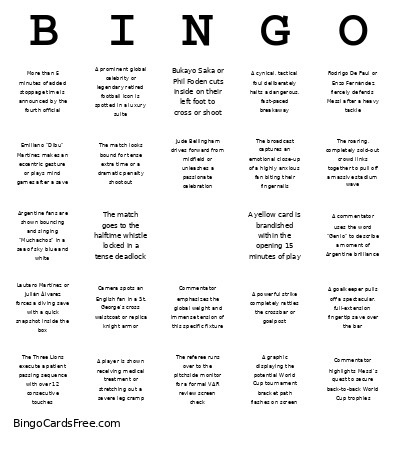 This FWC2026 Bingo Cards Game contains following Words or Phrases: A commentator uses the word "Genio" to describe a moment of Argentine brilliance, A cynical, tactical foul deliberately halts a dangerous, fast-paced breakaway, A goalkeeper pulls off a spectacular, full-extension fingertip save over the bar, A graphic displaying the potential World Cup tournament bracket path flashes on screen, A high-stakes penalty kick is awarded to either side, A player is shown receiving medical treatment or stretching out a severe leg cramp, A powerful strike completely rattles the crossbar or goalpost, A prominent global celebrity or legendary retired football icon is spotted in a luxury suite, A yellow card is brandished within the opening 15 minutes of play, Argentine fans are shown bouncing and singing "Muchachos" in a sea of sky blue and white, Bukayo Saka or Phil Foden cuts inside on their left foot to cross or shoot, Camera spots an English fan in a St. George's cross waistcoat or replica knight armor, Cole Palmer is shown warming up on the sideline or executing his "cold" celebration, Commentator emphasizes the global weight and immense tension of this specific fixture, Commentator highlights Messi's quest to secure back-to-back World Cup trophies, Commentator mentions England's painful historical record with penalty shootouts, Commentator references the historic 1986 "Hand of God" or the 1998 Beckham red card, Emiliano "Dibu" Martínez makes an eccentric gesture or plays mind games after a save, Harry Kane drops deep into the midfield to hold up play and spray a pass wide, Jordan Pickford passionately screams at his defenders after a close defensive call, Jude Bellingham drives forward from midfield or unleashes a passionate celebration, Lautaro Martínez or Julián Álvarez forces a diving save with a quick snapshot inside the box, Lionel Messi weaves through a crowded midfield with his signature close-control dribbling, More than 5 minutes of added stoppage time is announced by the fourth official, Rodrigo De Paul or Enzo Fernández fiercely defends Messi after a heavy tackle, The Albiceleste bench is shown jumping up to protest a decision by the referee, The broadcast captures an emotional close-up of a highly anxious fan biting their fingernails, The camera cuts to a sweeping, panoramic wide shot of the host stadium, The match goes to the halftime whistle locked in a tense deadlock, The match looks bound for tense extra time or a dramatic penalty shootout, The referee runs over to the pitchside monitor for a formal VAR review screen check, The roaring, completely sold-out crowd links together to pull off a massive stadium wave, The Three Lions execute a patient passing sequence with over 12 consecutive touches.