Print free bingo for school cards or adjust them,
unlimited cards! Choose from 42,200+ designs or use our bingo card generator.
Add numbers, phrases, photos, or any combination.
Play using PDF printouts, virtual bingo cards,
and our virtual bingo caller, or go hybrid.
About: This bingo card is perfect for a school art class, club meeting, or back-to-school event where creativity and connection are the focus. It’s designed to spark conversations among students who love art, fun facts, and discovering things in common. The tone is upbeat and welcoming, making it easy for everyone to jump in and make new friends.
How To: To save a PDF to print, click the Print button.
You can modify the number of cards and other
printing preferences on the Print tab.
Grid items and free space content can be edited on the Basic tab.
Appearance can be completely personalized on the
corresponding tabs, or you can quickly search any setting
using the 🔍 tab.
How to play Bingo for school Cards?
Paper Players: Print PDF bingo cards and manually write on the cards.
Virtual Caller: Click on the Play button above.
Virtual Players: Click on the Play button above, and then click on the 🎫 button.
Paper Caller: Print PDF calling list & calling slips and manually choose the slips.
Hybrid Play: Select any combination above.
For instance, caller can be either Paper or Virtual.
And players can be Paper or Virtual or a combo of both.
Step-By-Step:
Start by downloading the Bingo for school PDF by clicking on the "Print" button above.
Open the PDF and print it.
For random calling, you can print another copy of the call list, cut, fold and then draw them randomly at play time.
Cut the bingo cards at the cut marks if there are more than 1 bingo cards per page.
Distribute one card per player. For marking, you can use pens. Crayons are the cheapest.
Select one person to be the caller. If you are playing in a small group, the caller can also play along with their own Bingo card.
The caller initiates the game by randomly picking an item from the call list and announcing it to everyone.
The players check their cards to see if they have the announced word. If they do, they dab that word.
The first player to complete a horizontal, vertical, or a diagonal line of crossed items shouts "Bingo!" and wins the play.
The caller checks that the items crossed off form a proper line according to the Bingo card and call list.
You can play for different patterns or a full card blackout for a longer play.
This Bingo for school Cards Game contains following Words or Phrases: Art is their favorite class, Born in Nevada, Can whistle, Enjoys rollercoaster, Excited for the school year, Has a birthday this month, Has a cat, Has a dog, Has a sibling, Has accidentally smudged a drawing, Has an art account, Has an art goal for this school year, Has an art style they want to learn, Has an exotic pet, Has blue eyes, Has brown eyes, Has dyed hair, Has entered an art contest, Has green eyes, Has lost a favorite pencil, Has made art for a friend, Has made their own character, Has many unfinished sketchbooks, Has spent more than an hour on one drawing, Has spent way too long on one tiny detail, Has used charcoal, Has used colored pencils, Has visited a different country, Has watched an art tutorial on YouTube, Is an only child, Is in a school club, Is shorter than you, Is taller than you, Is wearing strips, Like ice cream, Likes anime/manga, Likes drawing landscapes, Likes drawing people, Likes listening to music, Likes pizza, Likes spicy food, Likes sushi, Likes the beach, Likes to cook, Likes to read, Likes video games, Plays a sport, Speaks more than one language, Wants to improve drawing hands, Wants to learn a new medium, Was born in a different state, Wasn't born in Nevada, Went to a concert over the summer, Went to a different county this summer.

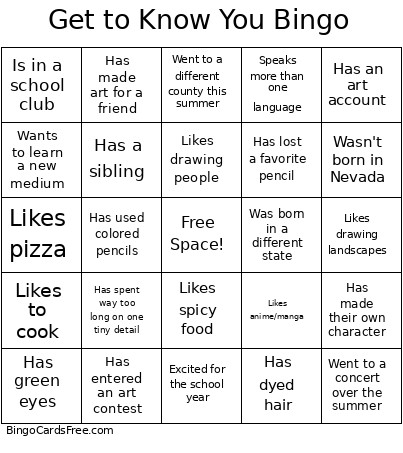 This Bingo for school Cards Game contains following Words or Phrases: Art is their favorite class, Born in Nevada, Can whistle, Enjoys rollercoaster, Excited for the school year, Has a birthday this month, Has a cat, Has a dog, Has a sibling, Has accidentally smudged a drawing, Has an art account, Has an art goal for this school year, Has an art style they want to learn, Has an exotic pet, Has blue eyes, Has brown eyes, Has dyed hair, Has entered an art contest, Has green eyes, Has lost a favorite pencil, Has made art for a friend, Has made their own character, Has many unfinished sketchbooks, Has spent more than an hour on one drawing, Has spent way too long on one tiny detail, Has used charcoal, Has used colored pencils, Has visited a different country, Has watched an art tutorial on YouTube, Is an only child, Is in a school club, Is shorter than you, Is taller than you, Is wearing strips, Like ice cream, Likes anime/manga, Likes drawing landscapes, Likes drawing people, Likes listening to music, Likes pizza, Likes spicy food, Likes sushi, Likes the beach, Likes to cook, Likes to read, Likes video games, Plays a sport, Speaks more than one language, Wants to improve drawing hands, Wants to learn a new medium, Was born in a different state, Wasn't born in Nevada, Went to a concert over the summer, Went to a different county this summer.