Heathers Holiday Bingo Cards - Print Free or Customize
Print free Heathers Holiday bingo cards or customize,
unlimited prints! Pick from 41,500+ designs or use our bingo card generator.
Add numbers, words, pictures, or all of them.
Play using PDF printouts, digital bingo cards,
and our digital bingo caller, or mix physical and digital.
About: This bingo card is all about celebrating the fun quirks, traditions, and shared experiences of the curling community. Perfect for a league social, holiday party, or bonspiel mixer, it’s designed to spark conversation and laughter among curlers of every experience level. Expect plenty of friendly competition as everyone tries to find a match for each unique square!
How To: To download a printable PDF, click the Print button.
You can change the card quantity and other
print settings on the Print tab.
Grid items and free space content can be edited on the Basic tab.
Appearance can be highly customized on the
corresponding tabs, or you can quickly search any setting
on the 🔍 tab.
How to play Heathers Holiday Bingo Cards?
Paper Caller: Print PDF calling list & calling slips and physically draw the slips.
Digital Caller: Click on the Play button above.
Paper Players: Print PDF bingo cards and physically scratch the cards.
Digital Players: Click on the Play button above, and then click on the 🎫 button.
Hybrid Play: Select any combination above.
For instance, caller can be either Paper or Digital.
And players can be Paper or Digital or a mix of both.
Step-By-Step:
Start by saving the Heathers Holiday Bingo PDF by clicking on the "Print" button above.
Open the PDF and print a hard copy.
For random drawing, you can print another copy of the call list, cut, fold and then pick them randomly at play time.
Cut the bingo cards at the cut lines if there are more than 1 bingo cards per page.
Give one card to each player. For marking, you can use pens. Crayons cost the least.
Select one person to be the caller. If you are playing in a small group, the caller may also play along with their own Bingo card.
The caller initiates the game by randomly drawing an item from the call list and saying it to all players.
The players look at their cards to see if they have the called word. If they do, they cross off that word.
The first player to complete a horizontal, vertical, or a diagonal line of marked items announces "Bingo!" and wins the game.
The caller verifies that the items marked form a proper line as per the Bingo card and call list.
You can play for multiple patterns or a full card blackout for an extended game.
This Heathers Holiday Bingo Cards Game contains following Words or Phrases: Played at Nationals, Curled for more than 10 years, Curled for 3 years or less, Prefer to play lead, Swept so hard you lost balance, Won a pin at a bonspiel, Already volunteered this season, Likes playing the 8:30 draw, Has yelled 'Sweep!' or 'Hard!' outside of curling, Met a close friend through curling, Wearing fuzzy socks right now, Likes hot chocolate more than coffee, Wearing something with sparkles, Has gone ice skating this season, Has the Olympics on their calendar, Will be traveling somewhere warm for the holidays, Holiday shopping is done, Thrown the wrong color rock, Watch curling online for fun, Knows the name of another curler's dog, Broomstacked for 2 hours after league, Has a seasonal candle burning at home, First Heathers event, Started curling because of a friend, Slid out with a gripper on, Celebrates Festivus, Still drinks iced coffee in the winter, Taught at a Learn2Curl, Subbed for a game with <24 hrs notice, Has a curling superstition, Can explain the gear effect, Discusses curling at family events to avoid other topics, A person you've never met before tonight, Has hobbies other than curling, Vegetarian, Slides with her broom flat, Has curling apparel with her name on it, Seen an 8-ender, Put up Christmas decorations before Thanksgiving.

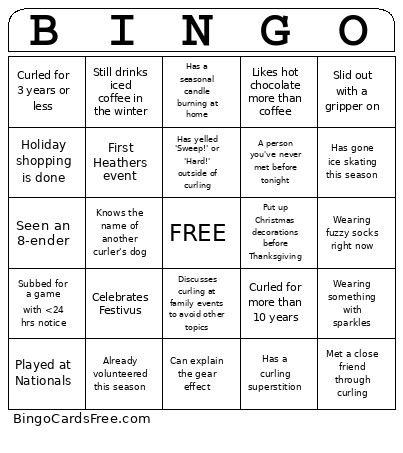 This Heathers Holiday Bingo Cards Game contains following Words or Phrases: Played at Nationals, Curled for more than 10 years, Curled for 3 years or less, Prefer to play lead, Swept so hard you lost balance, Won a pin at a bonspiel, Already volunteered this season, Likes playing the 8:30 draw, Has yelled 'Sweep!' or 'Hard!' outside of curling, Met a close friend through curling, Wearing fuzzy socks right now, Likes hot chocolate more than coffee, Wearing something with sparkles, Has gone ice skating this season, Has the Olympics on their calendar, Will be traveling somewhere warm for the holidays, Holiday shopping is done, Thrown the wrong color rock, Watch curling online for fun, Knows the name of another curler's dog, Broomstacked for 2 hours after league, Has a seasonal candle burning at home, First Heathers event, Started curling because of a friend, Slid out with a gripper on, Celebrates Festivus, Still drinks iced coffee in the winter, Taught at a Learn2Curl, Subbed for a game with <24 hrs notice, Has a curling superstition, Can explain the gear effect, Discusses curling at family events to avoid other topics, A person you've never met before tonight, Has hobbies other than curling, Vegetarian, Slides with her broom flat, Has curling apparel with her name on it, Seen an 8-ender, Put up Christmas decorations before Thanksgiving.