Print free Highlander bingo cards or adjust them,
limitless cards! Select from 41,500+ designs or use the bingo card generator.
Add numbers, words, photos, or mix them all.
Play using printed PDF, online bingo cards,
and the online bingo caller, or combine all formats.
About: This bingo card is tailor-made for fans of competitive Magic: The Gathering, especially those who love high-powered plays and interactive board states. With a focus on dramatic moments and clever strategies, it’s perfect for tracking wild games at a tournament or spicing up your Commander nights with friends who appreciate cunning moves and epic combos.
How To: To download a printable PDF, click the Print button.
You can adjust the number of cards and other
printing options on the Print tab.
Grid items and free space text can be added on the Basic tab.
Appearance can be highly customized on the
corresponding tabs, or you can easily locate any preference
on the 🔍 tab.
How to play Highlander Bingo Cards?
Digital Players: Click on the Play button above, and then click on the 🎫 button.
Printed Caller: Print PDF calling list & calling slips and physically pick the slips.
Printed Players: Print PDF bingo cards and physically scratch the cards.
Digital Caller: Click on the Play button above.
Hybrid Mode: Choose any combination above.
For instance, caller can be either Paper or Digital.
And players can be Paper or Digital or a mix of both.
Step-By-Step:
Start by saving the Highlander PDF by clicking on the "Print" button above.
Open the PDF and print it.
For random calling, you can print another copy of the call list, cut, fold and then pick them randomly at play time.
Cut the bingo cards at the cut lines if there are more than 1 bingo cards per page.
Distribute one card per player. For marking, you can use crayons. Crayons are the cheapest.
Choose one person to be the caller. If you are playing in a small group, the caller may also play along with their own Bingo card.
The caller initiates the game by randomly pulling an item from the call list and calling out it to everyone.
The players look at their cards to see if they have the announced word. If they do, they dab that word.
The first player to finish a horizontal, vertical, or a diagonal line of marked items yells "Bingo!" and wins the game.
The caller checks that the items crossed off form a proper line as per the Bingo card and call list.
You can play for multiple patterns or a full card blackout for an extended game.
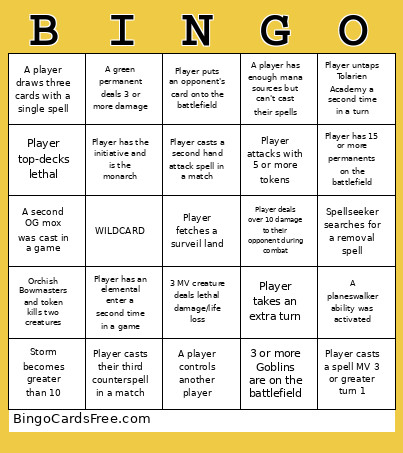
This Highlander Bingo Cards Game contains following Words or Phrases: Player untaps Tolarien Academy a second time in a turn, Spellseeker searches for a removal spell, Player deals over 10 damage to their opponent during combat, A player controls another player, Player has the initiative and is the monarch, Player casts a second hand attack spell in a match, Player puts an opponent's card onto the battlefield, 3 MV creature deals lethal damage/life loss, A planeswalker ability was activated, Orchish Bowmasters and token kills two creatures, Player casts a spell MV 3 or greater turn 1, Storm becomes greater than 10, Player takes an extra turn, Player casts their third counterspell in a match, Player top-decks lethal, A player draws three cards with a single spell, 3 or more Goblins are on the battlefield, A player has enough mana sources but can't cast their spells, A second OG mox was cast in a game, Player attacks with 5 or more tokens, Player has 15 or more permanents on the battlefield, WILDCARD, Player has an elemental enter a second time in a game, A green permanent deals 3 or more damage.

 This Highlander Bingo Cards Game contains following Words or Phrases: Player untaps Tolarien Academy a second time in a turn, Spellseeker searches for a removal spell, Player deals over 10 damage to their opponent during combat, A player controls another player, Player has the initiative and is the monarch, Player casts a second hand attack spell in a match, Player puts an opponent's card onto the battlefield, 3 MV creature deals lethal damage/life loss, A planeswalker ability was activated, Orchish Bowmasters and token kills two creatures, Player casts a spell MV 3 or greater turn 1, Storm becomes greater than 10, Player takes an extra turn, Player casts their third counterspell in a match, Player top-decks lethal, A player draws three cards with a single spell, 3 or more Goblins are on the battlefield, A player has enough mana sources but can't cast their spells, A second OG mox was cast in a game, Player attacks with 5 or more tokens, Player has 15 or more permanents on the battlefield, WILDCARD, Player has an elemental enter a second time in a game, A green permanent deals 3 or more damage.