
HRO Giving Back Bingo Cards - Print Free or Customize
Print free HRO Giving Back bingo cards or personalize, limitless prints! Select from 42,200+ designs or use the bingo card generator. Add numbers, words, pictures, or mix them all. Play using printed PDF, online bingo cards, and the online bingo caller, or combine all formats.
About: This bingo card is all about spreading kindness and fostering connections in everyday life. Designed with community spirit in mind, it encourages thoughtful gestures, from reconnecting with old friends to helping strangers. Perfect for team-building days, school challenges, or neighborhood events, it’s a feel-good way to inspire positive action and brighten everyone’s day.
How To: To save a printable PDF, click the Print button. You can change the number of cards and other printing preferences on the Print tab. Grid items and free space text can be edited on the Basic tab. Appearance can be totally personalized on the corresponding tabs, or you can quickly find any option using the 🔍 tab.
How to play HRO Giving Back Bingo Cards?
- Paper Players: Print PDF bingo cards and manually write on the cards.
- Digital Caller: Click on the Play button above.
- Paper Caller: Print PDF calling list & calling slips and manually select the slips.
- Digital Players: Click on the Play button above, and then click on the 🎫 button.
- Hybrid Play: Choose any combination above. For instance, caller can be either Printed or Digital. And players can be Printed or Digital or a combination of both.
Step-By-Step:
- Start by getting the HRO Giving Back PDF by clicking on the "Print" button above.
- Open the PDF and print it.
- For random calling, you can print another copy of the call list, cut, fold and then pick them randomly at play time.
- Cut the bingo cards at the cut marks if there are greater than 1 bingo cards per page.
- Distribute one card per player. For marking, you can use markers. Crayons cost the least.
- Choose one person to be the caller. If you are playing in a small group, the caller can as well play along with their own Bingo card.
- The caller initiates the game by randomly drawing an item from the call list and announcing it to everyone.
- The players look at their cards to see if they have the called word. If they do, they mark that word.
- The first player to finish a horizontal, vertical, or a diagonal line of crossed items yells "Bingo!" and wins the play.
- The caller verifies that the items marked form a correct line as per the Bingo card and call list.
- You can play for varied patterns or a full card blackout for an extended play.
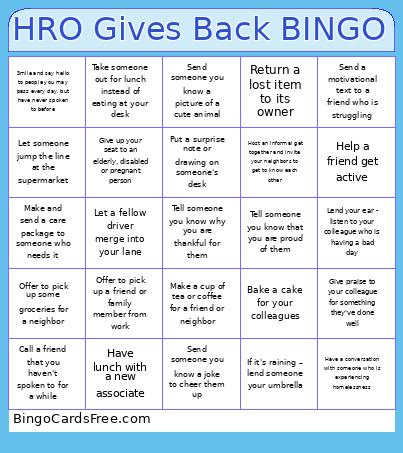 This HRO Giving Back Bingo Cards Game contains following Words or Phrases: Call a friend that you haven't spoken to for a while, Send a letter to a grandparent or elderly person, Send flowers to a friend, Offer to pick up some groceries for a neighbor, Send someone a handwritten note, Offer to babysit for a friend, Walk your friend's dog, Tell your family members how much you love and appreciate them, Help a friend get active, Make someone laugh, Cook a meal for a friend or neighbor, Make a cup of tea or coffee for a friend or neighbor, Help with a household chore at home or for a friend, Host an informal get together and invite your neighbors to get to know each other, Tell someone you know that you are proud of them, Tell someone you know why you are thankful for them, Send a motivational text to a friend who is struggling, Send someone you know a joke to cheer them up, Send someone you know a picture of a cute animal, Send an inspirational quote to a friend, Send an interesting article to a friend, Put a surprise note or drawing on someone's desk, Contact someone you haven't seen in a while and arrange to meet face to face, Engage in conversation with a cashier/waiter when paying at the till, Spend time playing with your pet, Sign up to do voluntary work in your local community, Reach out to spend time with a friend, family member or neighbor who is experiencing loneliness, Donate items you no longer need to a charity, Make and send a care package to someone who needs it, Make a donation to a charity, Offer to pick up a friend or family member from work, Have lunch with a new associate, Lend your ear - listen to your colleague who is having a bad day, Say good morning, Bake a cake for your colleagues, Give praise to your colleague for something they've done well, If it's raining – lend someone your umbrella, Take someone out for lunch instead of eating at your desk, Give up your seat to an elderly, disabled or pregnant person, Let someone jump the line at the supermarket, Take a minute to help someone who is lost, Have a conversation with someone who is experiencing homelessness, Help a mother carrying her stroller down the stairs or hold the door for her, Let a fellow driver merge into your lane, Pick up some rubbish lying around in the street, Smile and say hello to people you may pass every day, but have never spoken to before, Return a lost item to its owner, Pop into a coffee shop and ask to pay for a coffee for them to give to someone later that day for free.