Print free Jori bingo cards or modify,
unlimited cards! Select from 42,200+ templates or use the bingo card generator.
Add numbers, phrases, pictures, or any combination.
Play using PDF prints, virtual bingo cards,
and the virtual bingo caller, or mix physical and digital.
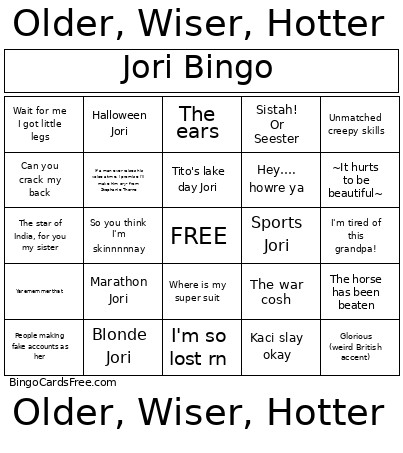
About: This bingo card is packed with inside jokes, playful banter, and quirky personal moments—perfect for a gathering of close friends or a group celebrating someone’s unique personality. Its tone is lighthearted and self-aware, bringing together funny catchphrases and classic anecdotes that will have everyone laughing and reminiscing as they play.
How To: To get a PDF to print, click the Print button.
You can modify the card quantity and other
print options on the Print tab.
Grid items and free space content can be edited on the Basic tab.
Appearance can be exactly personalized on the
relevant tabs, or you can quickly search any setting
on the 🔍 tab.
How to play Jori Bingo Cards?
Digital Caller: Click on the Play button above.
Printed Players: Print PDF bingo cards and manually cross off the cards.
Printed Caller: Print PDF calling list & calling slips and manually choose the slips.
Digital Players: Click on the Play button above, and then click on the 🎫 button.
Combo Mode: Choose any combination above.
For example, caller can be either Printed or Digital.
And players can be Printed or Digital or a combination of both.
Step-By-Step:
Start by saving the Jori Bingo PDF by clicking on the "Print" button above.
Open the PDF and print it.
For random calling, you can print another copy of the call list, cut, fold and then draw them randomly at play time.
Cut the bingo cards at the cut lines if there are greater than 1 bingo cards per page.
Distribute one card per player. For marking, you can use crayons. Crayons cost the least.
Choose one person to be the caller. If you are playing in a small group, the caller can also play along with their own Bingo card.
The caller opens the game by randomly drawing an item from the call list and announcing it to everyone.
The players scan their cards to see if they have the announced word. If they do, they cross off that word.
The first player to finish a horizontal, vertical, or a diagonal line of marked items yells "Bingo!" and wins the play.
The caller confirms that the items marked form a proper line as per the Bingo card and call list.
You can play for varied patterns or a full card blackout for a longer play.
This Jori Bingo Cards Game contains following Words or Phrases: "I crack my own neck" proceeds to crack neck — i look in horror, "Imagine trusting me to drive at night and I have astigmatism", (Blank) is calling me by my full government name, *Man standing emoji*, ~It hurts to be beautiful~, Any sentence sung in the tune of a song, Army Barbie, Bad day to be a beer (/whatever she's eating or drinking), Bike week Jori, Blonde Jori, Booty..nuff said, Brother I'm never eating at chilis again- from Stephanie Thorne, Can you crack my back, Cheerleader Jori, Do it, you won't, Glorious (weird British accent), Good enough for governments work, Gym Jori, Halloween Jori, Have you seen my phone, Hell yeah brother, Hey…. howre ya, I am obsessed/dead/unwell, I lost something once, I need a fridge cig (Diet Coke), I took too much pre workout and my face is tingling, I want waffle fries, I'm fighting for my life, I'm so lost rn, I'm tired of this grandpa!, If a man ever raises his voice at me, I promise I'll make him cry- from Stephanie Thorne, If you're feeling froggy, It's been X days since I've been able to go to the bathroom, Kaci slay okay, Lemme just sneak past ya, Marathon Jori, Oh shit, bitch!, Oh so you hate me, Ope, People making fake accounts as her, Sistah! Or Seester, So you think I'm skinnnnnay, Space buns and crimped hair, Sports Jori, That's a huuuuuuge bi, The "ween"/bunny face, The ears, The face she makes before laughing or trying not to laugh, The horse has been beaten, The star of India, for you my sister, The war cosh, Tissues in the nostrils, Tito's lake day Jori, Unmatched creepy skills, Wait for me I got little legs, Wait I know a line dance to this song, Western Jori, Where is my super suit, Yarememmerthat, You guys…I have tea.

 This Jori Bingo Cards Game contains following Words or Phrases: "I crack my own neck" proceeds to crack neck — i look in horror, "Imagine trusting me to drive at night and I have astigmatism", (Blank) is calling me by my full government name, *Man standing emoji*, ~It hurts to be beautiful~, Any sentence sung in the tune of a song, Army Barbie, Bad day to be a beer (/whatever she's eating or drinking), Bike week Jori, Blonde Jori, Booty..nuff said, Brother I'm never eating at chilis again- from Stephanie Thorne, Can you crack my back, Cheerleader Jori, Do it, you won't, Glorious (weird British accent), Good enough for governments work, Gym Jori, Halloween Jori, Have you seen my phone, Hell yeah brother, Hey…. howre ya, I am obsessed/dead/unwell, I lost something once, I need a fridge cig (Diet Coke), I took too much pre workout and my face is tingling, I want waffle fries, I'm fighting for my life, I'm so lost rn, I'm tired of this grandpa!, If a man ever raises his voice at me, I promise I'll make him cry- from Stephanie Thorne, If you're feeling froggy, It's been X days since I've been able to go to the bathroom, Kaci slay okay, Lemme just sneak past ya, Marathon Jori, Oh shit, bitch!, Oh so you hate me, Ope, People making fake accounts as her, Sistah! Or Seester, So you think I'm skinnnnnay, Space buns and crimped hair, Sports Jori, That's a huuuuuuge bi, The "ween"/bunny face, The ears, The face she makes before laughing or trying not to laugh, The horse has been beaten, The star of India, for you my sister, The war cosh, Tissues in the nostrils, Tito's lake day Jori, Unmatched creepy skills, Wait for me I got little legs, Wait I know a line dance to this song, Western Jori, Where is my super suit, Yarememmerthat, You guys…I have tea.