
Mrs. Brosseau 101 BINGO Cards - Print Free or Customize
Print free Mrs. Brosseau 101 BINGO cards or modify, limitless prints! Select from 42,200+ templates or use our bingo card generator. Add numbers, words, images, or mix them all. Play using PDF printouts, digital bingo cards, and our digital bingo caller, or mix physical and digital.
About: This bingo card is perfect for high school English classrooms, especially at the start of a new term. With a focus on classroom expectations, routines, grading policies, and important acronyms, it helps students become familiar with how things run. It’s a fun, interactive way for teachers to reinforce key guidelines and set a positive classroom tone.
How To: To download a printable PDF, click the Print button. You can adjust the card quantity and other printing settings on the Print tab. Grid items and free space text can be edited on the Basic tab. Appearance can be completely personalized on the relevant tabs, or you can easily locate any preference on the 🔍 tab.
How to play Mrs. Brosseau 101 BINGO Cards?
- Digital Players: Click on the Play button above, and then click on the 🎫 button.
- Printed Players: Print PDF bingo cards and manually scratch the cards.
- Digital Caller: Click on the Play button above.
- Printed Caller: Print PDF calling list & calling slips and manually select the slips.
- Combo Mode: Select any combination above. For instance, caller can be either Offline or Digital. And players can be Offline or Digital or a combo of both.
Step-By-Step:
- Start by saving the Mrs. Brosseau 101 BINGO PDF by clicking on the "Print" button above.
- Open the PDF and print it.
- For random drawing, you can print another copy of the call list, cut, fold and then pick them randomly at play time.
- Cut the bingo cards at the cut lines if there are more than 1 bingo cards per page.
- Give one card to each player. For marking, you can use pencils. Crayons cost the least.
- Select one person to be the caller. If you are playing in a small group, the caller can as well play along with their own Bingo card.
- The caller begins the play by randomly pulling an item from the call list and calling out it to everyone.
- The players check their cards to see if they have the called word. If they do, they cross off that word.
- The first player to complete a horizontal, vertical, or a diagonal line of marked items yells "Bingo!" and wins the game.
- The caller verifies that the items crossed off form a correct line as per the Bingo card and call list.
- You can play for multiple patterns or a full card blackout for an extended game.
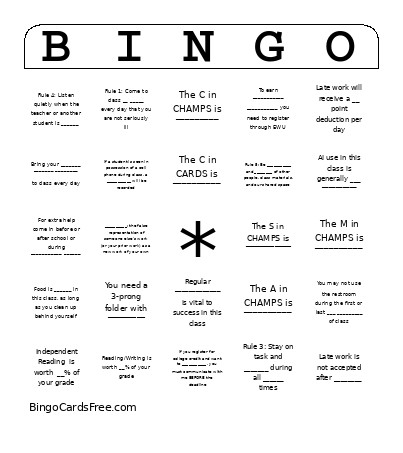 This Mrs. Brosseau 101 BINGO Cards Game contains following Words or Phrases: Independent Reading is worth __% of your grade, Vocabulary/Language is worth __% of your grade, Reading/Writing is worth __% of your grade, The C in CARDS is __________, The A in CARDS is __________, The R in CARDS is __________, The D in CARDS is __________, The S in CARDS is __________, The C in CHAMPS is _________, The H in CHAMPS is _________, The A in CHAMPS is __________, The M in CHAMPS is __________, The P in CHAMPS is __________, The S in CHAMPS is ___________, __________: the false representation of someone else's work (or your prior work) as a new work of your own, To earn ___________ ___________ you need to register through EWU, If you register for college credit and want to ___________, you must communicate with me BEFORE the deadline, Regular _____________ is vital to success in this class, Excessive absences will result in student/teacher _________ and/or a parent conference, Late work will receive a __ point deduction per day, Book Tasks will not be accepted after the ________ of the week they are assigned, When you enter the room, after you put your cell phone in the pocket, immediately ______ _____ _____, Plagiarism may result in: a zero on the assignment, a written referral, and _________ ________, You may not use the restroom during the first or last ___ _________ of class, ______ students will be allowed out of the room at a time, To ask to use the restroom, _________ _______ ______, If I am giving instructions or direct teaching, please wait until I have ___________ _________ to ask to use the restroom, Before you leave to use the restroom, _______ ______ on the Minga kiosk, At the end of class, remain ____ _____ ________ until you are dismissed, _____ ________ need to be stowed in the pocket as you enter class, AI use in this class is generally ___ __________, Bring your _______ _______ ________ to class every day, Rule 1: Come to class __ _____ every day that you are not seriously ill, Rule 2: Follow daily ________ without reminders, Rule 2: Follow directions the _____ time they are given, Rule 3: Stay on task and _______ during all ______ times, Rule 4: Listen quietly when the teacher or another student is ______, Rule 5: Be ___________ and ________ of other people, class materials, and our shared space, Food is ______ in this class, as long as you clean up behind yourself, When you are absent, _____ ___ when you return, You need a 3-prong folder with _________, You need a ________ notebook (college ruled), You need _____ highlighters, Late work is not accepted after ________, For extra help come in before or after school or during ___________ ______, If a student is seen in possession of a cell phone during class, a ___________ will be recorded, If a student need to access their phone during class, they should _______________ with the teacher in advance.