Print free Poco '25 bingo cards or personalize,
unlimited prints! Choose from 42,200+ templates or use our bingo card generator.
Add numbers, words, pictures, or all of them.
Play using PDF prints, virtual bingo cards,
and our virtual bingo caller, or mix physical and digital.
About: This bingo card is perfect for breaking the ice and celebrating unique experiences at youth retreats, cultural gatherings, or conventions. With a fun mix of travel tales, hidden talents, personal quirks, and creative hobbies, it's sure to spark lively conversations and help everyone discover surprising connections in a relaxed, friendly atmosphere.
How To: To get a printable PDF, click the Print button.
You can change the card quantity and other
printing preferences on the Print tab.
Grid items and free space text can be edited on the Basic tab.
Appearance can be exactly personalized on the
corresponding tabs, or you can quickly locate any setting
using the 🔍 tab.
How to play Poco '25 Bingo Cards?
Printed Caller: Print PDF calling list & calling slips and manually pick the slips.
Printed Players: Print PDF bingo cards and manually mark the cards.
Digital Players: Click on the Play button above, and then click on the 🎫 button.
Digital Caller: Click on the Play button above.
Hybrid Play: Choose any combination above.
For example, caller can be either Offline or Digital.
And players can be Offline or Digital or a mix of both.
Step-By-Step:
Start by saving the Poco '25 PDF by clicking on the "Print" button above.
Open the PDF and print it.
For random calling, you can print another copy of the call list, cut, fold and then pick them randomly at play time.
Cut the bingo cards at the cut lines if there are more than 1 bingo cards per page.
Distribute one card per player. For marking, you can use crayons. Crayons are the cheapest.
Choose one person to be the caller. If you are playing in a small group, the caller may also play along with their own Bingo card.
The caller begins the play by randomly pulling an item from the call list and announcing it to all players.
The players scan their cards to see if they have the called word. If they do, they dab that word.
The first player to complete a horizontal, vertical, or a diagonal line of crossed items yells "Bingo!" and wins the play.
The caller verifies that the items crossed off form a correct line as per the Bingo card and call list.
You can play for different patterns or a full card blackout for a longer play.
This Poco '25 Bingo Cards Game contains following Words or Phrases: Has been to India, Speaks 3 or more languages, Has been to YJA convention, Loves to cook, Plays a instrument, Can do a Bollywood dance, Has run a 5K, Loves to draw or paint, Enjoys reading books, Loves photography, Has made a TikTok, Has traveled to 10 or more countries, Has taken a road trip, Been camping, Has been on a cruise, Has visited a desert, Has gone zip-lining, Has been to a national park, Has the same birth month as you, Is left-handed, Can juggle, Wears glasses, Has never broken a bone, Has a hidden talent, Can say "hello" in 4 languages, Has met a celebrity, Knows a magic trick, Has a name that starts with the same letter as yours, Can solve a Rubik's cube, Has been on a road trip lasting longer than 10 hours, Has gone hiking on a mountain trail, Can write with both hands, Has performed on stage (music, dance, theater), Has collected something interesting (coins, stamps, etc.), Has taken a solo trip before, Can cook an entire meal from scratch, Prefers sweets over spicy food, Has never had coffee before, Can do a backflip or cartwheel, Can play more than one instrument, Can do a card trick, Has taken a spontaneous last-minute trip, Has a sibling at retreat, Has a first or last name with more than eight letters, Has attended a wedding in another country, Knows how to roller skate or ice skate, Likes pineapple on pizza, Has attended a sports game in the past year, Has lived in more than two different cities, Was born in a different state than where they live now, Can hold a plank for over one minute, Has traveled to another state just for food, Has taken a ferry ride, Has taken a trip with just one backpack, Prefers salty snacks over sweet snacks, Has fallen asleep during a movie at the theater.

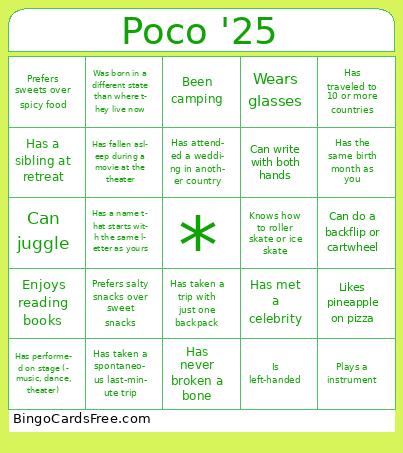 This Poco '25 Bingo Cards Game contains following Words or Phrases: Has been to India, Speaks 3 or more languages, Has been to YJA convention, Loves to cook, Plays a instrument, Can do a Bollywood dance, Has run a 5K, Loves to draw or paint, Enjoys reading books, Loves photography, Has made a TikTok, Has traveled to 10 or more countries, Has taken a road trip, Been camping, Has been on a cruise, Has visited a desert, Has gone zip-lining, Has been to a national park, Has the same birth month as you, Is left-handed, Can juggle, Wears glasses, Has never broken a bone, Has a hidden talent, Can say "hello" in 4 languages, Has met a celebrity, Knows a magic trick, Has a name that starts with the same letter as yours, Can solve a Rubik's cube, Has been on a road trip lasting longer than 10 hours, Has gone hiking on a mountain trail, Can write with both hands, Has performed on stage (music, dance, theater), Has collected something interesting (coins, stamps, etc.), Has taken a solo trip before, Can cook an entire meal from scratch, Prefers sweets over spicy food, Has never had coffee before, Can do a backflip or cartwheel, Can play more than one instrument, Can do a card trick, Has taken a spontaneous last-minute trip, Has a sibling at retreat, Has a first or last name with more than eight letters, Has attended a wedding in another country, Knows how to roller skate or ice skate, Likes pineapple on pizza, Has attended a sports game in the past year, Has lived in more than two different cities, Was born in a different state than where they live now, Can hold a plank for over one minute, Has traveled to another state just for food, Has taken a ferry ride, Has taken a trip with just one backpack, Prefers salty snacks over sweet snacks, Has fallen asleep during a movie at the theater.