Print free Puente bingo cards or adjust them,
limitless prints! Choose from 42,200+ templates or use our bingo card generator.
Add numbers, phrases, images, or all of them.
Play using printable PDF, digital bingo cards,
and our digital bingo caller, or go hybrid.
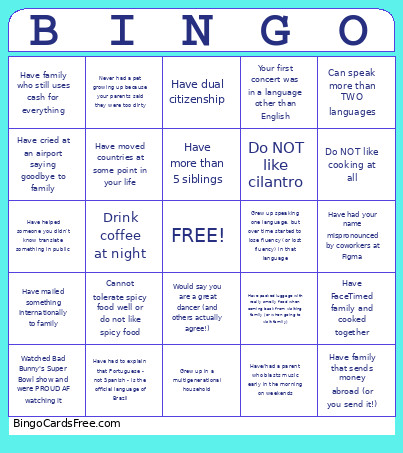
About: This bingo card celebrates the unique stories and cultural experiences that come from growing up in multicultural or immigrant families. Perfect for workplace diversity events or community gatherings, this card highlights shared memories and funny quirks many people with international backgrounds can relate to, sparking conversations and helping everyone feel seen and understood.
How To: To get a printable PDF, click the Print button.
You can adjust the card quantity and other
printing settings on the Print tab.
Grid items and free space content can be added on the Basic tab.
Appearance can be totally customized on the
corresponding tabs, or you can easily locate any setting
using the 🔍 tab.
How to play Puente Bingo Cards?
Online Players: Click on the Play button above, and then click on the 🎫 button.
Online Caller: Click on the Play button above.
Printed Caller: Print PDF calling list & calling slips and manually select the slips.
Printed Players: Print PDF bingo cards and manually scratch the cards.
Mixed Play: Select any combination above.
For example, caller can be either Offline or Online.
And players can be Offline or Online or a combo of both.
Step-By-Step:
Start by downloading the Puente Bingo PDF by clicking on the "Print" button above.
Open the PDF and print a hard copy.
For random calling, you can print another copy of the call list, cut, fold and then pull them randomly at play time.
Cut the bingo cards at the cut marks if there are greater than 1 bingo cards per page.
Distribute one card per player. For marking, you can use crayons. Crayons are the cheapest.
Select one person to be the caller. If you are playing in a small group, the caller can as well play along with their own Bingo card.
The caller starts the play by randomly picking an item from the call list and calling out it to all players.
The players check their cards to see if they have the called word. If they do, they cross off that word.
The first player to complete a horizontal, vertical, or a diagonal line of crossed items shouts "Bingo!" and wins the play.
The caller validates that the items marked form a proper line according to the Bingo card and call list.
You can play for different patterns or a full card blackout for a longer play.
This Puente Bingo Cards Game contains following Words or Phrases: Can speak more than TWO languages, Have had your name mispronounced by coworkers at Figma, Grew up speaking one language, but over time started to lose fluency (or lost fluency) in that language, Grew up in a multigenerational household, Have moved countries at some point in your life, Have more than 5 siblings, Have dual citizenship, Would say you are a great dancer (and others actually agree!), Have FaceTimed family and cooked together, Have mailed something internationally to family, Have family that sends money abroad (or you send it!), Watched Bad Bunny's Super Bowl show and were PROUD AF watching it, Have packed luggage with really smelly food when coming back from visiting family (or when going to visit family), Have had to explain that Portuguese - not Spanish - is the official language of Brazil, Have cried at an airport saying goodbye to family, Have family who still uses cash for everything, Have/had a parent who blasts music early in the morning on weekends, Your first concert was in a language other than English, Have helped someone you didn't know translate something in public, Do NOT like cilantro, Do NOT like cooking at all, Drink coffee at night, Cannot tolerate spicy food well or do not like spicy food, Never had a pet growing up because your parents said they were too dirty.

 This Puente Bingo Cards Game contains following Words or Phrases: Can speak more than TWO languages, Have had your name mispronounced by coworkers at Figma, Grew up speaking one language, but over time started to lose fluency (or lost fluency) in that language, Grew up in a multigenerational household, Have moved countries at some point in your life, Have more than 5 siblings, Have dual citizenship, Would say you are a great dancer (and others actually agree!), Have FaceTimed family and cooked together, Have mailed something internationally to family, Have family that sends money abroad (or you send it!), Watched Bad Bunny's Super Bowl show and were PROUD AF watching it, Have packed luggage with really smelly food when coming back from visiting family (or when going to visit family), Have had to explain that Portuguese - not Spanish - is the official language of Brazil, Have cried at an airport saying goodbye to family, Have family who still uses cash for everything, Have/had a parent who blasts music early in the morning on weekends, Your first concert was in a language other than English, Have helped someone you didn't know translate something in public, Do NOT like cilantro, Do NOT like cooking at all, Drink coffee at night, Cannot tolerate spicy food well or do not like spicy food, Never had a pet growing up because your parents said they were too dirty.