
Sampires Session 2 Bingo Cards - Print Free or Customize
Print free Sampires Session 2 bingo cards or alter them, unlimited prints! Select from 42,200+ designs or use the bingo card generator. Add numbers, words, pictures, or mix them all. Play using PDF printouts, digital bingo cards, and the digital bingo caller, or go hybrid.
About: This bingo card is perfect for a chaotic and hilarious Dungeons & Dragons or roleplay streaming session, especially one centered around vampires and quirky characters. With moments ranging from epic fails to accidental reveals and in-jokes, it sets a fun-loving, unpredictable mood that viewers or players will love. Great for keeping everyone engaged during wild, lore-heavy campaigns!
How To: To save a PDF to print, click the Print button. You can alter the number of cards and other print preferences on the Print tab. Grid items and free space text can be added on the Basic tab. Appearance can be fully personalized on the relevant tabs, or you can quickly find any option using the 🔍 tab.
How to play Sampires Session 2 Bingo Cards?
- Virtual Caller: Click on the Play button above.
- Paper Players: Print PDF bingo cards and physically mark the cards.
- Virtual Players: Click on the Play button above, and then click on the 🎫 button.
- Paper Caller: Print PDF calling list & calling slips and physically select the slips.
- Mixed Play: Select any combination above. For instance, caller can be either Paper or Virtual. And players can be Paper or Virtual or a combination of both.
Step-By-Step:
- Start by getting the Sampires Session 2 PDF by clicking on the "Print" button above.
- Open the PDF and print a hard copy.
- For random drawing, you can print another copy of the call list, cut, fold and then draw them randomly at play time.
- Cut the bingo cards at the cut lines if there are greater than 1 bingo cards per page.
- Give one card to each player. For marking, you can use pens. Crayons cost the least.
- Select one person to be the caller. If you are playing in a small group, the caller can also play along with their own Bingo card.
- The caller starts the game by randomly drawing an item from the call list and saying it to all players.
- The players scan their cards to see if they have the called word. If they do, they cross off that word.
- The first player to complete a horizontal, vertical, or a diagonal line of marked items shouts "Bingo!" and wins the play.
- The caller validates that the items marked form a proper line according to the Bingo card and call list.
- You can play for different patterns or a full card blackout for a longer play.
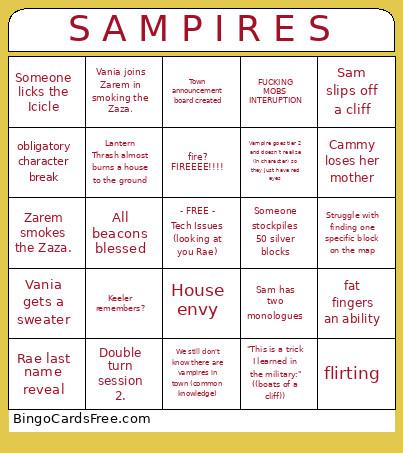 This Sampires Session 2 Bingo Cards Game contains following Words or Phrases: Human fatfingers ability, Von Whamphyre mention, Sam slips off a cliff, Someone will struggle with farm animals for ~30 minutes, Vampires turn a beacon: Everyone - "Did you feel that?", All beacons blessed, Earthshattering reveal unrelated to Vampires., Anne gets called Cleo; Mina gets called Lenny; etc., Someone falls off the Lighthouse, fat fingers an ability, Expedition to find the beacons, Double turn session 2., Loud public beef, Sam has two monologues, All beacons concentrated, "I'm something worse", Vania gets a sweater, Vampire reveal within 30 minutes of their turning, Someone gets accused of killing another town member, Mina misses everything (like pearl), Vampire fatfingers ability, Roommates break up, fire? FIREEEE!!!!, Keeler remembers?, Forgot to unpause recording after the break, Cammy skull shenanagins, We still don't know there are vampires in town (common knowledge), Zarem smokes the Zaza., Someone kills Clover's Horse / Ginger's Dogs., Lantern Thrash sets a house on fire, flirting, Town announcement board created, Vampire goes tier 2 and doesn't realize (in character) so they just have red eyes, Clover is allowed to progress his plot, Someone gets caught desecrating a beacon, Vampire outs themself on accident, "I forgor", Cammy loses her mother, Someone accidentally calls Cammy "Skitty", Storm call fat finger, Lantern Thrash almost burns a house to the ground, People forget to unmute more than three seperate times, Someone licks the Icicle, FUCKING MOBS INTERUPTION, New outfit changes, Struggle with finding one specific block on the map, House envy, Flashback crashes someone again, Vania joins Zarem in smoking the Zaza., Someone learns something they weren't meant to., "This is a trick I learned in the military:" ((boats of a cliff)), obligatory character break, Someone does parkour tower and falls off, Vania Ginger Sam trio., Keeler sees a vampire but forgets, "Can I come in?" "No", Skitty gets lost in frostvein again, Rae last name reveal, The server continuously fails to pronounce Shadow's character name., Someone stockpiles 50 silver blocks, Someone gets lost in a cave for a significant period of time, Someone's house burns down completely by accident.