
Simiona Bingo Cards - Print Free or Customize
Print free Simiona bingo cards or personalize, unlimited cards! Pick from 42,200+ templates or use the bingo card generator. Add numbers, words, pictures, or mix them all. Play using printable PDF, digital bingo cards, and the digital bingo caller, or combine all formats.
About: This bingo card is packed with playful number nicknames, cheeky rhymes, and cultural references that add extra fun to any game night. Its lighthearted tone and mix of familiar phrases make it great for parties, family gatherings, or community events looking to put a creative twist on classic bingo. Everyone will enjoy calling out these lively names!
How To: To download a PDF to print, click the Print button. You can alter the card quantity and other printing preferences on the Print tab. Grid items and free space text can be edited on the Basic tab. Appearance can be completely customized on the relevant tabs, or you can easily locate any preference using the 🔍 tab.
How to play Simiona Bingo Cards?
- Digital Players: Click on the Play button above, and then click on the 🎫 button.
- Paper Players: Print PDF bingo cards and physically mark the cards.
- Digital Caller: Click on the Play button above.
- Paper Caller: Print PDF calling list & calling slips and physically draw the slips.
- Hybrid Play: Select any combination above. For example, caller can be either Printed or Digital. And players can be Printed or Digital or a combo of both.
Step-By-Step:
- Start by getting the Simiona PDF by clicking on the "Print" button above.
- Open the PDF and print it.
- For random drawing, you can print another copy of the call list, cut, fold and then pull them randomly at play time.
- Cut the bingo cards at the cut lines if there are more than 1 bingo cards per page.
- Distribute one card per player. For marking, you can use markers. Crayons cost the least.
- Select one person to be the caller. If you are playing in a small group, the caller may as well play along with their own Bingo card.
- The caller opens the play by randomly picking an item from the call list and saying it to everyone.
- The players look at their cards to see if they have the announced word. If they do, they mark that word.
- The first player to finish a horizontal, vertical, or a diagonal line of marked items shouts "Bingo!" and wins the game.
- The caller validates that the items crossed off form a proper line according to the Bingo card and call list.
- You can play for different patterns or a full card blackout for an extended game.
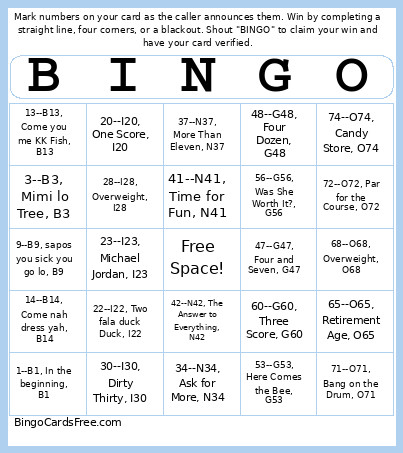 This Simiona Bingo Cards Game contains following Words or Phrases: 1--B1, In the beginning, B1, 2--B2, Baby duck duck, B2, 3--B3, Mimi lo Tree, B3, 4--B4, long time ago, B4, 5--B5, Number blo oketa single, B5, 6--B6, Relax to death, B6, 7--B7, Baby wetem axe, B7, 8--B8, the honey B8, 9--B9, sapos you sick you go lo, B9, 10--B10, kneelim na ya, B10, 11--B11, Ŋuru fall down, B11, 12--B12, One Dozen Egg, B12, 13--B13, Come you me KK Fish, B13, 14--B14, Come nah dress yah, B14, 15--B15, Small girl yet, B15, -c-, -c-, 16--I16, Sweet Sixteen, I16, 17--I17, Dancing Queen, I17, 18--I18, Now You Can Vote, I18, 19--I19, Old Enough, I19, 20--I20, One Score, I20, 21--I21, Key to the Door, I21, 22--I22, Two fala duck Duck, I22, 23--I23, Michael Jordan, I23, 24--I24, Two Dozen, I24, 25--I25, Quarter Century, I25, 26--I26, Pick and Mix, I26, 27--I27, Gateway to Heaven, I27, 28--I28, Overweight, I28, 29--I29, Rise and Shine, I29, 30--I30, Dirty Thirty, I30, -c-, -c-, 31--N31, Get Up and Run, N31, 32--N32, Buckle My Shoe, N32, 33--N33, All the Threes, Rolling Trees, N33, 34--N34, Ask for More, N34, 35--N35, Jump and Jive, N35, 36--N36, Three Dozen, N36, 37--N37, More Than Eleven, N37, 38--N38, Christmas Cake, N38, 39--N39, Jack Benny's Age, N39, 40--N40, Life Begins at 40, N40, 41--N41, Time for Fun, N41, 42--N42, The Answer to Everything, N42, 43--N43, Pain in the Knee, N43, 44--N44, Magnum, N44, 45--N45, Halfway There, N45, -c-, -c-, 46--G46, Up to Tricks, G46, 47--G47, Four and Seven, G47, 48--G48, Four Dozen, G48, 49--G49, 49ers, G49, 50--G50, Half a Century, G50, 51--G51, Area 51, G51, 52--G52, Deck of Cards, G52, 53--G53, Here Comes the Bee, G53, 54--G54, Clean the Floor, G54, 55--G55, Speed Limit, G55, 56--G56, Was She Worth It?, G56, 57--G57, Heinz Varieties, G57, 58--G58, Make Them Wait, G58, 59--G59, Brighton Line, G59, 60--G60, Three Score, G60, -c-, -c-, 61--O61, Baker's Bun, O61, 62--O62, Turn on the Screw, O62, 63--O63, Tickety Boo, O63, 64--O64, Nintendo 64, O64, 65--O65, Retirement Age, O65, 66--O66, Route 66, O66, 67--O67, Made in Heaven, O67, 68--O68, Overweight, O68, 69--O69, Dinner for Two, O69, 70--O70, Three Score and Ten, O70, 71--O71, Bang on the Drum, O71, 72--O72, Par for the Course, O72, 73--O73, Queen Bee, O73, 74--O74, Candy Store, O74, 75--O75, Top of the Shop, O75.