
Slasher Movies Bingo Cards - Print Free or Customize
Print free Slasher Movies bingo cards or adjust them, unlimited cards! Pick from 41,500+ templates or use our bingo card generator. Add numbers, phrases, images, or mix them all. Play using PDF printouts, digital bingo cards, and our digital bingo caller, or mix physical and digital.
About: This bingo card is perfect for a horror movie night or a spooky-themed party, capturing the classic tropes and chilling moments found in slasher films. It’s packed with suspenseful scenarios, sudden scares, and creepy settings, making every viewing experience more interactive and fun—especially for fans who love to spot familiar horror clichés with friends.
How To: To save a PDF to print, click the Print button. You can change the number of cards and other printing options on the Print tab. Grid items and free space text can be changed on the Basic tab. Appearance can be highly personalized on the corresponding tabs, or you can quickly find any preference on the 🔍 tab.
How to play Slasher Movies Bingo Cards?
- Digital Players: Click on the Play button above, and then click on the 🎫 button.
- Digital Caller: Click on the Play button above.
- Paper Caller: Print PDF calling list & calling slips and manually pick the slips.
- Paper Players: Print PDF bingo cards and manually scratch the cards.
- Combo Mode: Select any combination above. For instance, caller can be either Offline or Digital. And players can be Offline or Digital or a mix of both.
Step-By-Step:
- Start by saving the Slasher Movies PDF by clicking on the "Print" button above.
- Open the PDF and print it.
- For random drawing, you can print another copy of the call list, cut, fold and then draw them randomly at play time.
- Cut the bingo cards at the cut marks if there are more than 1 bingo cards per page.
- Give one card to each player. For marking, you can use pens. Crayons cost the least.
- Select one person to be the caller. If you are playing in a small group, the caller can also play along with their own Bingo card.
- The caller initiates the game by randomly drawing an item from the call list and calling out it to all players.
- The players look at their cards to see if they have the called word. If they do, they mark that word.
- The first player to finish a horizontal, vertical, or a diagonal line of marked items shouts "Bingo!" and wins the game.
- The caller verifies that the items marked form a correct line according to the Bingo card and call list.
- You can play for multiple patterns or a full card blackout for a longer game.
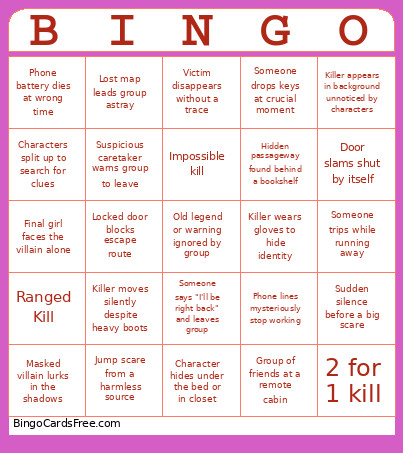 This Slasher Movies Bingo Cards Game contains following Words or Phrases: Blood-curdling scream echoes, Broken window used for escape, Camera pans slowly down empty hallway, Car won't start during escape attempt, Character hides under the bed or in closet, Character investigates strange noise alone, Character is grabbed from behind, Character pretends to be dead to survive, Characters split up to search for clues, Creepy abandoned house explored at night, Creepy music plays unexpectedly, Door slams shut by itself, Eerie message written on wall, Final girl faces the villain alone, Flashlight flickers at the worst moment, Fog rolls in, reducing visibility, Group of friends at a remote cabin, Hidden passageway found behind a bookshelf, Jump scare from a harmless source, Locked door blocks escape route, Lost map leads group astray, Masked villain lurks in the shadows, Mirror reveals something scary behind character, Mysterious footprints found near campsite, Mysterious symbol found carved into tree, Object falls, startling everyone, Oddly specific news report on radio or TV, Old legend or warning ignored by group, Old photograph hints at villain's past, Pet senses danger before anyone else does, Phone battery dies at wrong time, Phone lines mysteriously stop working, Power outage in the middle of nowhere, Rain pours down, making roads impassable, Shadow passes across window suddenly, Someone drops keys at crucial moment, Someone reads an ominous diary entry, Someone says "I'll be right back" and leaves group, Someone trips while running away, Stormy night with thunder and lightning, Sudden silence before a big scare, Suspicious caretaker warns group to leave, Unexplained scream heard from distance, Victim disappears without a trace, Killer appears in background unnoticed by characters, Killer disappears after being defeated, Killer moves silently despite heavy boots, Killer returns for one last scare, Killer wears gloves to hide identity, Weapon conveniently found just in time, Killer Falls Over, Old person gives warning, Ranged Kill, 2 for 1 kill, Impossible kill.