Songs About Sports Volume 2 Bingo Cards - Print Free or Customize
Print free Songs About Sports Volume 2 bingo cards or customize,
unlimited prints! Select from 42,200+ templates or use our bingo card generator.
Add numbers, phrases, photos, or all of them.
Play using PDF prints, virtual bingo cards,
and our virtual bingo caller, or combine all formats.
About: This bingo card is packed with classic pump-up anthems, iconic sports themes, and timeless feel-good hits, perfect for energizing any game day or sports-themed party. With a mix of rock, pop, and motivational tracks, it’s designed to get fans of all ages excited—whether you're hosting a Super Bowl party or a music trivia night with friends.
How To: To save a PDF to print, click the Print button.
You can adjust the card quantity and other
print options on the Print tab.
Grid items and free space text can be changed on the Basic tab.
Appearance can be entirely customized on the
relevant tabs, or you can easily search any setting
using the 🔍 tab.
How to play Songs About Sports Volume 2 Bingo Cards?
Virtual Caller: Click on the Play button above.
Paper Players: Print PDF bingo cards and manually mark the cards.
Virtual Players: Click on the Play button above, and then click on the 🎫 button.
Paper Caller: Print PDF calling list & calling slips and manually pick the slips.
Combo Play: Pick any combination above.
For example, caller can be either Offline or Virtual.
And players can be Offline or Virtual or a combination of both.
Step-By-Step:
Start by saving the Songs About Sports Volume 2 PDF by clicking on the "Print" button above.
Open the PDF and print a hard copy.
For random drawing, you can print another copy of the call list, cut, fold and then pull them randomly at play time.
Cut the bingo cards at the cut marks if there are greater than 1 bingo cards per page.
Distribute one card per player. For marking, you can use pens. Crayons cost the least.
Pick one person to be the caller. If you are playing in a small group, the caller may as well play along with their own Bingo card.
The caller starts the play by randomly drawing an item from the call list and saying it to all players.
The players scan their cards to see if they have the called word. If they do, they mark that word.
The first player to finish a horizontal, vertical, or a diagonal line of marked items yells "Bingo!" and wins the game.
The caller checks that the items crossed off form a correct line as per the Bingo card and call list.
You can play for multiple patterns or a full card blackout for a longer game.
This Songs About Sports Volume 2 Bingo Cards Game contains following Words or Phrases: The Boxer Simon & Garfunkel, Surfin' U.S.A. - The Beach Boys, We Are The Champions Queen, Centerfield John Fogerty, Basketball Kurtis Blow, Sweet Caroline Neil Diamond, Another One Bites The Dust - Queen, The Winner Takes It All ABBA, The Distance CAKE, We're Gonna Win Bryan Adams, Kung Fu Fighting Carl Douglas, Play the Game Kodaline, Playing with the Boys Kenny Loggins, Glory Days Bruce Springsteen, Na Na Hey Hey Kiss Him Goodbye Steam, Jackie Robinson Everclear, Games People Play The Alan Parsons Project, Hurricane Bob Dylan, Eye of the Tiger Survivor, Running With The Night Lionel Richie, Running On Empty Jackson Browne, Physical - Olivia Newton-John, Jump - 2015 Remaster Van Halen, Seven Nation Army The White Stripes, Cheerleader (Felix Jaehn Remix) OMI and Felix Jaehn, The Best Tina Turner, Don't Stop Believin' Journey, No Surrender Bruce Springsteen, We Will Rock You Queen, AOK Tai Verdes, All Star Smash Mouth, Thunderstruck AC/DC, Welcome To The Jungle Guns N' Roses, The Final Countdown Europe, Gonna Fly Now Bill Conti, Jump Around House Of Pain, Hells Bells AC/DC, Unstoppable Sia, Livin' On A Prayer Bon Jovi, Right Field Peter, Paul and Mary, Get Ready for This 2 Unlimited, Sirius The Alan Parsons Project, Slide The Goo Goo Dolls, Run To You Bryan Adams, All I Do Is Win - DJ Khaled, Everybody Wants To Rule The World Tears For Fears, New Kid in Town - Eagles, Man I Need Olivia Dean, Blow the Whistle Too $hort, Dancing On My Own - Tiësto Remix Calum Scott.

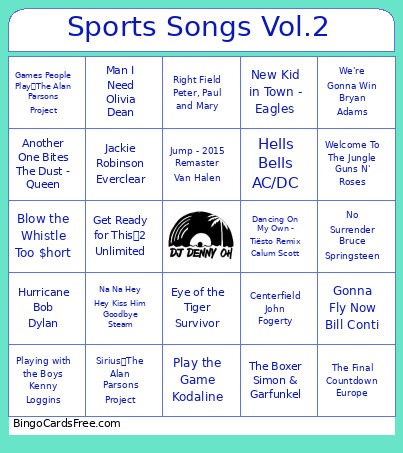 This Songs About Sports Volume 2 Bingo Cards Game contains following Words or Phrases: The Boxer Simon & Garfunkel, Surfin' U.S.A. - The Beach Boys, We Are The Champions Queen, Centerfield John Fogerty, Basketball Kurtis Blow, Sweet Caroline Neil Diamond, Another One Bites The Dust - Queen, The Winner Takes It All ABBA, The Distance CAKE, We're Gonna Win Bryan Adams, Kung Fu Fighting Carl Douglas, Play the Game Kodaline, Playing with the Boys Kenny Loggins, Glory Days Bruce Springsteen, Na Na Hey Hey Kiss Him Goodbye Steam, Jackie Robinson Everclear, Games People Play The Alan Parsons Project, Hurricane Bob Dylan, Eye of the Tiger Survivor, Running With The Night Lionel Richie, Running On Empty Jackson Browne, Physical - Olivia Newton-John, Jump - 2015 Remaster Van Halen, Seven Nation Army The White Stripes, Cheerleader (Felix Jaehn Remix) OMI and Felix Jaehn, The Best Tina Turner, Don't Stop Believin' Journey, No Surrender Bruce Springsteen, We Will Rock You Queen, AOK Tai Verdes, All Star Smash Mouth, Thunderstruck AC/DC, Welcome To The Jungle Guns N' Roses, The Final Countdown Europe, Gonna Fly Now Bill Conti, Jump Around House Of Pain, Hells Bells AC/DC, Unstoppable Sia, Livin' On A Prayer Bon Jovi, Right Field Peter, Paul and Mary, Get Ready for This 2 Unlimited, Sirius The Alan Parsons Project, Slide The Goo Goo Dolls, Run To You Bryan Adams, All I Do Is Win - DJ Khaled, Everybody Wants To Rule The World Tears For Fears, New Kid in Town - Eagles, Man I Need Olivia Dean, Blow the Whistle Too $hort, Dancing On My Own - Tiësto Remix Calum Scott.