Print free surprise bingo cards or adjust them,
limitless cards! Select from 42,200+ designs or use our bingo card generator.
Add numbers, words, pictures, or mix them all.
Play using PDF printouts, virtual bingo cards,
and our virtual bingo caller, or mix physical and digital.
About: This bingo card is tailor-made for Apple retail team members during a big iPhone launch. The focus is on sales success, customer engagement, and seamless service—perfect for motivating a sales team or making a launch day more fun. It encourages friendly competition while covering product demos, service excellence, and some lighthearted milestones unique to Apple culture.
How To: To save a printable PDF, click the Print button.
You can alter the card quantity and other
printing settings on the Print tab.
Grid items and free space content can be edited on the Basic tab.
Appearance can be totally customized on the
corresponding tabs, or you can quickly locate any setting
on the 🔍 tab.
How to play surprise Bingo Cards?
Printed Players: Print PDF bingo cards and manually scratch the cards.
Online Players: Click on the Play button above, and then click on the 🎫 button.
Online Caller: Click on the Play button above.
Printed Caller: Print PDF calling list & calling slips and manually pick the slips.
Combo Play: Choose any combination above.
For instance, caller can be either Printed or Online.
And players can be Printed or Online or a combination of both.
Step-By-Step:
Start by saving the surprise PDF by clicking on the "Print" button above.
Open the PDF and print a hard copy.
For random calling, you can print another copy of the call list, cut, fold and then draw them randomly at play time.
Cut the bingo cards at the cut lines if there are more than 1 bingo cards per page.
Distribute one card per player. For marking, you can use pens. Crayons are the cheapest.
Choose one person to be the caller. If you are playing in a small group, the caller may also play along with their own Bingo card.
The caller begins the game by randomly pulling an item from the call list and calling out it to all players.
The players check their cards to see if they have the announced word. If they do, they cross off that word.
The first player to finish a horizontal, vertical, or a diagonal line of crossed items announces "Bingo!" and wins the game.
The caller confirms that the items marked form a correct line according to the Bingo card and call list.
You can play for multiple patterns or a full card blackout for an extended game.
This surprise Bingo Cards Game contains following Words or Phrases: Overcome objection using a Services Demo, Found the Dogcow in iOS 27, Attach Applecare to 10+ pickups, Sold 10+ 20w/40w adapters, Reverse Run all trade-ins w/last 4 of serial # in comments, Demo extend & reframe, Confirmed customer Apple Account password before sale, Setup new iPhone + new Apple Watch combo, Attached extra Apple Watch band to sale, Demo pro camera features, Discussed HRV with a customer, Demo "Describe a Shortcut", Sold 5 or more Wrist Straps, Supported Operations, Supported On Point, Used Connect & Personalize on every eligible sale, Shared a Peer to Peer Recognition, This is your 1st ever iPhone launch, This is your 5th+ iPhone launch, This is your 10th+ iPhone launch, Facilitated Apple Upgrade as payment, Mentioned Apple Upgrade in every sale, Demo Siri AI in every sale, Accessory attach to 10+ pickups, Sold 15+ iPhone cases, Add AppleCare to 15+ devices, Reset Apple Watch table after each sale, Business Intro, Connected business to sale, Converted AppleCare one to AppleCare Family, Conversion, Deliver 100+ runs, Signed up for Today at Apple, TRIFECTA: Biz Intro & AppleCare & Service (on one transaction), QUADFECTA: Apple Upgrade & Biz intro & AppleCare & Service.

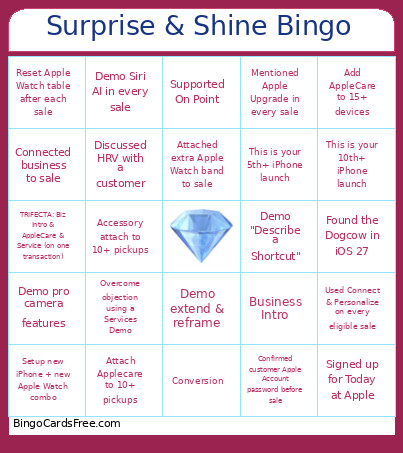 This surprise Bingo Cards Game contains following Words or Phrases: Overcome objection using a Services Demo, Found the Dogcow in iOS 27, Attach Applecare to 10+ pickups, Sold 10+ 20w/40w adapters, Reverse Run all trade-ins w/last 4 of serial # in comments, Demo extend & reframe, Confirmed customer Apple Account password before sale, Setup new iPhone + new Apple Watch combo, Attached extra Apple Watch band to sale, Demo pro camera features, Discussed HRV with a customer, Demo "Describe a Shortcut", Sold 5 or more Wrist Straps, Supported Operations, Supported On Point, Used Connect & Personalize on every eligible sale, Shared a Peer to Peer Recognition, This is your 1st ever iPhone launch, This is your 5th+ iPhone launch, This is your 10th+ iPhone launch, Facilitated Apple Upgrade as payment, Mentioned Apple Upgrade in every sale, Demo Siri AI in every sale, Accessory attach to 10+ pickups, Sold 15+ iPhone cases, Add AppleCare to 15+ devices, Reset Apple Watch table after each sale, Business Intro, Connected business to sale, Converted AppleCare one to AppleCare Family, Conversion, Deliver 100+ runs, Signed up for Today at Apple, TRIFECTA: Biz Intro & AppleCare & Service (on one transaction), QUADFECTA: Apple Upgrade & Biz intro & AppleCare & Service.