
Survivor 50 Bingo Cards - Print Free or Customize
Print free Survivor 50 bingo cards or alter them, limitless prints! Select from 42,200+ designs or use the bingo card generator. Add numbers, phrases, pictures, or mix them all. Play using printed PDF, digital bingo cards, and the digital bingo caller, or combine all formats.
About: This bingo card is tailor-made for diehard Survivor fans celebrating the show's 50th season. Packed with classic moments, inside jokes, and nods to legendary players, it perfectly captures the unpredictable, dramatic, and hilarious spirit of Survivor. Use it during viewing parties or fan gatherings to add an extra layer of fun to every tribal council twist and challenge showdown.
How To: To save a PDF to print, click the Print button. You can adjust the number of cards and other printing settings on the Print tab. Grid items and free space content can be edited on the Basic tab. Appearance can be fully personalized on the corresponding tabs, or you can quickly find any preference on the 🔍 tab.
How to play Survivor 50 Bingo Cards?
- Paper Caller: Print PDF calling list & calling slips and manually choose the slips.
- Paper Players: Print PDF bingo cards and manually mark the cards.
- Digital Caller: Click on the Play button above.
- Digital Players: Click on the Play button above, and then click on the 🎫 button.
- Mixed Mode: Pick any combination above. For instance, caller can be either Offline or Digital. And players can be Offline or Digital or a combo of both.
Step-By-Step:
- Start by downloading the Survivor 50 PDF by clicking on the "Print" button above.
- Open the PDF and print it.
- For random calling, you can print another copy of the call list, cut, fold and then pull them randomly at play time.
- Cut the bingo cards at the cut lines if there are greater than 1 bingo cards per page.
- Give one card to each player. For marking, you can use markers. Crayons cost the least.
- Pick one person to be the caller. If you are playing in a small group, the caller can as well play along with their own Bingo card.
- The caller opens the game by randomly picking an item from the call list and announcing it to everyone.
- The players scan their cards to see if they have the announced word. If they do, they cross off that word.
- The first player to complete a horizontal, vertical, or a diagonal line of marked items shouts "Bingo!" and wins the play.
- The caller checks that the items crossed off form a correct line as per the Bingo card and call list.
- You can play for multiple patterns or a full card blackout for an extended play.
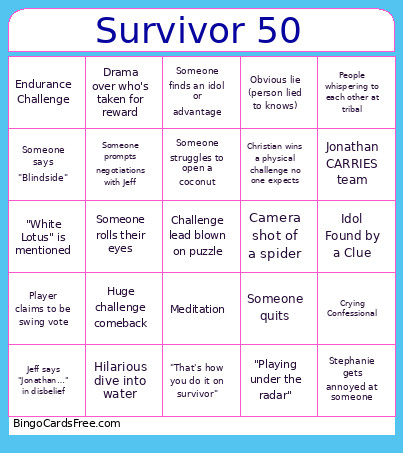 This Survivor 50 Bingo Cards Game contains following Words or Phrases: Coach calls himself "The Dragon Slayer", Camera shot of a snake, Camera shot of a spider, Rizo says "R-I-Z-G-O-D RIZGOD BAYBEE", Christian mentions something super nerdy, Someone struggles to open a coconut, Tribe makes fire, Someone cries, Jonathan does an impressive feat of strength, Jeff says "Dig Deep", Someone finds an idol or advantage, Jeff says "50 seasons", Jeff says "The game has changed", Dramatic helicopter or boat arrival shot, Jeff says "Got nothing for ya", Sunset or sunrise shot, People whispering to each other at tribal, Someone says "Blindside", Underwater camera shot, Someone rolls their eyes, Ozzy goes fishing, Jeff says "Jonathan…" in disbelief, Someone does "tai chi" or "meditation", "White Lotus" is mentioned, Someone says "Old School", Emily bonds unexpectedly, Wide overhead drone shot of challenge, Night vision shot, Camera zooms in on an advantage or idol, Subtitles are used, An alliance is formed with a handshake or fistbump, Someone comes up with a name for an alliance, Someone climbs a tree, Medical is called in, Someone wears a buff as a tube top, Idol is played incorrectly, Someone is sent home with an idol, Charlie mentions "Taylor Swift", "That's how you do it on survivor", Christian wins a physical challenge no one expects, Someone eats a bug, Have/kill pet chicken, Jeff makes a sassy comment, Someone quits, Coach and Ozzy alliance, Someone prompts negotiations with Jeff, Angelina brings up borrowing someone's jacket, Someone spells someone's name wrong at tribal council, Jeff in a cowboy hat, Jonathan CARRIES team, Confessional trashing another player, Crying Confessional, Close up of shocked face after tribal, Celebrity Cameo, Bad weather, Hilarious dive into water, Challenge lead blown on puzzle, Frustration at JOE'S gameplay, Men alliance, Women alliance, Old school alliance, Old people not understanding a pop culture ref, Buff worn in an interesting way, Ozzy wins individual immunity, Water well strategy, Meditation, "Damage control", Survivor 50 Challenge mention, Coach x Charlie alliance, Obvious lie (person lied to knows), "Want to play with strong players", Ozzy being entitled, Bromance, Huge challenge comeback, Christian does a puzzle, "Keep the tribe strong", Unecessary idol play, Weird jury outfit, Stupid metaphor, Somebody throws someone under the bus, Player claims to be swing vote, Someone says "RIZGOD" (not him), Fear of women's alliance, Rock paper scissors decision, Tree mail is read, "Playing under the radar", Drama over who's taken for reward, Colby visible frustrated after loosing, Billie Eilish boomerang idol, Cirie sits out a challenge, Someone in the room mentions they love christian hubicki (cannot be prompted or you), Stephanie gets annoyed at someone, "The last time I was on the island", Tina or Lorrie refer to Colby being "The Best", Shot of snake, Eating Coconuts, Buff worn as a bra, Underwear, Endurance Challenge, Food Challenge, Some type of maze challenge, Balance Challenge, Hanging Challenge, Idol Found by rock, Idol Found in a tree, Idol Found by a Clue, Good/Bad Advantage.