
XJ2 Card Bingo - Print Free or Customize
Print free XJ2 Card bingo or personalize, unlimited cards! Pick from 41,100+ designs or use our bingo card generator. Add numbers, words, pictures, or all of them. Play using printed PDF, online bingo cards, and our online bingo caller, or mix physical and digital.
About: This bingo card is all about capturing the drama, strategy, and unpredictable moments of Survivor. With a mix of classic phrases, game twists, player lingo, and memorable Jeff Probst moments, it's perfect for viewing parties with die-hard fans or office pools. Get ready to cheer each time someone adapts, risks it all, or delivers an unforgettable Tribal Council moment.
How To: To download a PDF to print, click the Print button. You can adjust the card count and other printing options on the Print tab. Grid items and free space text can be added on the Basic tab. Appearance can be exactly personalized on the relevant tabs, or you can quickly find any option using the 🔍 tab.
How to play XJ2 Card Bingo?
- Digital Caller: Click on the Play button above.
- Paper Players: Print PDF bingo cards and physically scratch the cards.
- Digital Players: Click on the Play button above, and then click on the 🎫 button.
- Paper Caller: Print PDF calling list & calling slips and physically pick the slips.
- Hybrid Mode: Select any combination above. For instance, caller can be either Printed or Digital. And players can be Printed or Digital or a combo of both.
Step-By-Step:
- Start by downloading the XJ2 Card PDF by clicking on the "Print" button above.
- Open the PDF and print it.
- For random drawing, you can print another copy of the call list, cut, fold and then pick them randomly at play time.
- Cut the bingo cards at the cut lines if there are greater than 1 bingo cards per page.
- Distribute one card per player. For marking, you can use markers. Crayons are the cheapest.
- Select one person to be the caller. If you are playing in a small group, the caller may also play along with their own Bingo card.
- The caller begins the game by randomly picking an item from the call list and announcing it to all players.
- The players check their cards to see if they have the called word. If they do, they dab that word.
- The first player to finish a horizontal, vertical, or a diagonal line of marked items shouts "Bingo!" and wins the play.
- The caller verifies that the items marked form a correct line as per the Bingo card and call list.
- You can play for different patterns or a full card blackout for a longer play.
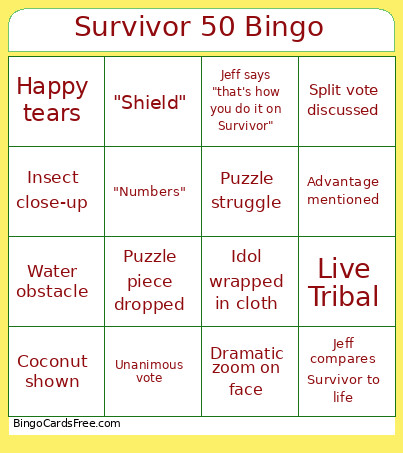 This XJ2 Card Bingo Game contains following Words or Phrases: "Adapt", "Agency", "Alliances", "At the end of the day", "Big move", "Blindside", "Community", "Control the game", "Crack", "Dream", "Flip", "Goat", "Historic", "Loyalty", "My game", "Numbers", "On the bottom", "Ownership", "Paranoid", "Perception", "Power position", "Resume", "Ride or die", "Risk", "Shield", "Social game", "Stick to the plan", "Target", "This means everything", "Threat level", "Threat", "Too comfortable", "Trust", "Under the radar", "Voting with my heart", "Working relationship", Advantage expires, Advantage mentioned, Awkward silence at Tribal, Balance beam fall, Camp argument, Camp celebration, Camp life montage, Camp repair, Camp strategy at the well, Career mentioned, Castaway talks to camera alone, Challenge bench reaction, Challenge comeback, Challenge domination, Challenge sit-out strategy, Challenge timeout, Close-up of fire, Coconut shown, Commercial cliffhanger, Confessional fakeout, Crab shown, Dramatic music fakeout, Dramatic reaction after vote, Dramatic torch walk, Dramatic zoom on face, Emotional breakthrough, Emotional confessional, Emotional family story, Episode title spoken, Fake idol shown, Fake laughter, Family mentioned, Firemaking challenge lopsided, Firewood gathering, Fishing scene, Food reward discussed, Happy tears, Hero music, Idol clue shown, Idol flashback, Idol found, Idol hidden, Idol hunt, Idol mentioned but not played, Idol play fakeout, Idol wrapped in cloth, Insect close-up, Jeff asks about loyalty, Jeff asks about trust, Jeff calls someone out, Jeff compares Survivor to life, Jeff laughs at his own joke, Jeff repeats a phrase dramatically, Jeff says "dig deep", Jeff says "earned", Jeff says "for the first time ever", Jeff says "safe tonight", Jeff says "survivors ready?", Jeff says "that's how you do it on Survivor", Jeff says "wanna know what you're playing for?", Last-second finish, Live Tribal, Long pause before votes, Lost flint, Name graphic appears, Near photo finish, Ocean drone shot, Ominous confessional, Ominous music, Personal growth story, Player caught eavesdropping, Player celebrates early, Player changes seat at Tribal, Player practices fire-making, Player searches bag, Puzzle lead changes, Puzzle piece dropped, Puzzle struggle, Rain scene, Reward challenge discussed, Reward feast shown, Sandbag toss, Shelter repair, Shocked reaction shot, Shot of the moon, Shot of torch flames, Slow-motion walk, Snake shown, Someone falls in the water, Someone naps, Split vote discussed, Split-second comeback, Sunset camp shot, Team falls behind quickly, Torch snuffed, Tribal analogy, Tribal whispering, Unanimous vote, Voting block discussed, Voting parchment shown, Water obstacle, Weather becomes a storyline, Wildlife close-up.