tango for bb Bingo Cards - Print Free or Customize
Print free tango for bb bingo cards or adjust them,
limitless prints! Choose from 42,200+ templates or use our bingo card generator.
Add numbers, words, images, or any combination.
Play using PDF printouts, digital bingo cards,
and our digital bingo caller, or go hybrid.
About: Get ready for some intense Warzone action with this bingo card packed full of ambitious and creative squad challenges. Perfect for game nights, tournaments, or streams with friends, this card pushes teams to break out of their comfort zone and chase wild objectives. It’s a fun way to spice up your usual matches and keep everyone on their toes!
How To: To save a printable PDF, click the Print button.
You can adjust the number of cards and other
print settings on the Print tab.
Grid items and free space text can be edited on the Basic tab.
Appearance can be completely personalized on the
relevant tabs, or you can easily search any preference
using the 🔍 tab.
How to play tango for bb Bingo Cards?
Virtual Players: Click on the Play button above, and then click on the 🎫 button.
Printed Caller: Print PDF calling list & calling slips and manually draw the slips.
Printed Players: Print PDF bingo cards and manually write on the cards.
Virtual Caller: Click on the Play button above.
Mixed Play: Pick any combination above.
For example, caller can be either Offline or Virtual.
And players can be Offline or Virtual or a combo of both.
Step-By-Step:
Start by saving the tango for bb PDF by clicking on the "Print" button above.
Open the PDF and print a hard copy.
For random drawing, you can print another copy of the call list, cut, fold and then pick them randomly at play time.
Cut the bingo cards at the cut marks if there are more than 1 bingo cards per page.
Distribute one card per player. For marking, you can use crayons. Crayons cost the least.
Pick one person to be the caller. If you are playing in a small group, the caller may as well play along with their own Bingo card.
The caller starts the play by randomly drawing an item from the call list and calling out it to everyone.
The players look at their cards to see if they have the announced word. If they do, they cross off that word.
The first player to finish a horizontal, vertical, or a diagonal line of crossed items announces "Bingo!" and wins the game.
The caller confirms that the items crossed off form a correct line as per the Bingo card and call list.
You can play for varied patterns or a full card blackout for a longer game.
This tango for bb Bingo Cards Game contains following Words or Phrases: Hotdrop Superstore. Team can't leave until they have $20,000 total, 5+ melee or assassination kills in Game 1, Visit 5+ Fire Stations in Game 1, Hold 60 armor plates as a team in Game 1, 20+ kills as a squad in Game 1, 2+ kills while freefalling in Game 2, 1+ knock with a Sniper from Airport Tower, Win Game 2 with ground loot only, 30+ kills as a squad in Game 2, Knock 5+ players by shooting them out of the air in Game 2, 5+ knocks with HDR (new sniper rifle) in Game 3, 5+ knocks with vehicles in Game 3, 5+ kills from the top of Stadium in Game 3, $100,000 held by one player in Game 3, Purchase from 4 different buystations in Game 4, 40+ kills as a squad in Game 4, All 4 players win a Gulag in Game 4, Complete at least 1 bounty contract in each Game, 5+ knocks from the bed/back of Big Bertha/Cargo Truck in Game 4, 50+ kills as a squad in Game 5, 10+ kills in Downtown in Game 5, Win game with all 4 players alive at the end, 5+ throwing knife knocks in Game 5, Road Trip: Visit Superstore, Hospital, TV Station, Stadium, and Dam in a single game.

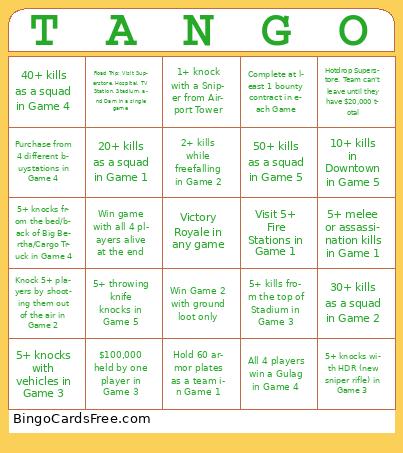 This tango for bb Bingo Cards Game contains following Words or Phrases: Hotdrop Superstore. Team can't leave until they have $20,000 total, 5+ melee or assassination kills in Game 1, Visit 5+ Fire Stations in Game 1, Hold 60 armor plates as a team in Game 1, 20+ kills as a squad in Game 1, 2+ kills while freefalling in Game 2, 1+ knock with a Sniper from Airport Tower, Win Game 2 with ground loot only, 30+ kills as a squad in Game 2, Knock 5+ players by shooting them out of the air in Game 2, 5+ knocks with HDR (new sniper rifle) in Game 3, 5+ knocks with vehicles in Game 3, 5+ kills from the top of Stadium in Game 3, $100,000 held by one player in Game 3, Purchase from 4 different buystations in Game 4, 40+ kills as a squad in Game 4, All 4 players win a Gulag in Game 4, Complete at least 1 bounty contract in each Game, 5+ knocks from the bed/back of Big Bertha/Cargo Truck in Game 4, 50+ kills as a squad in Game 5, 10+ kills in Downtown in Game 5, Win game with all 4 players alive at the end, 5+ throwing knife knocks in Game 5, Road Trip: Visit Superstore, Hospital, TV Station, Stadium, and Dam in a single game.