
test for 7 gen Bingo Cards - Print Free or Customize
Print free test for 7 gen bingo cards or customize, limitless cards! Choose from 42,200+ templates or use the bingo card generator. Add numbers, phrases, pictures, or mix them all. Play using printable PDF, online bingo cards, and the online bingo caller, or combine all formats.
About: This bingo card is all about celebrating unique hobbies, fun facts, and hidden talents. It’s packed with quirky experiences, passionate interests, and fascinating backgrounds that reflect a diverse group of people. Perfect for icebreakers at team events, parties, or student socials, this card sparks conversations and helps everyone find unexpected connections.
How To: To save a printable PDF, click the Print button. You can alter the number of cards and other print options on the Print tab. Grid items and free space content can be edited on the Basic tab. Appearance can be totally customized on the relevant tabs, or you can easily find any option on the 🔍 tab.
How to play test for 7 gen Bingo Cards?
- Virtual Players: Click on the Play button above, and then click on the 🎫 button.
- Virtual Caller: Click on the Play button above.
- Paper Caller: Print PDF calling list & calling slips and manually choose the slips.
- Paper Players: Print PDF bingo cards and manually write on the cards.
- Mixed Play: Pick any combination above. For instance, caller can be either Paper or Virtual. And players can be Paper or Virtual or a mix of both.
Step-By-Step:
- Start by getting the test for 7 gen PDF by clicking on the "Print" button above.
- Open the PDF and print it.
- For random drawing, you can print another copy of the call list, cut, fold and then pick them randomly at play time.
- Cut the bingo cards at the cut lines if there are more than 1 bingo cards per page.
- Distribute one card per player. For marking, you can use pencils. Crayons are the cheapest.
- Pick one person to be the caller. If you are playing in a small group, the caller can as well play along with their own Bingo card.
- The caller initiates the game by randomly pulling an item from the call list and saying it to all players.
- The players scan their cards to see if they have the called word. If they do, they mark that word.
- The first player to complete a horizontal, vertical, or a diagonal line of crossed items yells "Bingo!" and wins the play.
- The caller verifies that the items marked form a proper line as per the Bingo card and call list.
- You can play for varied patterns or a full card blackout for an extended play.
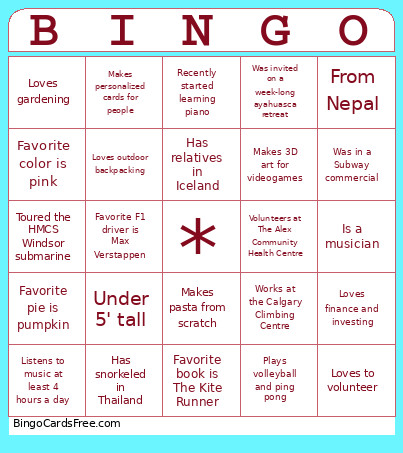 This test for 7 gen Bingo Cards Game contains following Words or Phrases: Was a jockey, Worked at Apple, Has 2 cats, 1 dog, and 2 fish tanks, Under 5' tall, Wants to adopt a dog, Has a golden retriever named Enzo, Played violin in high school, Has a Scottish Fold cat named Theo, Loves birdwatching, Loves climbing trees, Loves gardening, Has 2 aquariums, Favorite food is sushi, Youngest in their family, Owns a horse, Owns a roborovski hamster, Loves Pokémon, Doesn't have an ACL, Horseback rode for 10 years, From Nepal, Walks their cat on a leash, Favorite food is rice, Favorite food is potatoes, Loves finance and investing, Has been singing since age 8, Loves Studio Ghibli movies, Software development student, Youngest of 5 siblings, Favorite food is shawarma, Has never broken a bone, Makes personalized cards for people, Visited Oxford last summer, Just finished a Bachelor of Interior Design, Favorite pie is pumpkin, Puts gravy on pizza, Has relatives in Iceland, Thinks mushrooms are cute, Played trumpet as a kid, Has a tattoo of a snowboarder falling, Favorite color is pink, Collects Pokémon cards, Can do a lele/lulu, Works at the Calgary Climbing Centre, Has snorkeled in Thailand, Favorite F1 driver is Max Verstappen, Plays ukulele, Is a dive master, Acts in short films, Makes a perfect matcha, Good at board games, Used to own a floral shop, Was in a Subway commercial, Has lived on 3 continents, Collects vinyl records, Toured the HMCS Windsor submarine, Spoke on stage at WE Day, Was invited on a week-long ayahuasca retreat, Owns an Aranmula mirror, Native language is Bengali, Loves Lord of the Rings, Loves outdoor backpacking, Plays guitar, Watches movies on VHS, Volunteers at The Alex Community Health Centre, Owns more than 50 board games, Makes 3D art for videogames, Did an 8-day sea kayaking expedition, Worked at Parks Canada for 3 seasons, Studied abroad in England, Going to Portugal this year, Started running recently, Recently started learning piano, Plays volleyball and ping pong, Watched all of Naruto in 2 months, Has been skydiving twice, Has been hit by a car, Accidentally did an 11-hour overnight hike, Favorite book is The Kite Runner, Is a musician, Loves basketball, Enjoys horror movies, Loves spicy food, Is a writer, Loves to volunteer, Makes pasta from scratch, Listens to music at least 4 hours a day, Will play any sport.