Print free Bruhhhhhh bingo cards or customize,
unlimited prints! Choose from 41,500+ templates or use the bingo card generator.
Add numbers, phrases, pictures, or all of them.
Play using PDF prints, online bingo cards,
and the online bingo caller, or mix physical and digital.
About: This bingo card is tailor-made for a lively family holiday gathering, packed with inside jokes and real-life moments only a Massey crowd would understand. It captures the quirky chaos and loving banter that happen when relatives reunite—perfect for sharing some laughs with siblings and cousins as you wait for dinner or sneak snacks in the kitchen.
How To: To save a printable PDF, click the Print button.
You can modify the number of cards and other
printing settings on the Print tab.
Grid items and free space content can be changed on the Basic tab.
Appearance can be exactly customized on the
corresponding tabs, or you can easily search any setting
using the 🔍 tab.
How to play Bruhhhhhh Bingo Cards?
Online Caller: Click on the Play button above.
Paper Players: Print PDF bingo cards and physically mark the cards.
Paper Caller: Print PDF calling list & calling slips and physically select the slips.
Online Players: Click on the Play button above, and then click on the 🎫 button.
Combo Play: Pick any combination above.
For example, caller can be either Printed or Online.
And players can be Printed or Online or a combination of both.
Step-By-Step:
Start by saving the Bruhhhhhh PDF by clicking on the "Print" button above.
Open the PDF and print it.
For random calling, you can print another copy of the call list, cut, fold and then pull them randomly at play time.
Cut the bingo cards at the cut lines if there are more than 1 bingo cards per page.
Distribute one card per player. For marking, you can use pencils. Crayons cost the least.
Pick one person to be the caller. If you are playing in a small group, the caller can also play along with their own Bingo card.
The caller starts the game by randomly pulling an item from the call list and announcing it to everyone.
The players look at their cards to see if they have the called word. If they do, they mark that word.
The first player to complete a horizontal, vertical, or a diagonal line of marked items announces "Bingo!" and wins the play.
The caller verifies that the items crossed off form a proper line as per the Bingo card and call list.
You can play for different patterns or a full card blackout for an extended play.
This Bruhhhhhh Bingo Cards Game contains following Words or Phrases: Someone mentions how "crazy it is that there are two people named Victoria., Someone mentions how I (Ezra) is not there, Dad leaves early to go lay down, Mom uses "teacher voice" on an adult, Granny tries to gives away a random item to you or another Massey child, Cheyanne is annoyingly Granny's favorite, Someone makes Jay cry, Granny asks someone to move something, Someone dead is brought up (Papa also counts) and it ruins the mood, Granny gets mad she asked you to do something and you had no idea what it meant so you did it wrong, John tries to show you an animal, Chey or Nathan leave early, Someone asks if Jay is Autistic, "When are you getting married", Dinner rolls are forgotten or suck, Giant tub of sour cream, Someone mentions the difference between stuffing and dressing, Distant relative mentions your hair, "Peanuts and Tree Nuts are different allergies"/ peanuts aren't nuts, A line to the bathroom, The cousin walk, Dad goes to hospital, Something breaks, Dad mentions ball pain,colonoscopy, or biopsy.

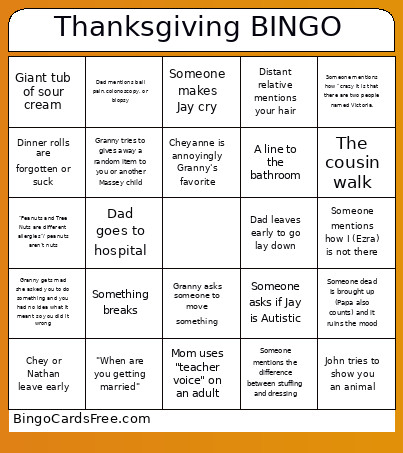 This Bruhhhhhh Bingo Cards Game contains following Words or Phrases: Someone mentions how "crazy it is that there are two people named Victoria., Someone mentions how I (Ezra) is not there, Dad leaves early to go lay down, Mom uses "teacher voice" on an adult, Granny tries to gives away a random item to you or another Massey child, Cheyanne is annoyingly Granny's favorite, Someone makes Jay cry, Granny asks someone to move something, Someone dead is brought up (Papa also counts) and it ruins the mood, Granny gets mad she asked you to do something and you had no idea what it meant so you did it wrong, John tries to show you an animal, Chey or Nathan leave early, Someone asks if Jay is Autistic, "When are you getting married", Dinner rolls are forgotten or suck, Giant tub of sour cream, Someone mentions the difference between stuffing and dressing, Distant relative mentions your hair, "Peanuts and Tree Nuts are different allergies"/ peanuts aren't nuts, A line to the bathroom, The cousin walk, Dad goes to hospital, Something breaks, Dad mentions ball pain,colonoscopy, or biopsy.